

n8n is a workflow automation platform that lets you connect apps, APIs, databases, and AI tools into automated workflows through a visual builder, while still letting developers add code when a job calls for it. It is best known for its node-based design, a self-hosting option, flexible integrations, and growing support for AI agents, LLM workflows, and enterprise automation use cases.
- What Is n8n, Exactly?
- Who Created n8n and Where Did It Come From?
- Is n8n No-Code, Low-Code, or Built for Developers Too?
- How Does n8n Actually Work?
- What Can n8n Do and What Makes It Stand Out?
- Can n8n Handle AI Agents, MCP, and LLM Workflows?
- What Is n8n Used For in Real Workflows?
- How Does n8n Compare With Zapier, Make, and Other Tools?
- Is n8n Free, and How Much Do Cloud and Self-Hosted Options Cost?
- Is n8n Open Source or Fair-Code?
- Is n8n Secure Enough for Enterprise Use?
- What Are the Main Limitations of n8n?
- How Does n8n Fit Into Multi-Agent and Enterprise AI Setups?
- How Popular Is n8n and Who Uses It?
- What Are the Best n8n Alternatives?
- Is Gumloop a Strong Alternative to n8n?
- Is Make a Better Fit Than n8n for Visual Automation?
- Is Zapier Better Than n8n for Simpler Automation?
- Is Lindy AI a Good Alternative for Sales and Support Workflows?
- Is Relevance AI Better for Enterprise AI Workflows?
- Is Activepieces the Best Open Source Alternative to n8n?
- Is Integrately a Better Choice for One-Click Automations?
- Is IFTTT a Good Alternative for Personal or Smart Home Automation?
- Is Stack AI Better for Enterprise AI Use Cases?
- Is Workato a Better Enterprise Automation Option Than n8n?
- Is Tray.ai a Good Fit for Technical Automation Teams?
- What Is n8n Used for Day to Day?
- Is n8n Really Free to Use?
- Is n8n Actually Open Source?
- Can You Build AI Workflows in n8n?
- Can n8n Build AI Agents?
- Does n8n Support Multi-Agent Workflows?
- How Do You Install n8n?
- Is n8n Better Than Zapier or Make?
- Can Enterprise Teams Use n8n Safely?
- What Does “n8n” Mean?
- Do You Need Coding Skills to Use n8n?
- How Secure Is n8n in Practice?
- How Do Teams Avoid Shadow IT When Using n8n?
Most teams adopt n8n to automate repetitive tasks and other digital chores, such as copying rows between sheets, routing tickets, or nudging people for sign-offs. The tools n8n orchestrates span business processes in IT, finance, sales, and support. Real-world examples are easy to find because people share n8n workflow automation setups openly.
A single project can begin as two nodes and grow into a scalable, repeatable solution. A flow can move data between services, hand a prompt to a model for LLM-driven steps, and apply AI logic to pick the next route. A first draft needs no advanced skills.
The part people underestimate is governance. Audit trails, approvals, permissions, and patching habits decide whether a smart setup survives a security review. The self-hostable design stretches the hosting options from a laptop to n8n Cloud. I would read the documentation, the n8n release notes, and the n8n official website at n8n.io before committing. After that, n8n login is a short step once an account exists. Following n8n news and n8n updates also helps.
What Is n8n, Exactly?
n8n is a workflow automation tool, pronounced en-eight-en and sometimes written nodemation, that works like a digital assistant for repetitive work.
You assemble custom workflows by placing nodes on a canvas and drawing a link between each pair. That feels closer to snapping puzzle pieces together, or laying out a SimCity block, than to programming. The visual interface supports drag and drop editing. The 1,250 pre-made templates shorten the first build, and n8n templates lift productivity early.
In a normal week, people schedule tasks, trigger alerts, enrich records, sync data between tools, and chain multi-step LLM pipelines. The integrations connect systems that never shared an interface. The n8n app therefore turns up wherever teams were gluing scripts together.
The model covers no-code and pro-code habits at once. Non-technical users assemble flows while developers write JavaScript or Python, ship custom nodes, and lean on extensibility. You can self-host through npm or Docker (n8n docker setups are common) on a local machine or a server, or pick the cloud version.
Next to Zapier, Make, and Node-RED, the contrast is that JSON workflows are portable workflows and auditable code. The n8n api exposes every action for CI/CD. That limits vendor lock-in, supports deep customization, and copes with high execution volume.
Who Created n8n and Where Did It Come From?
Jan Oberhauser created n8n in Berlin, and the platform dates to 2019, when it was built as an alternative to Zapier and Make.
The pitch, as I read it, was a reaction to closed-source tools that felt restrictive and expensive once volume climbed, with a vendor deciding how far a team could scale. Oberhauser’s answer was something open and powerful enough for real jobs. The n8n logo became a familiar sight in that period of growth.
Many people call n8n open-source and leave it there, a label the licensing sections below qualify. The node-based design welcomed non-developers as readily as developers.
Over the years the community contributed integrations, and later waves of AI automation and LLMs pushed real-world applications forward. That growth and adoption attracted funding, with $73M raised by 2025.
Is n8n No-Code, Low-Code, or Built for Developers Too?
n8n is best described as low-code, because people can design workflows visually without writing code and still add code where a step needs it.
Developers can extend functionality with scripting logic or custom nodes, then deploy them into complex environments where plain drag-and-drop would fall short. Non-technical users meanwhile stay on the canvas and never touch that layer.
The setup path changes how much depth you meet. n8n Cloud is fully managed and offers quick setup. Self-hosted installs through Docker or npm reach serverless environments and keep full control of your data and infrastructure.
The real question is flexibility against visual simplicity. In my view, developer depth is why n8n holds a distinct place in the wider automation landscape.
How Does n8n Actually Work?
n8n works by joining puzzle pieces called nodes into workflows, where a trigger starts each run and action nodes carry out the steps that follow.
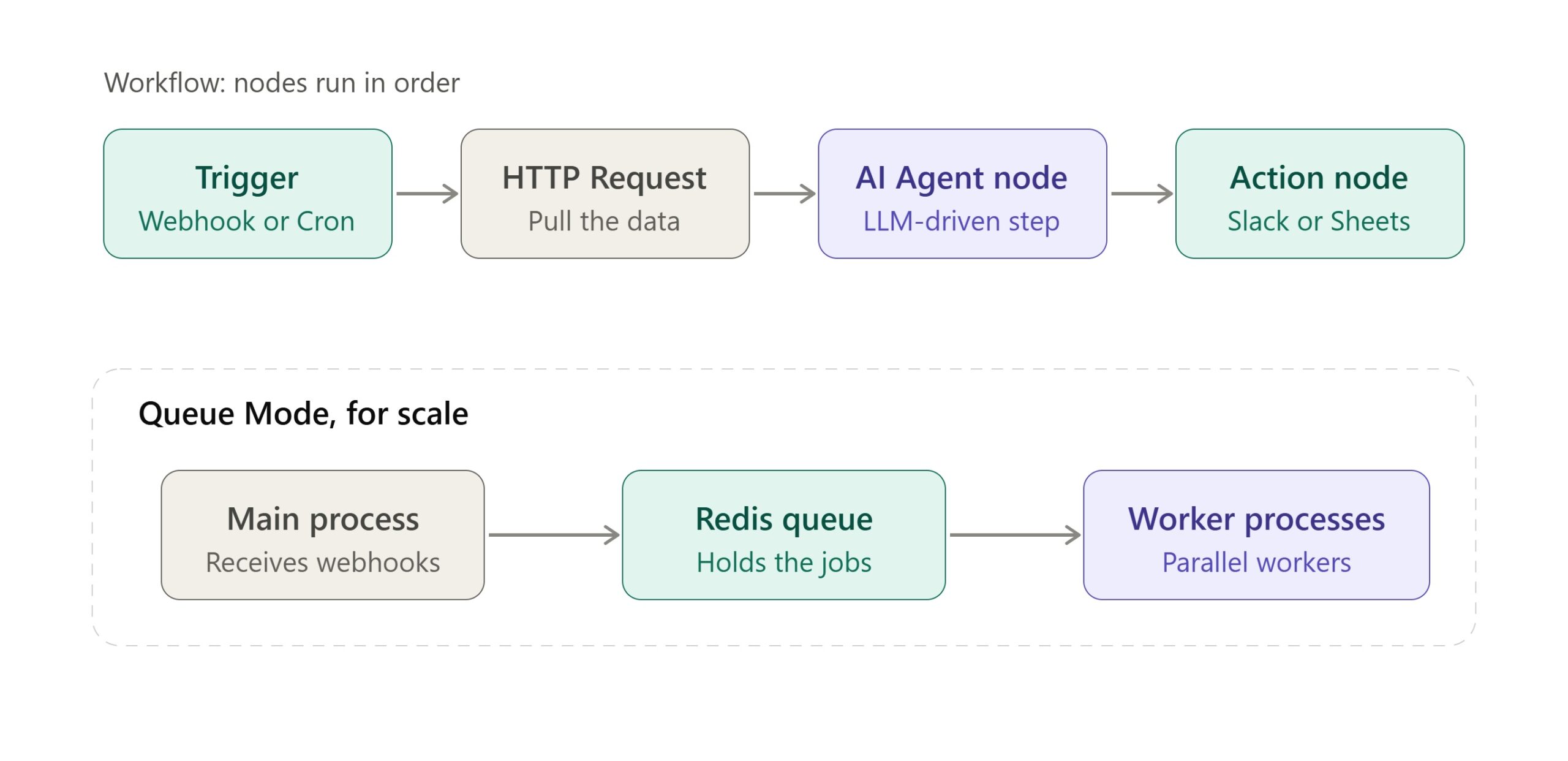
A trigger might be a form submission, a message landing in an inbox, or any other event. From there the actions can send email, ask Claude to summarise a thread, update a spreadsheet, or call an API.
That is no-code workflow automation through a visual interface. You build workflows for simple tasks or multistep workflows, such as storing data in a database and firing a notification into a project management app.
When a step needs more, HTTP requests, custom Python, and Javascript code slot into the same flow, and an AI prompt can sit between two nodes. The n8n http request node documentation and the n8n code node documentation cover each option. Every workflow run follows the right order, which cuts manual effort.
Under the hood, a visual workflow engine draws a flowchart of real tasks. Execute Workflow lets one flow call another, each execution path is stored in JSON format, and engine control handles retries and logs.
Two process modes matter. Main Mode is the default. Queue Mode passes work from the main process through a Redis queue to worker processes, so hundreds of webhooks per minute can be absorbed. The n8n webhook node documentation explains the entry point. A published benchmark reached 220 workflow executions per second for a simple webhook workflow on a small instance, using parallel workers.
Each run carries an execution ID that exposes input and output data plus errors, which makes debugging quicker. Credentials stay encrypted and can be supplied through environment variables. Supported methods include API keys, OAuth2, SSH, and Basic Auth.
For extension work there is a Function node, TypeScript, the Node Creator CLI, a REST API, and webhooks. Storage is PostgreSQL for production and SQLite for development. A dashboard fed by Prometheus and Grafana helps monitoring. Role-based access control and flow control with conditions, loops, and branches round it out.
What Can n8n Do and What Makes It Stand Out?
n8n can run rule-based automation and AI actions inside one builder, and full visibility into every execution is the quality that sets it apart.
A run can be watched live, reopened as a past run, and compared with the same workflow after an edit. The rules and AI actions accept structured inputs, return structured outputs, and pause for human-in-the-loop approvals where a mistake would be costly.
Teams that want an AI stack kept on-prem can run n8n from its source code on GitHub, or use the hosted version. Many aids are built in, and finished flows double as handover write-ups for the next person.
When something breaks you can recover quickly. Re-run a single step, read the version history, and see what was tracked. To move fast, replay an execution with mock data so no external systems are hit.
On security and control, n8n offers SSO SAML, LDAP, encrypted secret stores, version control, and RBAC permissions. Observability and transparency come from audit logs, log streaming into a SIEM, workflow history, real-time alerts, and usage dashboards.
The developer experience adds Git-based control, isolated environments, multi-user workflows, and workflow diffs. AI governance relies on guardrails and evaluations.
The visual workflow editor uses a drag-and-drop interface with parameters you can test in real time through execution previews. You can clone and reuse pieces. More than 400+ ready-made nodes exist, including Slack, Google Sheets, Airtable, and OpenAI (the n8n openai node documentation covers the last). A node SDK in TypeScript serves internal APIs and custom services.
Trigger nodes such as Webhook, Cron, and Email start flows. If/Else, Switch, Merge, and Split shape them, with error handling on top. Function and Code nodes handle inline transformations and JSON restructuring, and plugins extend things further.
Self-hosting brings deployment options. Queue Mode pairs with Redis and workers, and secure credentials, environment management, and OAuth tokens carry across development, staging, and production. Secrets can live in HashiCorp Vault or AWS Secrets Manager. Node-level data previews and automatic retries keep troubleshooting honest.
Model choice is wide: HuggingFace, local LLMs, and custom API-driven models sit beside Claude. You can send data to an LLM, build multi-step AI workflows, or chain LLM prompts. Then clean data and structure data before pushing results into email, CMS systems, dashboards, PDFs, and other APIs.
Under the Sustainable Use License, n8n is source-available with no lock-in thanks to portable JSON workflows. From what I have seen, teams stay for speed, cost control, and the workflow executions they can afford to run.
Can n8n Handle AI Agents, MCP, and LLM Workflows?
Yes, n8n handles AI agents, MCP, and LLM workflows through its AI agent node, which is built on LangChain (see the n8n ai agent node documentation).
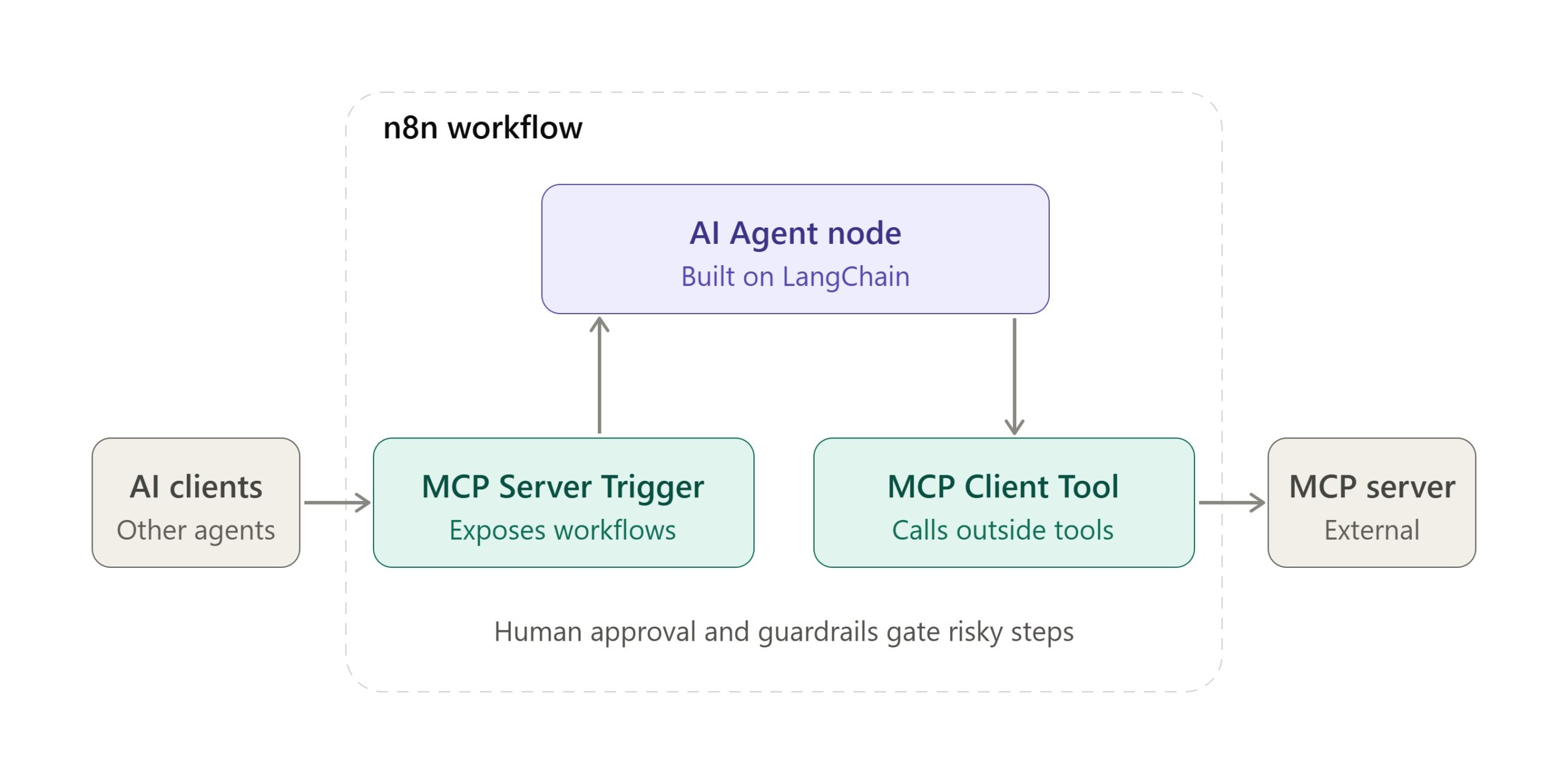
You can connect any model, let it make decisions, and require human approval before anything irreversible happens. That keeps visibility and human-in-the-loop control intact. Typical jobs include summarization, document processing, and embeddings feeding a search step.
MCP support runs in both directions. The MCP Client Tool node lets an agent call tools on an external MCP server. The MCP Server Trigger node exposes your workflows to other AI clients. People searching for n8n mcp or n8n mcp server usually need exactly this pair, and n8n ai features grow around it.
Simple cases, such as lightweight decisions that classify ticket items and branch them, work with a plain model call. Open-ended reasoning is where agents pay off. You can nest agents through the AI Agent Tool node across multiple layers, and then orchestration becomes the hard part. A central registry keeps agents discovered and governed, while the LLM prompts themselves sit in version control.
What Is n8n Used For in Real Workflows?
n8n is used to automate notifications, data synchronization, payments, reporting, scraping, and onboarding across the supported applications a team already pays for.
A notification service can start from a trigger node type such as a connector into other platforms, then send SMS when a new order lands on a website. Two-way synchronization keeps a CRM and project management software consistent in both directions. The parallel examples below show the spread:
- Invoice and payment processing: an ecommerce website hands orders to a payment provider, and flows manage payment retries, recurring payments, payment status updates, and payment detail verification. They also route checks to fraud detection services, store payment information, generate invoice documents, and send a client email.
- Reporting automation: before weekly meetings, a flow can collect data, compile data into a report template, and post a meeting notification.
- Web scraping: data collection that can extract data from websites, systems, and applications, tracking competitor prices and industry insights from media.
- Smart home automation: smart home devices on a home network react to location, switching lights and heating, or firing an unlock door action, with alerts on top.
- Microsoft Teams messages for customer signups, payment failures, and system errors.
- Form entries that flow into HubSpot, Notion, and a marketing platform.
Finance teams wire Stripe, PayPal, QuickBooks, and Xero into a finance database. Automated reporting pulls from Google Analytics and Datadog for the leadership team through the HTTP Request node and public APIs, and thresholds nudge the sales team. Hobbyists push into IoT, where smart sensors talk to Home Assistant and a calendar entry can dim lights, pause music, and mute notifications.
Inside companies the recurring patterns are employee onboarding, support routing, security ticket enrichment, marketing and sales work, and natural language to API calls, owned by HR, IT, and security systems teams. A bot can sort helpdesk tickets by keyword and customer priority, schedule follow-ups, and raise alerts for analysts. It can also prepare target customers for outreach from chat requests or text requests. New user onboarding can create Jira items. Threat investigation pulls security tools output that is summarized by AI for alert triage, and lead qualification works similarly.
One refund flow shows the chaining. Refund requested triggers lookup the order, investigate the claim, and parse the verdict, followed by approval on Slack, process refund, open ticket, and record refund in database. Then classify reason for refund and route by reason decide between an email win-back discount, a return pickup, or a QA ticket. A refunds report follows each refund-closed event. In the published example, Claude Sonnet 4.6 reads the refund policy, order history, and past tickets, and can track delivery. Other examples process invoice files, run a knowledge assistant, or send a Daily News Digest.
How Does n8n Compare With Zapier, Make, and Other Tools?
n8n beats Zapier and Make on advanced customization but gives up some user-friendly polish, so the right pick depends on who builds the automations.
Comparing n8n vs Zapier, Zapier gives beginners a quick and easy solution that will connect applications and handle simple manual tasks. n8n offers fewer limitations and room for fine-tuning, though the first hour feels steeper. For make.com vs n8n, Make brings polished templates and a strong visual UX. n8n answers with custom logic, JS and Python in the same canvas, so heavy coding needs fewer workarounds.
On cost, expensive plans at high task volume push many teams toward n8n, though some paid features such as governance sit behind tiers. Search phrases like “ai automation agency korea workflow n8n make.com 2025” suggest agencies quote both tools side by side.
For full data control and a GDPR posture, n8n can run cloud-based or in your own hosting. Its modern workflow features include branching and logic that go well past basic LLM support, and its AI/LLM workflows and large multi-step workflows share one engine. Teams use it across SaaS apps, custom devices, and business workflows. Scaling is handled by worker mode, but DevOps time and engineering effort are the price. It is a workflow engine first and not an agent platform, so deterministic workflows and developer-controlled automation are where it shines. That power is the trade.
| Tool | Ease of use | Self-hosting | AI support | Scalability |
| n8n | Steeper start, very customizable | Yes, Docker or npm | AI agent node, MCP nodes | Queue Mode with Redis workers |
| Zapier | Beginner-friendly | Vendor-hosted | AI automated workflows | Plans by tasks; Team is $69/month for 25 users |
| Make | Visual builder | Not emphasized | AI agent builder | Credit-based plans, free tier of 1,000 credits/month |
| Activepieces | Visual builder | Yes, MIT-licensed Community Edition | AI keys supported | Free plan covers 5 users; paid from $20/month |
Is n8n Free, and How Much Do Cloud and Self-Hosted Options Cost?
n8n is free to self-host through its Community Edition, while n8n Cloud is paid and starts at $20/month on the Starter plan.
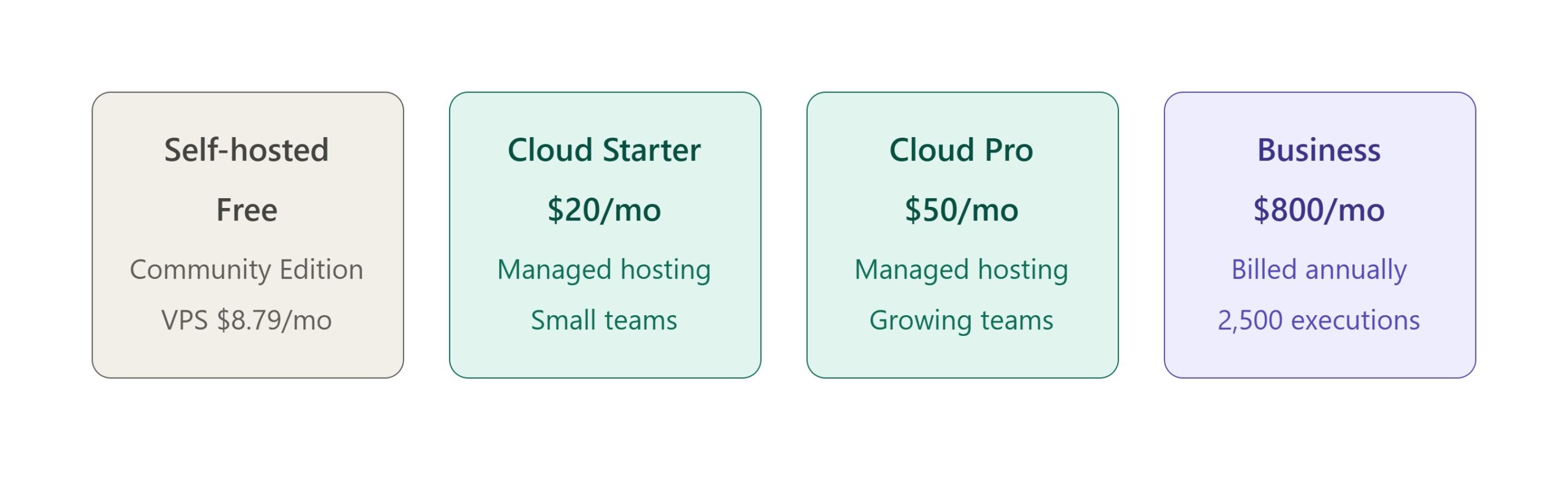
As a hosting solution, the cloud version prices the Starter plan at $20/month and the Pro plan at $50/month, which is what n8n pricing and n8n cloud pricing pages show. Those paid cloud plans are subscription-based and tiered by executions/month, so the n8n price rises with usage.
Self-hosting trades customizability for effort. A self-hosted version runs on a virtual private server (VPS) such as the KVM 2 plan at $8.79/month, configured through the Hostinger dashboard. It also runs on a home computer or a single-board computer like a Raspberry Pi, using Node.js or Docker. That free self-hosting route is how most people try n8n free, and n8n self hosted guides cover it.
Managed hosting is where n8n Cloud vs. Self-Hosted Deployment differs most. Cloud needs no installation required and skips setup friction. Manual setup through the CLI adds maintenance and infrastructure costs. n8n GmbH operates the cloud, with an EU cloud option, while auto-scaling, worker queues, Postgres, and Kubernetes become your job when self-hosting. Data ownership and compliance flexibility are the payoff.
Advanced features, scalability, and team support separate the tiers, while workflow-building features and unlimited custom nodes stay available when you self-host. A local deployment suits experiments and a server deployment suits production. The fair-code license grants personal usage rights and small-team usage rights. Embedding n8n inside a SaaS product or any other commercial use needs a separate agreement. Collaboration, RBAC, and SSO arrive higher up, and Enterprise Custom Plans add SLAs. The Business plan costs $800/month billed annually, with 2,500 workflow executions, Git version control, and multiple environments. Anyone choosing self-hosting must run and maintain it.
| Option | Cost | Best for | Notes |
| Self-hosted Community Edition | Free software, plus server cost | Developers, tinkerers | KVM 2 VPS is $8.79/month |
| Cloud Starter | $20/month | Small teams | Managed hosting |
| Cloud Pro | $50/month | Growing teams | Managed hosting |
| Business | $800/month, billed annually | Larger teams | 2,500 workflow executions, SSO, Git version control, multiple environments |
| Enterprise | Custom | Regulated organizations | SLAs, advanced controls |
Is n8n Open Source or Fair-Code?
n8n is fair-code, meaning it is source-available under the Sustainable Use License (SUL) and not fully open source, which matters for the n8n open source question.
You can modify it for internal use and internal business use, and for non-commercial purposes. Offering n8n as a hosted service or trying to resell it commercially needs a commercial license, because those commercial uses fall outside the terms.
The upside of readable code is practical: security teams can inspect it, and community connectors grow around it. Compare that with MIT-licensed Activepieces, which markets itself as a more permissive route.
Is n8n Secure Enough for Enterprise Use?
n8n can be secured for enterprise use, but security patching, upgrades, and backups fall on the team that self-hosts it.
An encrypted database of credentials, plus external secrets, SSO, and log streaming on paid tiers, covers the basics. The n8n documentation lists the controls tier by tier.
Patch discipline is not optional. In January 2026, CVE-2026-21858 was disclosed with a CVSS 10.0 rating. It was described as an arbitrary file read reachable through form-based workflows that could escalate to remote code execution. It affected versions before 1.121.0 and was fixed in 1.121.0, released November 18, 2025. An internet-facing automation platform deserves that attention.
The deeper risk is identity. Stored credentials give workflows broader access than any one user, which breeds shadow automation that writes to systems, moves payments, or sends outbound messages.
On the agent side, n8n is not agent-first. Long-running, open-ended agents meet limited multi-agent support and thin governance. There is no central agent registry, discovery layer, per-user permissions, or unified audit trail. Human review and an approval policy are set workflow by workflow, which adds operational burden. An MCP gateway with logging helps contain agent sprawl.
What Are the Main Limitations of n8n?
n8n’s main limits appear at scale: it can turn slow and inefficient with millions of data rows or massive datasets, and the JSON format makes bulk handling awkward.
Messy workflows are hard to read unless you name nodes sensibly and organise branches early, and beginner users hit that wall first.
A self-hosted setup wants DevOps knowledge, because updates, Redis workers, Postgres, backups, and scaling are yours. Complex enterprise workflows need careful testing and clear deployment requirements.
n8n also takes more time to learn than point-and-click rivals and has fewer supported applications than some. As noted above, it is not agent-first, with limited multi-agent support, thin governance, an operational burden, and paid tiers.
How Does n8n Fit Into Multi-Agent and Enterprise AI Setups?
n8n fits as the hands of an agent setup, running deterministic workflows while a dedicated agent platform supplies the brain.
With Agent Builder doing research across Salesforce, Google Drive, and Confluence, the setup can give a confident answer from usage data. Governed access comes through the MCP Platform.
An orchestrator agent can delegate to a Salesforce agent and an analytics agent to spot churn, then draft a re-engagement email or upsell message. Memory carries context between turns. Such multi-agent platforms coordinate agents, and n8n executes the fixed steps they call.
How Popular Is n8n and Who Uses It?
n8n ranks as a Top 50 Github project with 211.6k stars and a 4.7/5 rating on G2, and its community exceeds 250k+ developers.
Use-case personas named Tom, Cécile, Konsti, and Alicia show the spread. The site’s logos include Meta, Zendesk, Mistral AI, Microsoft, Deutsche Telekom, Mercedes-Benz, Dell, Liberty, and Sixt. I have not checked which of those count as Fortune 500 companies. Search oddities like n8n boy show the brand’s reach.
Huel reports 1,000 hours saved. Its Chief Technology Officer, Ollie Scheers, is quoted in that case study, which is framed around an AI-first culture where ChatGPT use stays safe and controlled.
Vodafone cites £2.2M as a security operations win. Claire Van Hinsbergh, Cyber Operations Engineering Manager, points to SOAR capability from a low-code model.
Praise tends to be vivid. Users call it the holy grail of automation or a Swiss army knife for automation, since one single workflow is the glue and nobody feels boxed in. A beginners course helps newcomers get going.
What Are the Best n8n Alternatives?
The best n8n alternatives depend on your audience and problem, with Gumloop, Make, Zapier, Lindy AI, Relevance AI, Activepieces, Integrately, IFTTT, Stack AI, Workato, and Tray.ai as the top picks.
A freelancer selling AI services, an in-house employee, a startup, a business owner, or a founder each weigh budget and compliance needs differently. Typical jobs include automate competitor analysis reports, a customer support chatbot, or an internal knowledge base in Slack. Business teams that want no code and visual automations lean on the largest app library, while sales and support agents and enterprise AI workforces suit other tools. An open source alternative keeps flexible integrations. One-click integrations fit personal automations and smart home automations, while integration and orchestration needs push people toward enterprise suites. These alternatives and competitors are compared below.
| Alternative | Ideal user | Starting price |
| Gumloop | AI agent builders | $37/month, 14-day free trial |
| Make | Visual automation fans | Free plan, paid from $12/month |
| Zapier | Simple automations | Free 100 tasks/month, from $19.99/month |
| Lindy AI | Sales and support teams | From $29.99/month |
| Relevance AI | Enterprise operations teams | Self-serve plan, see pricing page |
| Activepieces | Open source seekers | Free cloud plan, from $20/month |
| Integrately | One-click automation | From $19.99/month |
| IFTTT | Personal and smart home use | From $2.99/month |
| Stack AI | Large organizations | Free plan, then enterprise |
| Workato | Established enterprises | Demo or call |
| Tray.ai | Technical teams | Sales contact |
Is Gumloop a Strong Alternative to n8n?
Gumloop is a no-code AI agent platform with a visual drag-and-drop interface, and it is a strong alternative when AI integration matters more than self-hosting.
The visual canvas bundles premium LLM access, and the Gummie assistant helps with debugging workflows. AI-powered workflows link Google Docs, Semrush, and a Google Sheet to produce product descriptions. Agents such as a data analysis agent, CRM agent, or support agent answer through Microsoft Teams, email, or @Gumloop. Flows gain structure from subflows, a Flow within a Flow, which keeps them modular and reusable.
Gumstack adds AI security as an observability layer that watches usage, and a MCP server plus a premium LLM model can be paired with API keys. The 14-day free trial leads to a Pro plan with 20k credits/month, 35+ models, unlimited agents, and unlimited seats. Shopify, Instacart, and Webflow are cited users, and a community Slack channel plus Gumloop University help onboarding. The learning curve and UI/UX on smaller screens draw criticism. Enterprise adds SCIM/SAML, org-wide guardrails, and a virtual private cloud, and reviews are attributed to Bryant Chou and Fidji Simo.
Is Make a Better Fit Than n8n for Visual Automation?
Make is a better fit than n8n for visual workflow automation when you want advanced flow control and a gentle start on a free plan.
Make, formerly Integromat, is automation software with a drag and drop builder and built-in flow control features. Its app ecosystem counts 2,000 integrations, and an AI agent builder supports smart automations that react to changing conditions. One example syncs a Notion meeting database with Google Calendar, where a flow creates, updates, and deletes events. Flow Control modules route data, and WordPress, LinkedIn, Microsoft 365, Facebook, and Gemini connect inside the Google ecosystem and beyond.
The free plan includes 1,000 credits a month, and paid tiers are listed at $12, $21, and $38 per month. You can bring own LLM API keys, and YouTube tutorials are plentiful. Critics mention self-hosted options as thin, and some find the interface outdated or clunky. Plans run Core, Pro, Teams, and Enterprise, with ratings of 4.7 on G2 and 4.8 on Capterra.
Is Zapier Better Than n8n for Simpler Automation?
Zapier is better than n8n for simpler automation because it is a well-known automation platform with the largest app integration library, which gives reliable automations.
Its massive integration library and reliability reward teams that value speed. AI automated workflows, conditional logic, and a Webflow integration for a personal website are covered by tutorials. Enterprise names like Meta, Okta, and Samsung are cited.
Complaints include UI changes that feel confusing and glitchy runs where a task failed after one that succeeded. Anything technical stays hosted on Zapier’s side. Plans include a free tier of 100 tasks a month, Professional from $19.99/month, and Team at $69/month for 25 users. Multi-step Zaps, unlimited premium apps, shared Zaps, SAML SSO, and admin controls appear higher up. Ratings are 4.5 on G2 and 4.7 on Capterra.
Is Lindy AI a Good Alternative for Sales and Support Workflows?
Lindy AI is a good alternative for sales automation and customer support operations because of its multi-channel agent capabilities.
Its sales prospecting tools work like an AI employee for customer support and lead generation. Agents record meetings, run LinkedIn outreach, and use Twilio, with a support Slackbot and scrapers that find prospects and rich leads.
Support tickets and email workflows use filter using AI and draft responses. Web embeds, WhatsApp, and Telegram widen the channels. Free credits of $50 last 7 days, then pricing starts at $29.99/month, with 3,000 or 5,000 credits. Billing and compliance questions sit with Enterprise. Ratings are 4.9 on G2 and 3.5 on Capterra.
Is Relevance AI Better for Enterprise AI Workflows?
Relevance AI is better for enterprise AI workflows when you want an AI workforce for enterprise operations teams.
It is LLM agnostic and enterprise-focused, with AI teammates for an operations team running automated workflows. Both an AI service provider and an in-house AI adopter can act as evangelist. Canva, Autodesk, and Rakuten appear as customers.
As a no-code platform, you build, train, and onboard agents that touch Gmail, Salesforce, Airtable, and Slack. A self-serve plan lives on the pricing page. A complex interface adds friction. The Enterprise plan covers users, projects, tools, 2,000+ integrations, calling agents, and meeting agents, with SSO, RBAC, and audit logs.
Is Activepieces the Best Open Source Alternative to n8n?
Activepieces is the best open source alternative to n8n for teams that need a MIT license, not fair-code.
Its Community Edition ships 760+ integrations, agents, tables, and a shared workspace, which makes it true open source. A free cloud plan has unlimited flows and 5 users, and an HTTP piece, webhook, and native integration cover glue work. Bring your own AI keys.
Enterprise features include SCIM, custom roles, and the Ultimate plan, with SOC 2 in progress. Uptime and scaling go with Plus and Team tiers, dedicated workers, and dedicated support. A commercial license exists for resellers.
Is Integrately a Better Choice for One-Click Automations?
Integrately is a better choice for one-click integrations and ecommerce automations than n8n.
It pitches enterprise integrations with 20 million ready-made automations, but it sits closer to an enterprise platform with outdated technology than to modern startups tools. SendFox, Wufoo, BigCommerce, and MailChimp are named. Larger e-commerce companies (Walmart, Accenture, Adobe, Deloitte) are cited.
The integrations library handles standard flows, while complex automations may need experts. Plans run Free, Starter, Professional, Growth, and Business, billed annually, from $19.99/month to $239/month. Ratings are 4.7 on G2 and 3.7 on Trustpilot.
Is IFTTT a Good Alternative for Personal or Smart Home Automation?
IFTTT is a good alternative for simple smart home integrations and personal automations, being the original automation platform.
The mobile app offers simple setup with Google Calendar, a weather forecast, or Instagram posts. Business use cases feel limited, and the OG platforms reputation hints at that. iOS and Android apps run Applets and multi-action Applets, with filter code. Free users get 2 Applets, Pro costs $2.99 to $8.99, and ratings are 4.5 on G2 and 4.6 on Capterra.
Is Stack AI Better for Enterprise AI Use Cases?
Stack AI is better for enterprise AI workflows in large organizations.
Its clean visual builder ships enterprise-focused templates. IBM, Red Bull, Allworth, and City of Santa Monica are customers across healthcare and government. Examples include a grant matching AI agent, compliance control AI, an AI policy memo analyst, and a technical support chatbot. Dedicated infrastructure and compliance features come with Enterprise. Ratings are 4.7 on G2 and 4.8 on Slashdot.
Is Workato a Better Enterprise Automation Option Than n8n?
Workato is a better enterprise automation option for established companies with legacy systems.
It positions as an AI agent orchestration platform for enterprise companies like Booking.com, Monday.com, Nextdoor, and Nokia. Teams in marketing, sales, HR, support, and security use it. To start trial, book a call or request a demo. Pricing follows usage plans, with unlimited connections and collaborators. Ratings are 4.7 on G2 and 4.6 on Capterra.
Is Tray.ai a Good Fit for Technical Automation Teams?
Tray.ai is a good fit for technical teams that want code capabilities in a low-code AI automation builder.
Its visual workflow builder accepts code and Python, with a steeper learning curve than rivals. IBM, Cisco, and NetApp are cited. An interactive demo helps, and a free tier plus onboarding and add-ons shape pricing. Ratings are 4.5 on G2 and 4.3 on Capterra.
What Is n8n Used for Day to Day?
A workflow automation tool, n8n is used to connect apps, databases, and APIs, so what is n8n used for comes down to taking over repetitive tasks like syncing data and sending alerts. It also powers AI-powered workflows without complex code, support ticket routing, security alert enrichment, marketing outreach, and natural-language requests turned into API calls, plus employee onboarding.
Is n8n Really Free to Use?
n8n is free when you run and maintain it yourself on your own server, while the managed version on n8n Cloud needs paid plans. Paying brings collaboration, scaling, and enterprise features, and the Community Edition stays available.
Is n8n Actually Open Source?
n8n is source-available, not OSI-approved open source. The license permits personal use and business use but restricts reselling n8n as a commercial SaaS, which fair-code under the SUL means in practice.
Can You Build AI Workflows in n8n?
Yes, AI nodes connect large language models from OpenAI and Anthropic, and you can chain multiple nodes for writing summaries, processing data, and answering questions. AI agents add decision-making on top.
Can n8n Build AI Agents?
Yes, the AI Agent node builds agents that call tools and MCP servers, running several steps in one workflow, which suits open-ended tasks. For multi-agent work, central governance is thinner, so a dedicated agent platform may suit larger teams.
Does n8n Support Multi-Agent Workflows?
Yes, you can nest agents through the AI Agent Tool node, but a registry of agents centrally discovered and governed is not built in, so a multi-agent orchestration platform usually sits on top for larger fleets.
How Do You Install n8n?
You install n8n with Docker or npm, or skip installation by choosing Cloud, and the n8n download page links all three paths.
- Docker: run docker run -it –rm -p 5678:5678 n8nio/n8n and open port 5678.
- npm: run npm install n8n -g, then start n8n.
- Cloud: sign up at n8n.io for instant managed setup.
Is n8n Better Than Zapier or Make?
n8n is better than Zapier or Make for developers and teams needing flexibility, self-hosting, complex logic, loops, conditions, and custom code. Zapier and Make suit non-technical users who want ready-made integrations.
Can Enterprise Teams Use n8n Safely?
Yes, enterprises can use n8n safely with enterprise-grade features such as SSO, role-based access control, and audit logs, plus scalable deployment and audit logging. Run data pipelines, marketing systems, and AI tools securely: patch promptly, restrict access, and tie identity to approvals.
What Does “n8n” Mean?
n8n stands for Node-to-Node: workflows connect nodes, so tasks become automated processes.
Do You Need Coding Skills to Use n8n?
No, you can build complete workflows visually without coding skills. JavaScript, TypeScript, and custom code help only when automations get complex.
How Secure Is n8n in Practice?
n8n is secure when configured well: encrypted credentials, environment variables, and role-based access keep workflows secure. Self-hosted deployments keep full data control, and n8n Cloud follows EU data protection standards. As an internet-facing automation platform, its credentials and setup still need care.
How Do Teams Avoid Shadow IT When Using n8n?
Teams avoid shadow IT by keeping an inventory of workflows and agents, assigning a named owner, controlling AI tool access through a central gateway, using group-based access instead of shared credentials, and review logs regularly.