

Lindy AI is one of the stronger AI agent platforms in 2026 for automating email, scheduling, meeting notes, CRM updates, and multi-step workflows, especially for founders, operators, and small teams that want no-code automation with context-aware actions. It stands out more as an AI agent builder than a traditional app builder, but its value depends on whether you need intelligent workflow automation enough to justify its pricing and task-based credit model.
- What Is Lindy AI and What Does It Actually Work?
- What Features Does Lindy AI Actually Give You?
- How Good Is Lindy AI for Email Automation?
- Can Lindy AI Really Handle Scheduling and Calendar Tasks?
- How Well Does Lindy AI Create Meeting Notes and Summaries?
- Can Lindy AI Automate CRM Updates and Lead Enrichment?
- Can Lindy AI Help With Research and Knowledge Work?
- Can Lindy AI Work as a Chatbot, Assistant, or Support Agent?
- How Powerful Are Lindy AI Agents and Multi-Step Workflows?
- What Tools and Integrations Does Lindy AI Connect With?
- How Easy Is It to Get Started With Lindy AI?
- How Good Is Lindy AI for Building Agents and Workflows?
- How Much Does Lindy AI Cost in 2026?
- What Are the Biggest Advantages of Lindy AI?
- What Are the Main Drawbacks of Lindy AI?
- How Does Lindy AI Compare With Zapier and Make?
- How Does Lindy AI Compare With Other AI Automation Tools?
- What Are the Best Lindy AI Alternatives?
- What Do Real Reviews and User Sentiment Say About Lindy AI?
- Is Lindy AI Actually Worth It?
- Is Lindy AI Safe for Business Use?
- Where Does Lindy AI Perform Best in Real-World Use?
- What’s the Quick Overview of Lindy AI?
- How Was Lindy AI Evaluated?
- Who Should Use Lindy AI?
- Who Should Avoid Lindy AI?
- What Is the Lindy AI Brand Identity in Context?
- Which Companies and Organizations Are Associated With Lindy AI?
- Does Lindy AI Have a Free Plan?
- What Is Lindy AI and How Does It Work?
- What Can Lindy AI Actually Do?
- What Tasks Can You Automate With Lindy AI?
- What Is a Lindy AI Agent?
- How Much Does Lindy AI Cost?
- Is Lindy AI Free?
- Do You Need Coding Skills to Use Lindy AI?
- Is Lindy AI Beginner-Friendly?
- Does Lindy AI Support Integrations With Other Tools?
- Can Lindy AI Automate Recurring Workflows?
- How Does Lindy AI Compare to Zapier?
- Is Lindy AI Better Than Zapier?
- Is Lindy AI Good for Small Businesses?
- How Does Lindy AI Compare to Other AI Assistants?
- Is Lindy AI Safe to Connect to Your Email?
- Does Lindy AI Integrate With HubSpot and Salesforce?
- Is Lindy AI Worth It?
- What Should You Look for in a Lindy AI Alternative?
- Are AI Employees Actually Real?
- What Are the 10 Best Lindy AI Alternatives and Competitors in 2026?
- Is Gumloop a Strong Alternative to Lindy AI?
- Is Chatbase a Good Alternative to Lindy AI?
- Is Zapier a Better Fit Than Lindy AI for Some Users?
- Is Relevance AI a Good Alternative to Lindy AI?
- Is n8n a Better Alternative to Lindy AI for Technical Users?
- Is Make a Better Budget Alternative to Lindy AI?
- Is Relay.app a Good Alternative to Lindy AI?
- Is IFTTT a Useful Alternative to Lindy AI?
- Is Stack AI a Better Enterprise Alternative to Lindy AI?
- Is Integrately a Good Lindy AI Alternative?
This review gives a direct answer to the search intent behind “is Lindy AI good”: yes for the right buyer, and no for people who only need simple triggers. The honest framing is that Lindy AI is an AI employee more than a builder of apps, and the best label depends on your productivity goals.
I treat this opening as a starting point, not a verdict. The platform earns its place through intelligent action across inbox and calendar, and the sections below test that claim against workflow realities.
What Is Lindy AI and What Does It Actually Work?
Lindy AI is an AI-powered platform that builds automated workflows, called Lindys, from plain natural language. People use it for office tasks across support, operations, sales, and marketing.
The company pitches Lindy as an AI employee that plugs into your tools, learns how you work, and takes real work off your plate. In practice that means cross-app execution of repetitive work and everyday tasks, with proactive execution instead of waiting for a prompt. Unlike conversational chatbots, Lindy keeps minimal manual effort on your side.
Under the hood, large language models handle data movement between emails, responses, and records, shaped by your preferences. Think of it as a business layer over your apps and automation tools, closer to an autonomous AI team for a solo founder than a script. Teams, individuals, and businesses can create, deploy, handle, and manage recurring workflows to reduce time spent on them. Connections reach Slack, email, text, calendar, and MCP.
What Features Does Lindy AI Actually Give You?
Lindy AI gives you a drag-and-drop builder for custom agents that run workflows across third-party tools. The core features are:
- Triggers, conditions, and actions: the building blocks behind email follow-ups, calendar updates, and meeting notes.
- Templates: starting points for repetitive workflows in Gmail, Slack, and CRM systems.
- Natural language inputs: these replace predefined rules when you describe a job.
- Monitoring: execution logs let you review each run in real time.
- Independent agents: each takes a specific job with approval and control kept with you.
The setup feels intuitive and straightforward, with seamless links to scheduling and recurring tasks. You can adjust workflows at will, which gives real flexibility.
What separates it from a script is behavior. The agents are proactive and context-aware, so they learn your business. They can call, accept a correction, and update clients, so every piece stays connected. As a team player and teammate, an agent can use a browser, place phone calls, and hand work back so everyone stays in the loop. It can watch a budget or campaign and notice what is slipping.
How Good Is Lindy AI for Email Automation?
Lindy AI is strong at email: its email assistant will classify incoming messages and write drafts inside Gmail or Outlook. This is among its strongest features for business communication.
I would set up a response agent with a tone guide and templates, then route everything through an approval queue. An urgent support request gets surfaced, while a newsletter reply can wait. Dozens of inquiries, or hundreds of them, such as vendor questions and partnership requests, become manageable through email triage.
The drafts use context-aware replies plus CRM updates and follow-up notes. Inbox automation can run overnight, so a fast reply reaches new leads and a personal reply still sounds like you. Teams report hours saved on common inquiry types.
Quality is the question. With human review, drafts stay on-brand, concise, accurate, and sometimes nuanced. After weeks in an active inbox, I would still flag ambiguous messages for a person.
Can Lindy AI Really Handle Scheduling and Calendar Tasks?
Lindy AI can handle scheduling by connecting to Google Calendar and Outlook Calendar, so you can automate meeting request handling. It checks availability, proposes suitable times, and sends booking confirmations.
The feature that feels magical is how it ends back-and-forth scheduling. It sends meeting invites, adds pre-meeting reminders, and triggers post-meeting follow-ups with CRM context, so you arrive prepared. A discovery call gets booked without a human typing a word.
A chained workflow goes further. An assistant can act as a parser of any request, extract relevant event information from an email about your child’s school, and drop calendar events in place. Reminders can post to Slack channels. It saves time on important dates and cuts coordination overhead.
How Well Does Lindy AI Create Meeting Notes and Summaries?
Lindy AI automatically generates clean, structured meeting summaries from Zoom or Google Meet, whichever recording source you connect. Each summary lists key discussion points, decisions made, and action items per participant.
The summaries can be sent directly to Notion, Slack, or a CRM. For sales teams this is transformative, because manually writing call notes disappears. The same post-call workflow drafts a follow-up email to the prospect.
Accuracy matters more than speed. Lindy can summarize meeting notes and extract action items, then distribute them, and the output was accurate and well-structured in my tests. With manual note-taking gone, nothing depends on attention that drifts, and details are captured correctly. Summaries arrived within minutes of each call.
Can Lindy AI Automate CRM Updates and Lead Enrichment?
Lindy AI can automate CRM automation in HubSpot and Salesforce, including updates to contact properties after every call, email, and meeting. It will automatically log interaction details and update contact records.
Beyond logging, it can move deals through pipeline stages, assign tasks, and score leads for sales reps. In a sales-driven business, clean data that stays current matters, and manual entry rarely does.
Lead enrichment is the other half. When a form arrives, Lindy gathers public information such as company, role, recent news, and a LinkedIn profile. Reps stay informed through pre-call research delivered instantly.
The payoff is updated task trackers and enriched leads built from public data. Less context-switching keeps aligned teams working from contact records and a follow-up draft. A flawless integration is a high bar, but the significant time savings are real.
Can Lindy AI Help With Research and Knowledge Work?
Lindy AI can help with research tasks by running web research and internet searches and returning data compilation in a usable document. That makes it useful for knowledge workflows as well as admin.
One example is a daily digest of AI tools, built from discussions on Reddit forums and popular topics, delivering updates each morning. This replaces manual research.
For podcast hosts, the agent handles interview preparation. It watches for upcoming podcast interviews, does guest research from a LinkedIn profile and other online sources, checks email history, and sends a comprehensive prep email.
An external knowledge base supports better-informed outputs and quick lookups of relevant information.
Can Lindy AI Work as a Chatbot, Assistant, or Support Agent?
Lindy AI can work as a customer support agent that handles first-response duty, which is a different job from a classic chatbot. For solo users and teams, its assistant positioning is its own thing.
When incoming support requests arrive, the agent reads the issue, pulls documentation, and handles drafting response and sending response steps. Complex cases escalate to a human, while simple, repetitive questions are closed out.
A traditional chatbot follows scripted decision trees. Lindy reads actual message text and understands context, giving natural responses and helpful replies instead of robotic deflections. No coding skills are needed for support automation, and the productivity gain shows up fast.
How Powerful Are Lindy AI Agents and Multi-Step Workflows?
Lindy AI agents are powerful because they make decisions with context across complex multi-step tasks. The key trick is chaining, where multiple agents pass work along.
A lead form can trigger an agent that researches the person and enriches CRM, then sends a personalized outreach email. A later agent schedules discovery call slots, builds a pre-call brief, and updates pipeline stages, end-to-end with zero manual steps.
That pattern depends on intelligent decisions and passing data cleanly, producing cross-tool execution and reliable automated processes with measurable time savings. Each agent can reason, think, and act, which is judgment rather than a rule. Chained Lindies show real workflow intelligence for an agent platform.
What Tools and Integrations Does Lindy AI Connect With?
Lindy AI connects to 3,000+ integrations plus MCP, so there are no new apps to learn. It also reaches phone calls and the browser.
Specific listings cover 70+ platforms, among them Gmail, Outlook, Google Calendar, Slack, HubSpot, Salesforce, Notion, Zoom, Google Meet, Airtable, Linear, Intercom, and Zendesk. These core business tools sit inside a seamless integration library.
Counts differ by listing: more than 100 integrations in one place and 6000 integrations in another, with a Zapier integration unlocking thousands of additional tools. The practical takeaway is platform reach through connected apps and CRM tools.
How Easy Is It to Get Started With Lindy AI?
Getting started with Lindy AI is easy: a first agent can run under 10 minutes, and the marketing claims you can be set up in 2 minutes. The process is user-friendly and approachable.
- Creating an account on the platform.
- Open the dashboard and learn the basic components.
- Pick triggers such as receiving an email or a scheduled event.
- Define actions and skills for your first AI agent.
- Add Gmail integration and conditions, then build the automated workflow.
Other examples include crawling a website in the visual workflow editor and chaining multiple actions with no coding. A step-by-step guide helps, and testing workflows before launch is wise. My first setup ran under 15 minutes and showed the flexibility.
How Good Is Lindy AI for Building Agents and Workflows?
Lindy AI is good for building agents and workflow creation, helped by a variety of templates for sales, support, meetings, and emails. As an app builder it is narrower, but as a builder of agents it works well.
Templates include summarizing YouTube videos, chatting with YouTube videos, turning podcasts into blog posts, and creating custom chatbots. Prebuilt templates speed up repetitive workflows, and pre-built workflows make start from scratch optional.
Advanced users can customize templates into complex workflows with conditional flows and multi-step processes across popular apps. That is how you structure automations into sophisticated automations.
How Much Does Lindy AI Cost in 2026?
Lindy AI pricing starts at $0 on a free plan, with paid tiers using task-based pricing. Published figures vary by date.
| Plan | Reported price | Credits / limits | Best fit |
| Free | $0 | 400 credits, up to 40 tasks | Free trial and testing |
| Starter | $19.99 | 2,000 credits | Light use |
| Pro | $49.99 (some listings $49) | 5,000 credits, 1500 tasks, 30 phone calls | Most solo users |
| Business | $99 or $199.99 | 20,000 credits, 100 phone calls, 30+ supported phone call languages | Larger teams |
| Enterprise | Custom pricing | Unlimited | Compliance-heavy |
Other facts: free credits of $50 last 7 days, a $29.99 seat gets 3,000 credits, and you can top up at $10 per 1,000 credits. Billed per active user, team members add seat pricing at $19.99, with shared usage.
A 1 credit basic run versus 5-10 credits for heavy runs means costs scale with usage. Higher tiers add premium features, model choice, iMessage, bonus credits, and bigger knowledge bases (1M character knowledge base, 20M character knowledge base, 50M character knowledge base). It can get expensive, and I would benchmark usage to find the sweet spot in the pricing structure across plans.
What Are the Biggest Advantages of Lindy AI?
The biggest advantage of Lindy AI is true AI reasoning delivered through a user-friendly interface and natural language setup. Its strengths show up for beginners and power users alike.
A wide range of templates and 50+ pre-built agents add flexibility, and you can create completely custom AI agents. The good free tier lets you configure workflows cheaply, with external knowledge base support and built-in templates.
Agents feel genuinely autonomous, making judgment calls with exceptional email drafting, meeting summaries, and action items. CRM integrations, no-code setup, a growing integration library, and agents chained together make it accessible. Users report it saves 5–20 hours per week on standard workflows.
What Are the Main Drawbacks of Lindy AI?
The main drawback of Lindy AI is credit consumption, which rises on complex tasks. A learning curve also shows up.
Limited integrations matter, since niche integrations missing can block complex automations and cause integration challenges. Results vary, so AI decisions need checking, and pricing can feel expensive as usage scale quickly.
Initial setup needs thoughtful configuration to avoid errors, plus permissions upfront. Trust with email inbox and AI autonomy worry highly technical industries and compliance-sensitive industries. Other drawbacks are delays, gaps in guidance, tricky debugging, and restrictive features that make it less suitable for intricate custom automations.
How Does Lindy AI Compare With Zapier and Make?
Lindy AI is an AI agent builder, while Zapier and Make are workflow automation tools built on rule-based automation. The compare question is versus by job type.
| Factor | Lindy AI | Zapier | Make |
| AI reasoning | Native | Limited AI add-ons | Limited AI modules |
| Learning curve | Low learning curve | Medium learning curve | Higher learning curve |
| Free plan | 400 credits | 100 tasks | 1,000 ops |
| Entry price | $19.99 | $29.99 | $10.59 |
| Best use | Complex context-aware tasks | Simple app integrations | Visual workflows |
Lindy suits email triage, research compilation, and meeting prep. The others do simple when X happens do Y automations, so judge alternatives by task type.
How Does Lindy AI Compare With Other AI Automation Tools?
Lindy AI fits individuals, teams, and SMBs better than Motion or n8n for AI task automation. Each tool has a tool fit.
Lindy offers prebuilt templates, a visual workflow editor, task monitoring, an intuitive interface, customizable agents, and external knowledge base support. Motion is productivity-focused, with limited integrations and less flexible workflows for scheduling.
n8n is open-source workflow automation with custom nodes and self-hosting, plus extensive integrations. It needs manual setup and has weaker AI features out of the box, though advanced setups gain flexibility for general automation. A comparison table of strengths and weaknesses shows who is ideal for what.
What Are the Best Lindy AI Alternatives?
The best Lindy AI alternatives depend on your use case: Gumloop, Relevance AI, and Stack AI are strong for AI-heavy work. The competitors differ on evaluation criteria.
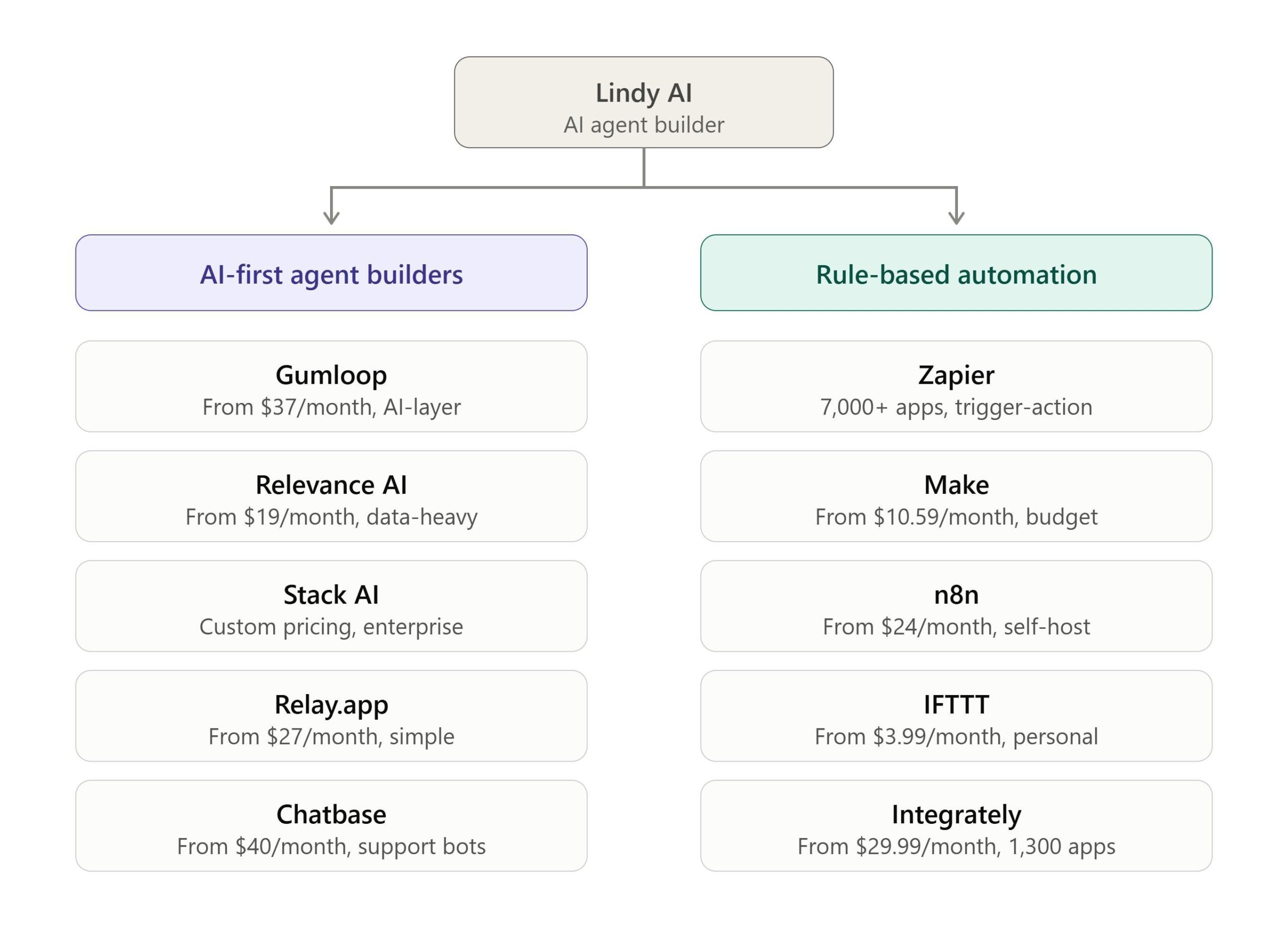
I compare ease of use, UI/UX, templates, pre-built workflows, integrations, LLMs, scalability, pricing, debugging, and documentation. If you need a customer support solution to cut support tickets, look at support agents.
Other tools are about moving data or a general-purpose AI employee platform for data analysis and research automation. A DIY automation framework is a valid alternative for technical teams, so choose carefully.
What Do Real Reviews and User Sentiment Say About Lindy AI?
User sentiment is positive feedback-heavy: Lindy AI is rated 9/10 and highly recommended. Hands-on testing backs that up.
Praise covers ease of use, extensive templates, seamless Google app integration, note-taking, calendar management, and document handling with little technical expertise. The visual flow editor is beginner-friendly, and onboarding and task creation are accessible.
Limitations appear in complex automation: Google services permissions, debugging multi-step workflows, occasional delays, task initialization issues, and advanced API integrations. Still, practicality and reliability hold on standard workflows. Some call it a 24/7 ops teammate with a 5x return on investment, flipping a switch into a second brain.
Is Lindy AI Actually Worth It?
Lindy AI is worth it for small to medium-sized teams and non-technical business users who want a no-code AI assistant for everyday workflows. It handles work intelligently.
For repetitive tasks, the free plan and paid plans let you dive deeper. The time savings and workflow efficiency make it one of the most impressive productivity tools I’ve seen beyond simple automation, with genuine intelligence.
If you’re running a business and tired of manually answering emails, typing meeting notes, and CRM data entry, the investment can justify itself as a superhumanly efficient assistant. It’s an easy recommendation for that profile, with alternatives for others. My verdict: a promising solution.
Is Lindy AI Safe for Business Use?
Lindy AI is built for business security, with SOC 2 Type II (audited by Johanson Group), GDPR, PIPEDA, SSO, audit logs, and HIPAA with a signed BAA. It is compliant with major regimes.
Data is encrypted in transit and encrypted at rest, never sold, never shared, and never used to train models. Your data is yours, a stance that matters for privacy and keeps it private.
The approval workflow means Lindy will prep the work, you approve, and then it goes out. Standard OAuth authentication and managed permissions let you queue drafts and stay comfortable, which suits enterprise security with no outside impact.
Where Does Lindy AI Perform Best in Real-World Use?
Lindy AI performs best on routine repetitive tasks across inbox, calendar, and CRM. Real-world scenarios, tested hands-on, show where it fits.
One scenario spans three jobs: client reports, a proposal overdue, and a retainer that’s late, where Lindy can help with a day summary. It flags client calls, new leads, and reports ready for sign-off, plus the Oakline proposal.
Overnight, it does one day of work: it answers the first lead through the last one, finds brands like your best clients, and some have replied. A monthly tally can show leads this month, cost per lead, and money collected this week.
It’s a smart employee running 24/7, backed by prebuilt templates, serving customers without lifting a finger. Limitations remain; real humans are expert reviewers. A one-person team can execute faster.
What’s the Quick Overview of Lindy AI?
Lindy AI is a quick overview of automating routine tasks and simplifying workflows for solo users and teams without coding skills. It’s best for AI-driven task automation.
It brings app integrations, prebuilt templates, a visual workflow editor, and task monitoring tools. The free version is generous, and the starting price is modest.
How Was Lindy AI Evaluated?
Lindy AI was judged by a research team using a testing methodology and evaluation criteria: core features, capabilities, ease of use, performance, reliability, pricing, value, and user feedback. The analysis follows this methodology.
Who Should Use Lindy AI?
Lindy AI is best for solo founders, entrepreneurs, and sales teams who drown in admin and email. It suits CRM automation and post-call follow-up.
Operations managers with recurring multi-step workflows, customer support teams facing high inquiry volume, consultants, and agencies with client accounts gain too. Startups can punch above their weight with repetitive tasks handled.
Who Should Avoid Lindy AI?
Lindy AI is less suitable for people with simple automation needs, where cheaper options work. Deep customization and proprietary API integrations also push users elsewhere.
Anyone not comfortable granting email access or calendar access should wait. Low-volume businesses may find manual work manageable.
What Is the Lindy AI Brand Identity in Context?
The Lindy AI logo is part of its visual identity, and the brand presents a clear identity through the image of a friendly assistant. Everything about Lindy AI here concerns brand only.
Which Companies and Organizations Are Associated With Lindy AI?
The companies and organizations linked with Lindy AI appear as customers and references that build brand trust. They include Shopify, Apple, Adobe, McKinsey & Company, NVIDIA, Harvard University, Airbnb, Retool, Compass, Stanford, Autodesk, and AppLovin, and these are associated names rather than endorsements.
Does Lindy AI Have a Free Plan?
Yes, Lindy AI has a free plan, and free access supports testing with limited tasks. Is free here means a starter tier, and you can upgrade anytime, with no credit card needed to begin as I understood it.
What Is Lindy AI and How Does It Work?
Lindy AI is an AI agent builder that turns artificial intelligence into automated workflows. Traditional tools run rigid rules, while Lindy uses context to make decisions on complex multi-step tasks. You describe what you want in natural language, it builds automation, and that is how it works.
What Can Lindy AI Actually Do?
Lindy AI can manage inbox duty, draft replies, schedule meetings, and handle calendar coordination. It will generate summaries of meeting summaries and action items, update CRM, research leads, and enrich contact data. It also offers first-response support for calls and email, running complex multi-step workflows autonomously with little manual input.
What Tasks Can You Automate With Lindy AI?
You can automate email processing, calendar management, internet searches, data compilation, and meeting prep with Lindy AI. Any repetitive tasks with a consistent pattern work well, so you can automate wide range of tasks.
What Is a Lindy AI Agent?
A Lindy AI agent is an autonomous AI assistant you configure for a specific recurring task with tools. It listens for triggers, such as a new email or calendar event, then takes intelligent action. Multiple agents can be chained together into end-to-end workflows.
How Much Does Lindy AI Cost?
Lindy AI cost begins with a free plan, then paid plans at $19.99 for 2,000 credits and $49.99 for 5,000 credits. Business adds unlimited credits at $49 to $99, while Enterprise brings custom SLAs, which shapes overall pricing.
Is Lindy AI Free?
Lindy AI is free to start on a free plan with 400 credits monthly. Premium features need upgrades, but core functionality and lightweight automations stay available.
Do You Need Coding Skills to Use Lindy AI?
You need no coding skills to use Lindy AI, since natural language descriptions are enough. Logical workflows help, and some automation concepts are helpful for complex agents.
Is Lindy AI Beginner-Friendly?
Lindy AI is beginner-friendly thanks to no-code setup and an intuitive interface. Prebuilt automations let you get started quickly without technical expertise.
Does Lindy AI Support Integrations With Other Tools?
Lindy AI supports popular tools and services, so you can connect workflows between apps and automate tasks, except where complex setup is needed.
Can Lindy AI Automate Recurring Workflows?
Lindy AI can automate recurring workflows on a schedule or from a trigger. It will manage repetitive tasks with minimal manual input.
How Does Lindy AI Compare to Zapier?
Lindy AI differs from Zapier in automation capabilities: Lindy has reasoning capabilities for nuanced automations, while Zapier covers simple integrations. Lindy is context-aware for reading emails, drafting responses, summarizing calls, and researching leads. They are different tools, with Zapier cheaper and simpler.
Is Lindy AI Better Than Zapier?
Lindy AI is not universally better than Zapier, because they are different tools doing different jobs. Any comparison says better depends on use case.
Is Lindy AI Good for Small Businesses?
Lindy AI is good for small businesses with customer service, email management, meeting scheduling, lead qualification, and research tasks. The Starter plan covers most small business needs.
How Does Lindy AI Compare to Other AI Assistants?
Lindy AI leans on workflow automation and tool integrations more than conversational help. It aims to simplify tasks and connect apps with minimal setup for better productivity.
Is Lindy AI Safe to Connect to Your Email?
Lindy AI is safe to connect to Gmail or Outlook through a secure method, with approval steps that queue drafts under your permissions.
Does Lindy AI Integrate With HubSpot and Salesforce?
Lindy AI integrates natively with HubSpot and Salesforce. It can log calls, update contact records, edit deal records, move pipeline stages, and trigger follow-up actions from meeting notes and email conversations, ending manual data entry.
Is Lindy AI Worth It?
Lindy AI is worth it if you want to reclaim time and run a leaner operation. My recommendation is yes for that profile.
What Should You Look for in a Lindy AI Alternative?
A Lindy AI alternative should be judged on core evaluation factors such as hidden costs and the workflow creation process.
Are AI Employees Actually Real?
AI employees are real in a limited sense: AI agents for marketing strategy and more are monitored by real humans, not 100% autonomous, so human intervention stays. It’s advanced tech and AI-driven human employees are not a replacement. With specific knowledge, people use these tools and get 2x productivity in day-to-day work.
What Are the 10 Best Lindy AI Alternatives and Competitors in 2026?
The 10 best Lindy AI alternatives and competitors in 2026 appear in this list.
| Tool | Starting price | Best for |
| Gumloop | $37/month | AI-layer workflows |
| Chatbase | $40/month | Support chatbots |
| Zapier | Varies | 7,000+ apps |
| Relevance AI | $19/month | Data-heavy AI |
| n8n | $24/month | Technical users |
| Make | $10.59/month | Budget automation |
| Relay.app | $27/month | Simple automations |
| IFTTT | $3.99/month | Personal automations |
| Stack AI | Custom | Enterprise |
| Integrately | $29.99/month | Common workflows |
Is Gumloop a Strong Alternative to Lindy AI?
Gumloop is a strong alternative as an automation platform for building AI automated workflow setups. Its pricing includes premium LLMs.
Teams use it for creating and sharing AI agents over data and apps, adding an AI-layer with any LLM model. It serves marketing, sales, and operations teammates at Shopify, Webflow, and Instacart, with parallel execution that’s 10x faster.
Features include LinkedIn profiles, scraping websites, templates, pre-built nodes, web search, web scraping, data extraction, document processing, and custom MCP servers.
What Are the Pros and Cons of Gumloop?
Gumloop’s main pro is no LLM API keys, though you can bring your own. Templates cover workflow use cases, leverage MCP helps connect almost any tool, and Gumstack adds enterprise security and observability. The con is a slight learning curve, since it is focused on AI agents rather than simple workflow automations.
What Do Gumloop Reviews Say?
Gumloop reviews describe getting time back across the org by letting teams automate tasks away. Operational efficiency rises for people with non-technical skills who adopt AI. Webflow’s Bryant Chou and Instacart’s Fidji Simo appear among customer quotes, a useful review perspective.
Is Chatbase a Good Alternative to Lindy AI?
Chatbase is a good alternative for customer support chatbots, with pricing from $40 a month. It is built specifically for customer support operations, so it can handle complex queries, take actions in systems, and escalate to humans. It will sync with real-time data, with model comparison and advanced analytics to optimize performance.
What Are the Pros and Cons of Chatbase?
Chatbase’s pros are customer service agents and customer experience tools with guardrails against misinformation and off-topic responses, plus white-label branding. Cons: it’s expensive with a narrow focus, and pre-built integrations may need APIs or Zapier.
What Do Chatbase Reviews Say?
Chatbase holds a 4.7 star rating on G2 from 13+ user reviews and 4.3 on Capterra from 73+. These review sites show solid but modest volume.
Is Zapier a Better Fit Than Lindy AI for Some Users?
Zapier is a better fit for simple automations. It’s an automation platform founded in 2011 with a trigger-and-action model to connect apps and handle moving data, with a huge library of apps. Pricing is clear, its AI features are growing with an AI-first mindset, and it stays reliable.
What Are the Pros and Cons of Zapier?
Zapier’s pros are over 7,000 apps, being easy to learn, tutorials, app connection templates, and being reliable. Cons: a lot of tasks gets pricey, AI features don’t feel native, complex logic needs custom code, it can be buggy, and you manage API keys for LLMs.
What Do Zapier Reviews Say?
Zapier carries 4.5 on G2 from 1,392+ user reviews and 4.7 on Capterra from 3,021+. These review sites give the strongest star rating volume here.
Is Relevance AI a Good Alternative to Lindy AI?
Relevance AI is a good alternative for data-heavy AI workflows, at about $19 per month in pricing. It handles unstructured data for an AI workforce through a no-code visual interface. Its automations cover research workflows with pre-built agent templates, acting as a general-purpose AI employee for data analysis and research automation.
What Are the Pros and Cons of Relevance AI?
Relevance AI’s pros are a visual builder, handling lots of data, research tasks, and workflow templates, with customers like Canva, Autodesk, and Rakuten. Cons: customization limited, limited free plan, a steep learning curve, and not a US-based company.
What Do Relevance AI Reviews Say?
Relevance AI has a 4.5 star rating on G2 from 17+ user reviews and 4.0 on Capterra from one. These review sites show a thin base.
Is n8n a Better Alternative to Lindy AI for Technical Users?
n8n is better for technical expertise buyers who want to self-host. It runs AI workflows as a workflow automation tool for developers, who get control over data, no vendor lock-in, and an own server. The visual builder allows custom code and APIs, a true DIY automation framework.
What Are the Pros and Cons of n8n?
n8n’s pros are self-hosting, handling complex tasks, a huge community, tutorials, and workflow templates. Cons: outdated UI/UX, own API keys, and a skew toward technical people, though sales use cases and marketing use cases exist.
What Do n8n Reviews Say?
n8n scores 4.8 on G2 from 118+ user reviews and 4.6 on Capterra from 37+. These review sites reflect a high star rating.
Is Make a Better Budget Alternative to Lindy AI?
Make is a better budget pick: a no-code automation workflow automation platform that is similar to Zapier and a cheaper alternative. Its AI features are basic, with 2,500 pre-built apps and templates for IT operations and customer experience roles, used at Tally, BambooHR, and Bolt.
What Are the Pros and Cons of Make?
Make’s pros are 2,500 app integrations, being affordable, error handling, debugging tools, and branching logic. Cons: basic AI features, a steep learning curve, and cluttered workflows in its UI/UX.
What Do Make Reviews Say?
Make has 4.7 on G2 from 249+ user reviews and 4.8 on Capterra from 406+. These review sites show a strong star rating.
Is Relay.app a Good Alternative to Lindy AI?
Relay.app is a good alternative for simple automations and non-technical users. Pricing starts around $27 with an easy interface and an AI agent builder for marketing use cases such as qualifying leads and scheduling social media posts. Templates include a LinkedIn post writer, meeting brief generator, and sales demo request qualifier.
What Are the Pros and Cons of Relay.app?
Relay.app’s pros are a clean interface, being affordable, and a solid range of templates used at big tech companies. Cons: fewer integrations, and marketing use cases dominate.
What Do Relay.app Reviews Say?
Relay.app has 4.9 on G2 from 70+ user reviews and 5 on Capterra from one. These review sites show a very small base.
Is IFTTT a Useful Alternative to Lindy AI?
IFTTT is useful for personal automations, with pricing from a $3.99 plan. The original automation tool, If This Then That, is simple and affordable to connect apps and services. It helps with business processes and personal life alike.
What Are the Pros and Cons of IFTTT?
IFTTT is easy to use with the most affordable pricing, strong personal automations, smart home devices, and a mobile app. Cons: no real AI features, limited features, and weak business-specific workflows.
What Do IFTTT Reviews Say?
IFTTT has 4.5 on G2 from 114+ user reviews and 4.6 on Capterra from 221+. These review sites are steady.
Is Stack AI a Better Enterprise Alternative to Lindy AI?
Stack AI is a better pick for enterprise companies, with a free plan and custom pricing. A clean UI and enterprise-level security support its AI agent builder for end-to-end agents in IT support, customer service, CRM enrichment, and RFP responses, built for scalability and security.
What Are the Pros and Cons of Stack AI?
Stack AI’s pros are enterprise SaaS fit, clean UI/UX, strong security, compliance, and complex workflows. Cons: pricing not transparent, overkill for startups, limited community resources, and longer implementation time.
What Do Stack AI Reviews Say?
Stack AI has 4.7 on G2 from 18+ user reviews and 4.8 on Slashdot from 20+. These review sites give a positive star rating.
Is Integrately a Good Lindy AI Alternative?
Integrately is a good alternative for simple automations and common workflows, with a free plan and starting pricing of $29.99. A large library of pre-built automations on a no code platform reaches 1,300 apps, used by Accenture, Adobe, Deloitte, HP, Indeed, Nvidia, and Salesforce for ecommerce websites.
What Are the Pros and Cons of Integrately?
Integrately’s pros are app integrations and one-click templates, being slightly more affordable. Cons: an outdated interface, limited advanced AI features, and being less intuitive as automation complexity grows.
What Do Integrately Reviews Say?
Integrately has 4.7 on G2 from 688+ user reviews and 4.1 on Capterra from 319+. These review sites show broad volume.