

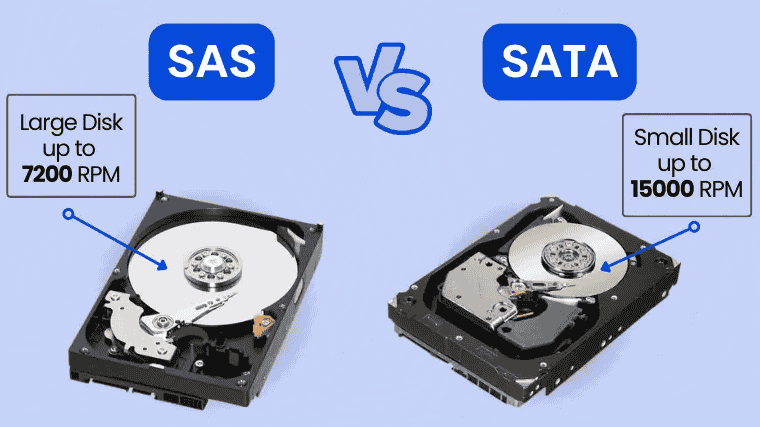
Racking servers in data centers taught me cheap disks can cost most. SAS and SATA hard drives look similar, yet their interfaces shape reliability, data transfer rates, and long-term cost.
- SAS vs SATA Hard Drive
- Performance and Speed
- Reliability
- Queue Depth
- Dual-Port Capability
- Error Handling
- Capacity and Physical Size
- Connector Design
- Compatibility
- Cost
- Use Cases and Hardware
- Choosing Between SAS And SATA
- I stopped asking which interface is faster. The real question is workload: constant workloads and 24/7 operation favor SAS, while archival purposes and personal use rarely justify the extra cost.
- A client packed a RAID controller card with SATA disks. Rebuilds crawled under heavy I/O loads; premature hardware failure followed. SAS, with redundant paths and superior error handling, fixed it.
- Honestly, SAS is often overkill. For a home computer, gaming PC build, or small business use, SATA’s cost per gigabyte and affordability deliver sufficient performance without paying the enterprise premium.
- My rule: map intended usage before specifications requirements. Enterprise grade servers handling data warehousing operations need SAS queuing up to 254 commands; consumer-grade PCs manage with NCQ at 32 commands.
- When To Choose SAS Drives
- When To Choose SATA Drives
- Is SAS Always Faster Than SATA?
- Not always. I’ve benchmarked SAS drives that crawled behind a SATA drive because a dated controller choked throughput. Spindle speed, cache, and workload shape data transfer rates more than labels.
- SAS-3 doubles SATA 3.0, yet one drive rarely hits that maximum speed. The gap emerges in data warehousing, where deeper queue depth and dual-port paths deliver superior performance under load.
- Can I Use a SAS Drive in a SATA System?
- SAS and SATA SSDs
- The Future Of SAS And SATA
- Conclusion
- Faq’s
- What Is Serial Attached SCSI (SAS)?
- What Is Serial Advanced Technology Attachment (SATA)?
- Can I Mix SAS And SATA Drives In A RAID Array?
- Do SAS Drives Consume More Power Than SATA Drives?
- What’s The Difference Between SAS And SCSI?
- Can SAS Drives Be Used In A NAS (Network Attached Storage) Device?
- Is There A Noticeable Difference In Daily Use Between SAS And SATA SSDs?
- Are SAS Drives Worth The Extra Cost For A Home Computer?
- Are There Any Scenarios Where SATA Is Preferable To SAS In An Enterprise Environment?
- Are SAS Drives Worth The Extra Cost For A Home Computer?
- Are There Any Scenarios Where SATA Is Preferable To SAS In An Enterprise Environment?
Enterprise-level businesses chasing 24/7 operations need hot swapping and superior performance, while laptops, desktop computers, and consumer-grade PCs reward affordability. Weighing use case against specific needs drives an informed decision.
SAS vs SATA Hard Drive
Years of racking servers taught me the SAS versus SATA debate rarely hinges on speed. It hinges on heavy workloads, 24/7 operations, and how much downtime your budget can absorb.
Serial Attached SCSI grew from the parallel SCSI interface, adding full-duplex communication and 12 Gb/s links. SATA III stops at 6 Gb/s, yet spinning platters seldom fully saturate either interface.
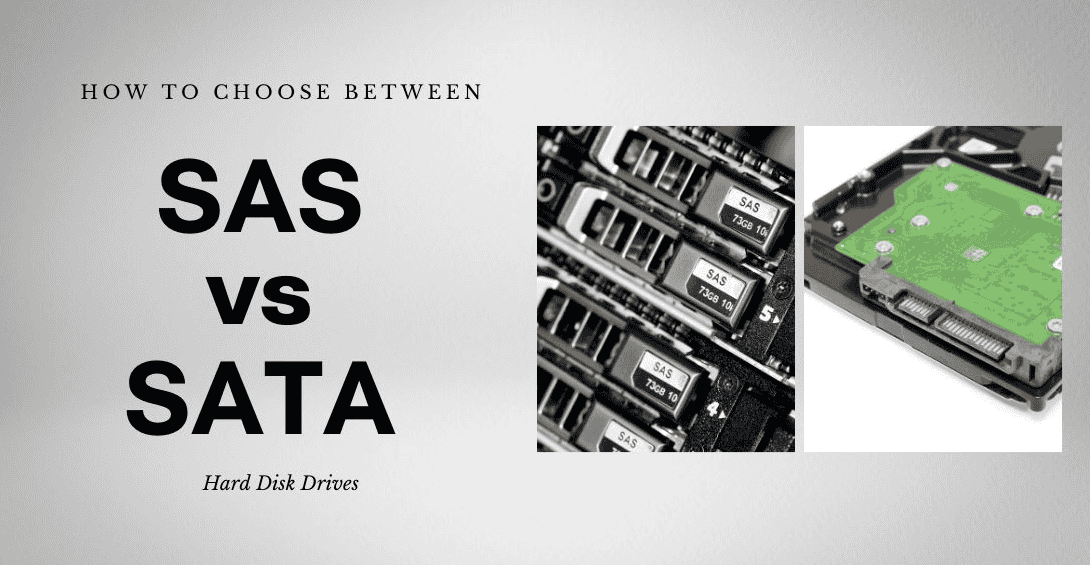
Overlooked detail: SAS controllers accept SATA drives, but never the reverse. That one-way compatibility lets small business owners start with affordable disks, then adopt SAS SSDs when IOPS demands climb.
Performance and Speed
The spindle, not the cable, sets the ceiling. A 7,200 RPM hard drive rarely saturates its link, so actual performance leans on platters and firmware, not the hard disk interface.
Serial Attached SCSI inherited command sets from parallel SCSI, while Serial ATA grew from desktop roots. SAS links commonly reach 12 Gb/s against 6 Gb/s, promising faster data transfer rates.
In my own testing, the performance difference surfaces under deep random queues. Benchmark specific drives for your use case; higher performance on paper rarely changes how SATA desktop computers feel.
Reliability
For reliability, I look first at MTBF and mean time between failures because they frame risk realistically. In 24/7 operation, robust enterprise models handle constant workloads with steadier, reliable performance.
From experience, monitoring software and preventive maintenance routines matter as much as ratings. A 1.2 million hours or 1.6 million hours claim still depends on environment, regular use, and limiting normal wear and tear.
Queue Depth
Native Command Queuing lets SATA reorder 32 commands, but SAS tagged queuing goes deeper. Under heavy OPS spikes, NCQ helps; near instantaneous access needs SCSI/SAS interfaces and faster access times.
Dual-Port Capability
Dual ports give redundant paths, so enterprise level businesses tolerate controller failures. Consumer-grade storage needs rarely justify it, and SATA drives skip it, while SAS high performance designs embrace it.
Error Handling
Advanced error checking and correction is where SAS earns respect; I’ve watched it catch corruption. SATA relies on simpler design, while mean time between failures figures hint at long-term durability.
Capacity and Physical Size
Larger capacity options usually arrive first on SATA drives, while desktop computers and laptops accept them. Any form factor requirement should be checked before buying hard drives, because bays differ.
I have seen enterprise-grade servers stacked with SAS drives inside data centers, where storage devices must fit rack caddies exactly. Capacity matters, but physical dimensions ultimately decide almost everything here.
Connector Design
Physically, SAS links use a port that accepts both drive types, while SATA interconnect links reject the reverse. Compatible backplanes saved me during swapping out drives on a single system.
Compatibility
Here’s the rule I learned the hard way: SATA controllers cannot talk to SAS drives. A SAS drive won’t seat on that L-shaped connector, so any SATA system rejects it.
Reverse it and things relax. Server-grade motherboards with SAS backplanes run SATA disks, while consumer motherboards need add-in controller cards for SAS support. Check computer specifications before buying any device.
Cost
Buyers flinch at SAS pricing, and I did too. Upfront spending looks brutal, yet modestly priced SATA wins when budget constraints outweigh reliability, because higher cost often prevents costlier outages.
Use Cases and Hardware
In practice, SAS solution deployments suit enterprise-level servers, server racks, and high availability environments where reliability, redundancy, error correction, and quick access matter more than lower cost or affordable price alone.
For personal computer, desktop computers, or small business applications, a conventional SATA hard drive or SATA SSDs usually fits storage needs, offering large storage capacity, cost efficiency, widely available upgrades, and simpler compatible hardware planning.
I have seen mission-critical applications favor dual-port style thinking, RAID array planning, and hot-swap drives, while consumer applications prioritize budget constraints, energy efficiency, gaming, and practical use cases over peak specifications.
Choosing Between SAS And SATA
I stopped asking which interface is faster. The real question is workload: constant workloads and 24/7 operation favor SAS, while archival purposes and personal use rarely justify the extra cost.
A client packed a RAID controller card with SATA disks. Rebuilds crawled under heavy I/O loads; premature hardware failure followed. SAS, with redundant paths and superior error handling, fixed it.
Honestly, SAS is often overkill. For a home computer, gaming PC build, or small business use, SATA’s cost per gigabyte and affordability deliver sufficient performance without paying the enterprise premium.
My rule: map intended usage before specifications requirements. Enterprise grade servers handling data warehousing operations need SAS queuing up to 254 commands; consumer-grade PCs manage with NCQ at 32 commands.
When To Choose SAS Drives
SAS decisions I make start with deadlines, not disks. When OPS spikes land during peak hours, SAS queue depth keeps server environments and hardware RAID arrays responding instead of stalling.
Spec sheets quoting 1.6 million hours MTBF matter less than hot swapping a failed disk. Dual ports add redundancy, and high-performance workstations running professional video editing software sustain consistent performance.
When To Choose SATA Drives
My SATA advice starts with files, not budgets. Archives accessed infrequently sit fine on hard disk drives, and home users rarely see a noticeable difference during web browsing or gaming.
A standard SATA connection stays widely compatible across personal computers, so solid-state drives deliver a cheap speed boost to aging systems. For small business needs, that cost-effectiveness beats enterprise extras.
Is SAS Always Faster Than SATA?
Not always. I’ve benchmarked SAS drives that crawled behind a SATA drive because a dated controller choked throughput. Spindle speed, cache, and workload shape data transfer rates more than labels.
SAS-3 doubles SATA 3.0, yet one drive rarely hits that maximum speed. The gap emerges in data warehousing, where deeper queue depth and dual-port paths deliver superior performance under load.
Can I Use a SAS Drive in a SATA System?
Plug a SAS drive into a typical home board and nothing happens. SATA controllers simply cannot speak SAS technology, and the keyed connector physically blocks the attempt, protecting your motherboard.
The reverse works better. Most RAID controllers and SAS backplanes accept SATA drives natively, which I’ve used for cold storage shelves, though you lose dual-port functionality. Confirm firmware support first.
SAS and SATA SSDs
I have swapped solid-state drives between servers for years, and SAS-enabled disks handle I/O operations per second spikes calmly, while consumer-grade storage needs rarely justify that higher cost or complexity.
Dual-port hot swapping and data redundancy keep enterprise-level businesses online, whereas a SATA bridge connector lets cheaper SATA counterparts sit in hardware RAID arrays; cost decides most upgrades in practice.
The Future Of SAS And SATA
Having deployed both in racks, I watched solid-state drives and NVMe keep superseding spinning disks, yet legacy systems still lean on SAS, while SATA survives wherever tight budget constraints rule.
Conclusion
Choosing between SAS and SATA ultimately comes down to budget constraints versus reliability; enterprise-grade features justify extra cost in server environments, while consumer-grade storage devices stay affordable for everyday builds.
My experience says longevity matters more than raw speed; weigh performance and price, consider future needs, and make your final decision around your usage scenarios, not just marketing hype, honestly.
Faq’s
What Is Serial Attached SCSI (SAS)?
Serial Attached SCSI is the serial version of SCSI, replacing parallel data transmission with point-to-point serial transmission, which is exactly why I now see it inside most enterprise storage arrays.
Beyond higher speeds and longer cables, SAS offers improved reliability, hot-swappable bays, and power management, so admins in high-performance computing environments rarely hesitate choosing it when uptime genuinely matters most.
What Is Serial Advanced Technology Attachment (SATA)?
Having swapped out countless consumer grade PCs, I treat Serial Advanced Technology Attachment as the budget-friendly pick among computer storage interfaces: simpler, easier to use, boasting affordability and lower cost.
Can I Mix SAS And SATA Drives In A RAID Array?
Mixing works in RAID arrays only cautiously; I keep each group uniform, because slower speeds from one drive drag down everyone, and reduced performance levels follow quite quickly in practice.
Do SAS Drives Consume More Power Than SATA Drives?
In my racks, lower power consumption usually favors SATA, since enterprise-grade components in SAS spin harder. Still, energy efficiency improves when idle disks power down, and consumer setups barely notice.
What’s The Difference Between SAS And SCSI?
Think of SAS as SCSI’s evolution: a point-to-point serial protocol that transfers data to multiple devices per port, whereas older SCSI relied on parallel cabling that I replaced years ago.
Can SAS Drives Be Used In A NAS (Network Attached Storage) Device?
Yes, SAS works in a NAS if the appliances support it, and a large number of drives gives robust, reliable performance over extended periods, though SATA remains the home choice.
Is There A Noticeable Difference In Daily Use Between SAS And SATA SSDs?
In my daily use, SSDs on SAS linkups feel nearly identical to SATA interfaces during web browsing and everyday workloads, but peak hours with write-intensive applications expose real reliability gaps.
Are SAS Drives Worth The Extra Cost For A Home Computer?
In every home setup I’ve built, SAS rarely earns its higher cost. For web browsing, gaming, and everyday tasks, modestly priced SATA drives deliver no noticeable difference in daily use.
Are There Any Scenarios Where SATA Is Preferable To SAS In An Enterprise Environment?
Counterintuitively, data centers I’ve audited park cold archives on SATA. Under budget constraints, lower power consumption and cost-effectiveness outweigh dual-port redundancy for that use case, scaling across multiple devices cheaply.
Are SAS Drives Worth The Extra Cost For A Home Computer?
Most home users never touch the ceiling of high-performance computing environments, so SAS rarely justifies itself. An affordable price point matters more; home computing needs are met comfortably by SATA.
Are There Any Scenarios Where SATA Is Preferable To SAS In An Enterprise Environment?
In enterprise environments, SATA wins for archival tiers where data is accessed infrequently; paying SAS premiums there wastes budget, and capacity per dollar matters far more than raw latency, honestly.