

A CyberGhost vpn login works with either a username and password or, on Android TV, a 4-digit PIN, and new users can sign up on the CyberGhost website or inside the Android app.
- How to Login Or Sign Up CyberGhost VPN in 2026?
- New Users: Sign Up for CyberGhost VPN
- How to Sign Up For CyberGhost
- Create an Account within the App
- Subscribe to CyberGhost VPN
- Start a Plan or Free Trial
- Existing Users: Log Into CyberGhost VPN
- Troubleshooting Login Issues
- Incorrect Login Credentials
- Forgot My Password
- Maximum Number of Devices Reached
- Encountered Issues Logging In?
- Contact Customer Support
- Download the Windows App
- CyberGhost VPN Review
- CyberGhost VPN Pricing
- Features
- Server Network
- Privacy, Security & No-Logs Policy
- Apps & Device Compatibility
- Pros & Cons
- Benefits of Using a VPN
- How to Choose the Best VPN for Yourself
- CyberGhost Customer Support
- Alternatives to CyberGhost
- Final Verdict
- Frequently Asked Questions
- CyberGhost VPN Software: What Is It and How Does It Work?
- How Do I Log In to CyberGhost?
- Is CyberGhost VPN Free?
- How Do I Download CyberGhost VPN?
- How Do I Download CyberGhost VPN for PC?
- How Do I Get the CyberGhost VPN Extension for Firefox?
- Is There a CyberGhost VPN for Mac?
- How to cancel CyberGhost
- Is CyberGhost Good for Streaming and Unblocking?
- How Fast Is CyberGhost?
- Why Is CyberGhost Based in Romania?
- Can You Trust CyberGhost?
- Does CyberGhost work in China?
- Who owns CyberGhost?
- Can you put CyberGhost on Firestick?
- How do I know if CyberGhost is working on my Firestick?
- How Do I Install CyberGhost on Amazon Firestick?
- How Do I Use CyberGhost on Firestick?
- What’s the Best VPN for a Fire TV Stick?
- How Do I Uninstall CyberGhost From My Firestick?
- How Many Countries Does CyberGhost VPN Cover?
Where CyberGhost VPN was purchased decides how the account is handled afterward. A purchase on the website is managed from the dashboard, while Google Play Store sign-ups are in-app subscriptions, so refunds usually go through Google Play Support rather than the money-back guarantee on the site (worth confirming against current terms). Anyone with an existing subscription should open the app and log in instead of buying a new one, because a second purchase can leave two accounts and a double charge when an active subscription already covers the login. The 1-day free trial, where available, still needs an account first. This guide also covers the common login issues and their solutions, and it suggests handling credentials with discretion, since they should not be shared or stored on devices other people use.
How to Login Or Sign Up CyberGhost VPN in 2026?
In 2026, you can sign up for CyberGhost VPN with an email address and a password, and the same credentials then work for every login on supported devices. Depending on how the account was created, the username may be the email address itself. Either way, one account covers the app on several devices, but it only works if the subscription behind it is active. A free trial, where offered, still requires an account first, so creating one is always step one.
New Users: Sign Up for CyberGhost VPN
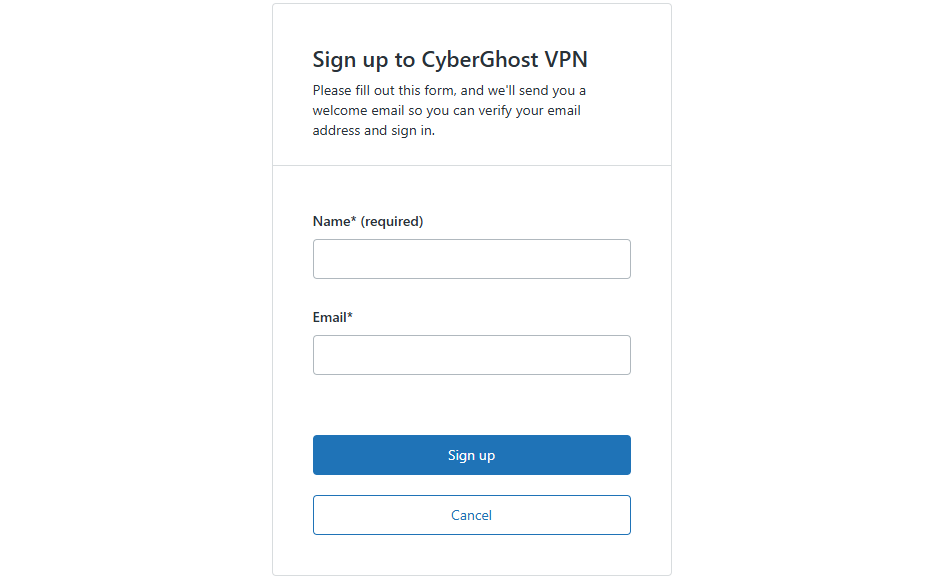
New users can register in two ways: through the website with a plan, or inside the app by creating an account on its login screen. The route matters because it decides who handles billing later.
How to Sign Up For CyberGhost
The fastest route is the CyberGhost VPN website: choose a plan, enter an email address, complete checkout, and confirm the account through your inbox. A short guide with step-by-step instructions:
- Open the CyberGhost VPN website and pick a subscription or free trial option.
- Enter your account details, meaning email address and password.
- Complete the purchase or trial checkout.
- Open the confirmation email in your inbox and follow its link.
- Install the Windows app and sign in with the same account.
Create an Account within the App
The Windows app lets you register without visiting the website first, though the website route is easier to review. On the login screen, pick “Click here to create a new one”, then Sign up with a valid email address and a strong password. The newly created account can start the 1-day free trial offered on desktop, if it is still available in your region. After that, log in with the same account details and decide whether to take out a subscription.
Subscribe to CyberGhost VPN
Choosing a plan comes down to commitment: a monthly subscription is flexible, while an annual subscription is generally cheaper per month. The Subscribe buttons lead to billing steps where the email address is requested first.
- Password Rules: Use 8+ characters, with mixed-case letters, numbers and special characters.
- Activation: Open the confirmation email in your inbox and click the link to activate your account. Without it, the new account may stay unusable.
- Cookie Banner: You will likely see Accept, Reject and Customize choices. These are data-sharing preferences. Rejecting leaves only essential data, while accepting allows analytics data that is anonymized. They govern website tracking, not VPN traffic or browsing activity, which CyberGhost says it does not log under its no-logs policy.
- Google In-App Purchases: Android users may be sent to Google in-app purchases, and the 3-day free trial usually belongs to that route. Billing and cancellation then happen inside Google Play, not on the CyberGhost site.
Start a Plan or Free Trial
To begin, tap “New user?”, enter your email address and choose a plan, then pick Start your trial or Subscribe now. On the Android TV app, the sequence is: Create account, set a password, and add a payment method. The 3-day free trial is meant to let you test the service, but the trial period converts to a paid subscription unless you cancel in time. Finally, check your email for the verification link and verify your account. Unverified accounts commonly cause “login failed” reports afterward, so this step is worth doing straight away.
Existing Users: Log Into CyberGhost VPN
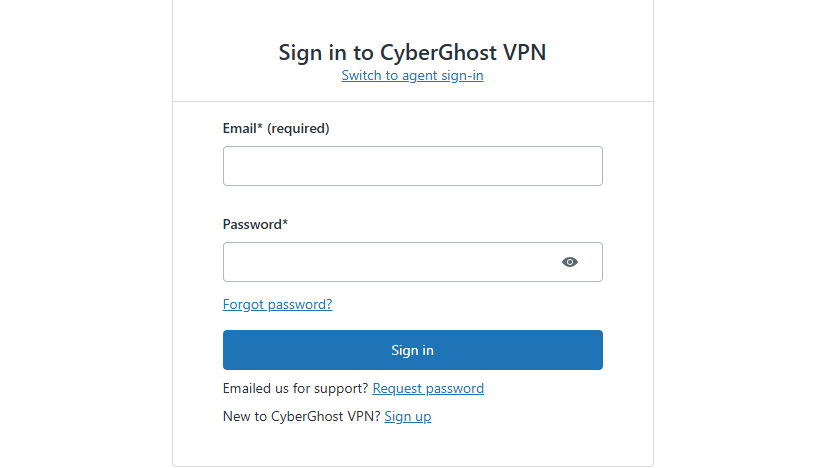
Existing user? Open the app, and on the Login screen choose between the available login options: a PIN code on TV or your username and password elsewhere. Users who have only just made a purchase should get started with the credentials from the confirmation email. The login options appear at the bottom of the screen on some versions, and a purchased subscription is not required for the login itself to succeed, only to connect afterward.
Option 1: Log In with a PIN
The PIN method suits Android TV because typing a long password with a remote is slow. Here is how it works:
- Open CyberGhost VPN on the TV and choose the PIN login. A 4-digit PIN appears on the TV screen.
- In any browser, sign in to your account dashboard and go to the Download Hub.
- Select CyberGhost VPN for Android TV and use the link or field provided to enter the PIN.
- Click Validate PIN. The TV is automatically logged in, and you can press Connect.
PINs are short-lived, so entering one quickly avoids a retry.
Option 2: Log In with Your Username and Password
The standard method is to open the regular login, type your username and password, and start using the service. It works on every platform, and it is the only route when no second device is at hand for a PIN.
Troubleshooting Login Issues
Most problems come down to a few common issues, each with a short solution: wrong credentials, a forgotten password or too many devices. Check them in that order when attempting to log in fails, as the first two take seconds to rule out.
Incorrect Login Credentials
Incorrect credentials are the leading cause of failed logins, and the message “Invalid username or password!” appears when anything is off by a single character. Both fields are case-sensitive, so check that Caps Lock is off. Double-check the email used in the sign-up process, since a typo there carries over. If the login credentials still fail, retype the password rather than pasting it, because copied text can add trailing spaces.
Forgot My Password
A forgotten password is fixed through a password reset link sent by email. Select the reset option on the login page, enter the email address tied to the account, and wait for the message. Click the link, set a new password and log in again. If no email arrives, look in spam, then confirm the address matches the account, since a different one will never receive the message.
Maximum Number of Devices Reached
The cap is 7 devices logged in at the same time, and the 8th login attempt will fail. This is a lesser-known snag for households with phones, laptops and TVs. To fix it:
- Open the account management page and choose Manage My Devices.
- Delete or remove any device you are no longer using.
- Log in on the new device again.
Removing a device frees its slot immediately, so there is no waiting period.
Encountered Issues Logging In?
When an error blocks login and the cause is unclear, use Recover account from the Login screen. In the Android app, tap Lost your password? and follow the instructions. If the message hints at “Activated too many devices?”, sign in on a device that still works, open My Account, and remove unused devices. After you drop below the maximum allowed devices, log in again from the blocked one.
Contact Customer Support
When the steps above fail, the customer support team can resolve account-level problems. Press the Support button in the app or on the site, then reach out by 24/7 Live Chat, email or an online request. Provide your account email and the exact error text, which speeds up the reply.
Download the Windows App
To get the app, go to the VPN for Windows page and click Download VPN for PC; the installation file downloads in a few seconds. Open the file, follow the on-screen prompts, and click Agree & Continue to give consent to limited anonymous data collection, or I want to opt-out if you prefer not to. The installer then finishes, and the app opens automatically on your Windows device, ready for the login screen.
CyberGhost VPN Review
CyberGhost has built its reputation around making VPN protection approachable rather than overwhelming, and after going through everything the service offers, that reputation mostly holds up. From a single, straightforward subscription tier to an app that connects in one click, it’s clearly designed for people who don’t want to fight with settings just to stay private online.
Backed by a global network stretching across roughly 100 countries, strong AES 256-bit encryption, and a strict no-logs policy verified through independent Deloitte audits, it comes across as a VPN that doesn’t ask users to compromise between ease of use and genuine security — though, as the breakdown below shows, it’s not without a few trade-offs. The sections that follow cover exactly what you’re paying for, how the features perform in daily use, and where CyberGhost edges ahead of — or falls behind — its closest competitors.
CyberGhost VPN Pricing
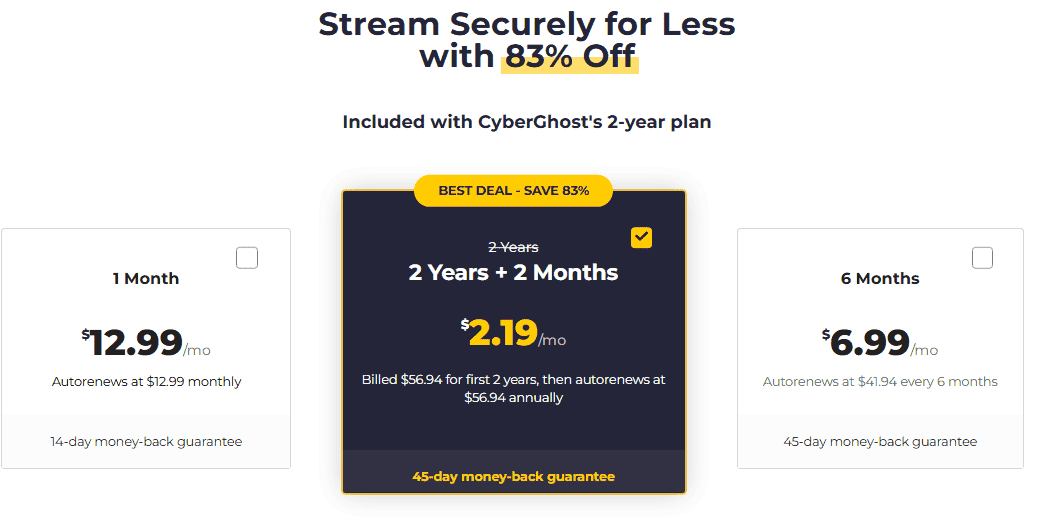
CyberGhost runs a single subscription tier rather than splitting features across multiple plans, which simplifies the buying decision but means the real variable is contract length, not feature access.
| Plan Length | Price (Auto-Renew) | Approx. Monthly Cost |
| 1 Month | $12.99 | $12.99 |
| 6 Months | 41.94(~6.99/mo) | $6.99 |
| 26 Months | 56.94(~2.19/mo) | $2.19 |
Long-term plans are where CyberGhost gets genuinely competitive — the 26-month plan works out to roughly $2.19 a month, which undercuts NordVPN’s typical $3.39 and sits close to Surfshark’s $1.99, though Surfshark’s own long-term deals shift often. All plans bill in US Dollars and come with a 45-day money-back guarantee, which is unusually generous — most competitors, including NordVPN and Surfshark, cap refund windows at 30 days. That said, the fine print matters: the extended 45-day window applies mainly to longer subscriptions, while shorter or monthly plans often carry a tighter 14-day guarantee instead.
Add-Ons Worth Knowing About
- Security Suite (Antivirus + Security Updater): roughly $4.50/month on top of a base plan, sometimes bundled at $3.25 or discounted to $19.50 for extended terms
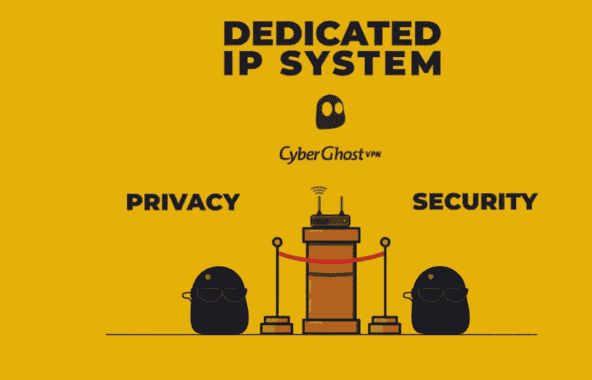
- Dedicated IP: an extra 2.50–5/month depending on term length, useful for avoiding CAPTCHAs on banking or shopping sites
- Available Dedicated IP locations include Australia, Belgium, Canada, France, Germany, Japan, the Netherlands, Singapore, Sweden, Switzerland, the UK, and the US
Payment options include credit card, PayPal, Bitcoin, Google Pay, and Apple Pay, and CyberGhost doesn’t require credit card details upfront if you’re only testing the free trial. Cancellation is handled through account settings, and billed amounts are refunded automatically once a cancellation request inside the guarantee window is processed. Customer support carries roughly a 9/10 rating among users who’ve dealt with live chat directly.
Features
CyberGhost’s core value comes down to a strict no-logs policy enforced from a Romania HQ, where privacy laws don’t compel data retention the way some other jurisdictions do — the company doesn’t track, share, or sell user data.
- Strong Encryption – industry-standard encryption scrambles traffic end-to-end using AES 256-bit encryption
- Large Server Fleet – a global network spanning America, Europe, Africa, and Asia
- Fast Speeds – built to handle sports games, movies, and online games without constant buffering
- Money-Back Guarantee – up to 45 days on select plans, 14 days on others
- 24/7 Customer Support – live chat and email, offered in multiple languages, backing a presence in 100 countries
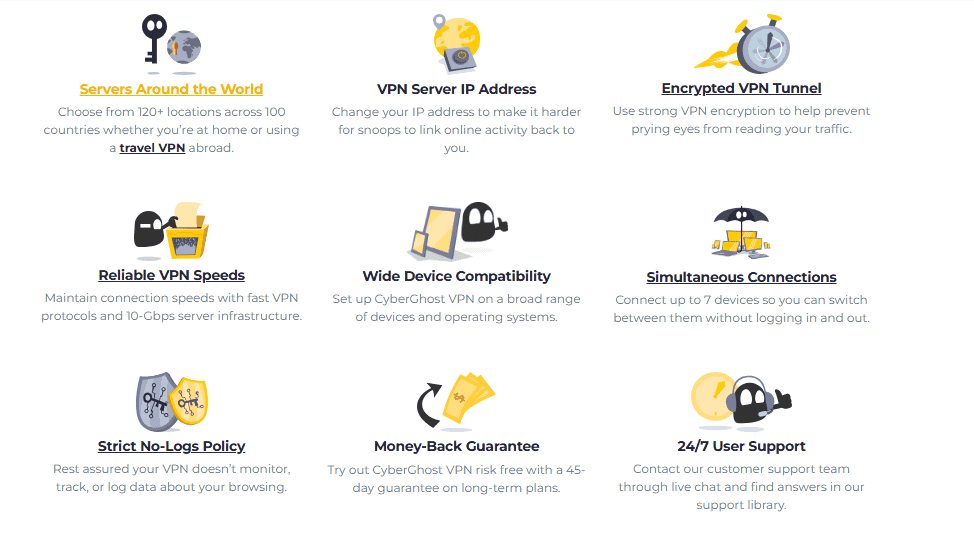
On the technical side, CyberGhost includes DNS leak protection, IP leak protection, and an automatic kill switch, running on your choice of OpenVPN, IKEv2, or WireGuard protocols. Bandwidth and traffic are unlimited across all 7 supported devices, with cross-platform apps for Windows, Android, macOS, and iOS. Split tunneling is available in both domain-based and app-based forms, letting you route only specific traffic through the tunnel while everything else uses your normal connection. An obfuscation feature helps mask the fact that you’re using a VPN at all, useful in restrictive network environments, and the auto-connect setting pairs with DNS blocking to filter ads, trackers, malware, and phishing sites automatically — CyberGhost bundles this under an ad blocker built on uBlock Origin Lite. A built-in Connection Checker also verifies Wi-Fi protection is active before you start browsing on unfamiliar networks.
Server Network
CyberGhost operates across 124 locations in roughly 100 countries, a number that puts it well ahead of smaller rivals like Windscribe (116 servers) and comparable to Hotspot Shield’s footprint.
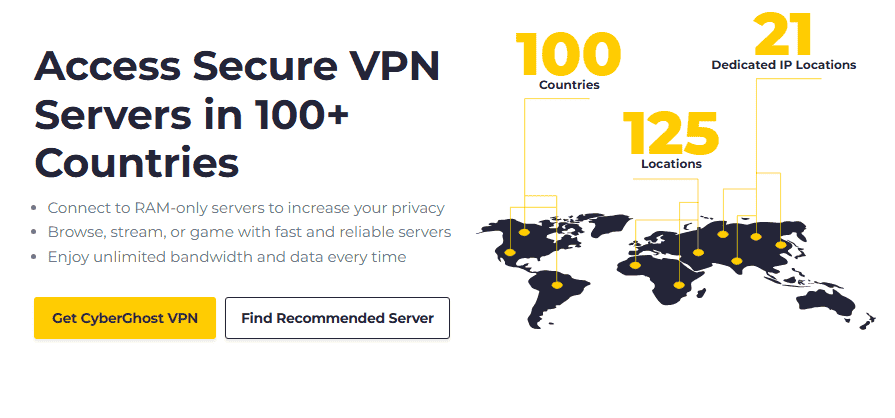
By region, the breakdown looks roughly like this:
| Region | Locations |
| Europe | 54 |
| Asia | 30 |
| US | 11 |
| South America | 9 |
| Africa | 6 |
CyberGhost also maintains specialized servers for specific use cases: streaming-optimized servers across 24 countries, torrenting-optimized servers, and dedicated gaming servers in the UK, France, and beyond. NoSpy servers — physically located in Romania and run entirely in-house rather than through third-party data centers — cover countries with more sensitive privacy considerations, including Cyprus, Egypt, and Germany. Notably, CyberGhost does not operate servers in Iran, which limits usefulness there compared to services with virtual locations in more restrictive regions. Every server supports 10-Gbps connections, which is what keeps 4K streaming free of lag or buffering even with multiple simultaneous connections active on one account. Independent speed and reliability testing generally puts the server network around an 8/10.
Privacy, Security & No-Logs Policy
CyberGhost’s no-logs claim isn’t just marketing language — it’s backed by RAM-only servers, meaning session data, browsing history, traffic destination, search preferences, and DNS queries are wiped completely on every reboot rather than written to a hard disk.
Being headquartered in Romania matters here: Romanian privacy laws don’t require ISPs or VPN providers to retain user data, which gives CyberGhost more legal room to anonymize and encrypt connections than a provider based in a Five Eyes country would have. The company runs colocated servers in some regions but operates NoSpy servers directly out of its own Romanian data center for an extra layer of control over third parties.
On encryption specifics, CyberGhost combines AES-256-CBC encryption with SHA-256 authentication over OpenVPN, and AES-256-GCM with newer post-quantum encryption additions on other protocols. The privacy policy states that only aggregate, non-identifying data — never IP addresses or browsing history — is retained for service improvement. This isn’t just a self-reported claim, either: Deloitte conducted independent third-party audits in both 2022 and 2024, with the audit reports confirming the no-logs policy holds up under external scrutiny.
Apps & Device Compatibility
CyberGhost’s apps are available on Windows, macOS, Android, iOS, and Linux (via a command-line app), plus Android TV, Fire TV Stick, Apple TV, and select routers, with Firefox and Chrome browser extensions for lighter, extension-only protection.
Connecting is intentionally simple: one connect button (a power icon) starts a session, typically in under 7 seconds, and the app displays upload speed, download speed, protocol in use, and connection duration on the main screen. The server list is organized alphabetically with a Favorites tab for quick access to frequently used locations. Advanced users get access to Privacy Settings, Smart Rules, and an Exclusions list for split tunneling, along with a disconnect warning that flags when protection has dropped. Desktop apps generally score around 8/10 in usability testing, while the iOS app trails slightly at 7/10 — some users note it takes 2–3 minutes to complete first setup versus a near-instant desktop install. For devices without native app support — certain Smart TVs or gaming consoles — CyberGhost also offers Smart DNS as a workaround, though Smart DNS doesn’t encrypt traffic the way the full VPN app does.
Pros & Cons
| Pros | Cons |
| 45-day money-back guarantee on longer plans | Live chat support quality varies by time of day |
| Unblocks US Netflix, BBC iPlayer, Amazon Prime Video | WireGuard speeds trail top-tier rivals like NordVPN slightly |
| Inexpensive per-month cost on long-term plans | Device limit capped at 7 |
| Large server fleet across 100 countries | iOS app less polished than desktop |
| Free trial available before paying | Ad-blocker occasionally over-blocks legitimate content |
| Strong ease-of-use for VPN beginners | Buffering possible on distant or overloaded servers |
Benefits of Using a VPN
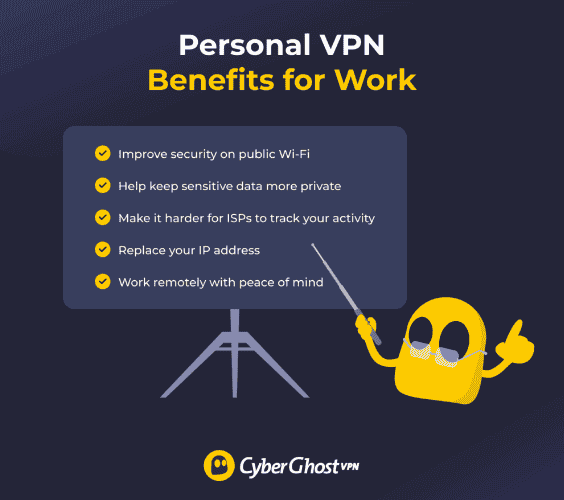
- Safeguard Your Privacy – blocks tracking and eavesdropping on your browsing activity
- Change Your Virtual Location – swaps your visible IP address for one tied to a different real location
- Public Wi-Fi Protection – shields data from cyberattackers on shared or unsecured networks
- Improve Your Gaming – a gaming VPN can sometimes reduce lag or ping issues and add protection against DDoS attacks
- Stop ISP Throttling – helps avoid activity-based throttling during peak hours
- Share Files with Added Privacy – adds a layer of protection when transferring files with peers, backed by a kill switch if the connection drops
Are VPNs Legal?
Yes, VPNs are legal for individuals and corporations in most countries, though a handful of governments with restrictive internet laws only permit government-approved VPNs or ban them outright. Using a VPN to protect sensitive information or guard against cyberattacks is legal virtually everywhere, but using one to carry out illegal activity remains illegal regardless of the VPN — always check local laws and regulations, especially when traveling.
How to Choose the Best VPN for Yourself
- Blazing Speeds — look for servers across 100+ countries with unlimited bandwidth
- Powerful Online Security Features — AES 256-bit encryption, DNS leak protection, and a working kill switch
- A VPN Service Without Logs — ideally one that’s been independently audited (Deloitte, for example)
- Split Tunneling — the option to route only chosen apps and websites through encryption
- Dedicated IP — a unique IP address that avoids repeated CAPTCHAs and verification checks
- VPN Cost — weigh premium features against price, and check for a 45-day money-back guarantee to test it risk-free
CyberGhost Customer Support
Support runs through 24/7 live chat and email, backed by a Support Center stocked with installation guides, troubleshooting articles, and over 200 FAQ-style articles. Response times through live chat are generally fast, while email support can take up to 8 hours for a full reply. Some support articles are dated — a handful reference features that are 5-9 years old or link to permanently deleted user threads — and an automated system sometimes routes queries before a live agent steps in. Overall, support rates around 7/10.
Alternatives to CyberGhost
- Surfshark — a cheap VPN starting around $1.99/month with strong streaming support and comparable or faster speeds, plus an Alternative ID feature and a 30-day money-back guarantee
- ExpressVPN — pricier at roughly 2.79–4.92/month depending on term, but a strong pick for beginners thanks to consistently audited privacy practices
- Private Internet Access — around $2.03/month, geared more toward torrenting with reliable port forwarding support
Final Verdict
CyberGhost secures your connection and unblocks most major streaming sites reliably, wrapped in a user-friendly app that doesn’t demand technical knowledge to operate. It’s not the most feature-rich VPN on the market — some competitors offer more granular controls — but as a no-frills VPN built around solid privacy, decent speeds, and a genuinely useful ad blocker, it holds up well against the asking price. It struggles more in restrictive environments like China than dedicated obfuscation specialists do, but for everyday streaming, security, and unblocking power, it lands a final rating around 79/100.
Frequently Asked Questions
CyberGhost VPN Software: What Is It and How Does It Work?
CyberGhost VPN software is a freeware app available across Windows, macOS, Android, iOS, and Linux, published directly by CyberGhost’s developer team. The most current build sits at version 8.42.1, with platform-specific versions trailing slightly behind — Android on 8.41.2, Windows on 8.4.15, and macOS on 8.4.7 — and each update typically ships with bug fixes rather than major redesigns. Installation is lightweight, with the desktop app sitting around 8.5 MB, and Windows users occasionally see UAC prompts during setup since the app needs permission to manage network settings for the VPN tunnel.
How Do I Log In to CyberGhost?
Logging in happens through “My Account” on the app or website using your email address and password, or through a faster validation PIN if you’re already logged in on another device — useful for Fire TV Stick logins where typing credentials with a remote is awkward. Account management, billing, and the login portal are all handled through CyberGhost’s official account section rather than a separate app.
Is CyberGhost VPN Free?
CyberGhost isn’t free long-term, but it does offer short free trials: 24 hours on Windows and macOS, and up to 7 days on Android and 3 days on iOS in some regions. No credit card details are required upfront for most trial paths — you just need a payment method on file if you continue past the trial through the app store, and you can cancel before expiry without being billed.
How Do I Download CyberGhost VPN?
Download options exist for Android, Windows, macOS, and iOS directly through CyberGhost’s site or the relevant app store, with the desktop installer weighing in at roughly 8.5 MB. As of the most recent update (September 10, 2026), the freeware has logged around 485,957 downloads with a 4.4-star user rating across 919 votes — respectable numbers that reflect an easy-to-use app rather than a niche or clunky one.
How Do I Download CyberGhost VPN for PC?
On Windows, go to CyberGhost’s official site, hit the download button for the Windows client, and run the installer — the file is freeware and only around 8.5 MB, so setup finishes in under a minute on most connections. Once installed, you just log in and hit connect.
How Do I Get the CyberGhost VPN Extension for Firefox?
Search for CyberGhost in the Firefox Add-ons store and install the official browser extension directly — it works as a lightweight proxy extension rather than a full VPN, letting you surf with your browser traffic masked without touching your system-level network settings.
Is There a CyberGhost VPN for Mac?
Yes — CyberGhost supports macOS with a native app currently on version 8.4.7, downloadable from the official site with a 24-hour free trial available before you commit to a paid plan. It runs on WireGuard and IKEv2 protocols, though it’s worth noting the Mac app has historically lacked split tunneling and a dedicated kill switch, which are present on Windows — worth checking current release notes if either feature matters to you.
How to cancel CyberGhost
Open the app store on iOS or Android, or the desktop account portal, go to your profile logo, select Subscriptions, and choose Cancel Subscription to stop auto-renewal. Refunds inside the guarantee window are processed automatically once customer support confirms the cancellation.
Is CyberGhost Good for Streaming and Unblocking?
Yes — CyberGhost reliably unblocks major platforms including Disney+, Prime Video, Netflix, Paramount+, Apple TV+, DAZN, ESPN, Peacock, Britbox, Philo, Crave, BBC iPlayer, ITV, and 9Now on the first try in most tests. UK content like Channel 4 and 10 Play in Australia work through streaming-optimized servers, and Netflix Australia unblocks without much issue. Torrenting-optimized servers also support port forwarding through select routers, and overall unblocking performance rates around a 9/10, though performance in more restrictive regions like Myanmar can run noticeably slower.
How Fast Is CyberGhost?
Speed varies significantly by protocol and location: WireGuard hit roughly 674 Mbps in UK tests and 406 Mbps in the US, while OpenVPN trailed at around 199–140 Mbps in comparable tests. That’s respectable but behind category leaders like NordVPN and ExpressVPN, which have pushed closer to 1000 Mbps on optimal connections; Surfshark tends to land somewhere in between. For everyday streaming, gaming, torrenting, banking, and shopping, CyberGhost’s consistency across servers matters more than peak numbers, and it rates around 7/10 for overall speed performance.
Why Is CyberGhost Based in Romania?

CyberGhost is headquartered in Bucharest, Romania, a deliberate choice tied to Romania sitting outside the Five Eyes, Nine Eyes, and Fourteen Eyes surveillance alliances. That positioning gives the company more legal insulation from data-sharing requests than a provider based in Germany or a Five Eyes member country would have. Since Kape’s 2020 acquisition, CyberGhost has stayed under the same corporate umbrella as ExpressVPN, Private Internet Access, and ZenMate — but each brand has kept its own operational headquarters.
Can You Trust CyberGhost?
Largely yes, though it’s not spotless — a high-severity vulnerability was reported in CyberGhost’s Windows app back in 2023 by an independent security researcher, and it was patched, which is a fairly normal part of VPN software lifecycle rather than a lasting red flag. User sentiment is generally solid: CyberGhost holds around a 4.0 rating on Trustpilot, with decent standing on Google Play, the App Store, and the Chrome Extension Store, though like most VPNs it collects its share of one-star scores from billing disputes. Overall trust rates around 8/10.
Does CyberGhost work in China?
It can, but not reliably for everyone — China’s Great Firewall actively blocks VPN traffic, so CyberGhost’s obfuscation and other privacy tools give it a fighting chance, though performance and connection stability there fluctuate.
Who owns CyberGhost?
Kape Technologies acquired CyberGhost in 2020 and also owns Private Internet Access, ExpressVPN, and ZenMate — meaning several well-known VPN brands now sit under one parent company.
Can you put CyberGhost on Firestick?
Yes, through the Amazon app store, though first-generation Firestick devices may run into performance limitations that newer hardware doesn’t have. The app updates automatically once installed.
How do I know if CyberGhost is working on my Firestick?
Check your IP address and VPN server location before and after connecting — a successful connection check should show the new server’s location rather than your actual one.
How Do I Install CyberGhost on Amazon Firestick?
Search for CyberGhost in the Amazon app store directly from the Fire TV homepage, or use the search bar to find it, then select the download button followed by the open button once installation completes. Sideloading is possible but unnecessary for most users since the app is available natively, and future updates install automatically without repeating this process.
How Do I Use CyberGhost on Firestick?
After opening the app, accept the privacy policy, then log in either with a validation PIN or a regular login using your email address and password — the PIN method usually links faster if you’re logged in on another device already. From the Fire TV section, tap the power button for an automatic connection to the best available location, or manually pick a country if you need a specific server for streaming or VPN connection permissions.
What’s the Best VPN for a Fire TV Stick?
NordVPN is a frequent award-winner for Fire TV integration thanks to its easy-to-use app and strong security features, though it runs pricier at times than CyberGhost. ExpressVPN offers similarly great Fire TV integration and reliable speed for around $4.92/month on a one-year plan, while Windscribe’s free VPN option gives a 10GB bandwidth cap across roughly 10 countries — workable for light use on a tight budget, but not a real substitute for a paid plan if streaming is the main goal.
How Do I Uninstall CyberGhost From My Firestick?
From the Fire TV homepage, go to apps and games, highlight CyberGhost, press the menu button (three horizontal lines) on the remote, and select the uninstall option to remove the app. This won’t automatically cancel any active subscription plan — that has to be done separately through the account portal or app store.
How Many Countries Does CyberGhost VPN Cover?
CyberGhost operates in around 100 countries across 124 server locations, with Europe holding the largest share at 54, followed by Asia at 30, the US at 11 locations, South America at 9, and Africa at 6. Coverage includes the USA, Australia, Canada, UK, France, Germany, Spain, Andorra, the Netherlands, Costa Rica, Cyprus, Egypt, Greenland, Iceland, India, Kenya, Macao, Myanmar, Pakistan, Russia, Saudi Arabia, the UAE, Belgium, Japan, Singapore, Sweden, and Switzerland. Iran is notably absent from CyberGhost’s physical server list, which limits it there compared to providers offering virtual server locations in more restrictive regions.