


After years in boiler rooms and campuses, I trust one lesson: software earns its keep through the record layer, where work orders, asset history, and inspection checklists share one truth.
- The Best Facilities Management Software
- What Is Facility Management Software?
- Best Facility Management Software
- Benefits of Facility Management Software
- Visible space utilization data
- Faster vendor and work order coordination
- Audit-ready compliance and documentation
- Time savings that redirect to higher-value work
- Key Features of Facility Management Software
- Facility Management Software Cost and Pricing
- Choosing the Right Facility Management Software
- For space and workplace management
- For maintenance and asset tracking
- For multi-site or enterprise operations
- For teams that need simplicity over depth
- CMMS vs. CAFM vs. Facility Management Software
- Additional Facility Management Software Products
- OpenBlue Workplace
- Planon
- ResortCleaning
- viewSPACE
- Wisp
- AkitaBox
- GoAudits
- Asset Panda
- OfficeSpace Software
- Inspect Point
- Less Paper
- MYBOS
- Limble
- iSite
- Mitti (by SafetyCulture)
- BlueFolder
- ACTIVENet
- Connecteam
- Fracttal One
- EZO EAM
- Easy Storage Solutions
- IBM Maximo
- ServiceNow Workplace Service Delivery
- Facilio
- Hippo CMMS
- Archibus
- Spacewell
- OperationsHERO – Best for Multi-Facility Campuses
- eMaint CMMS – Best for Universities
- Facilitron – Best for Facility and Room Rentals
- MicroMain – Best Reporting Tools
- Brightly Asset Management – Best for Energy Management
- WebTMA – Best for Large Facilities Teams
- Relevant Facility Management Trends
- Frequently Asked Questions
- How much does school facility management software cost?
- Is there free facility management software for schools?
- What integrations should I look for in facility management software?
- Can Small Businesses Use Facility Management Software?
- Is Facility Management Software Worth It for a Single-Site Operation?
- How Long Does It Take to Implement Facility Management Software?
- Do Schools Need Separate Software for Facility Space Rentals and Community Use?
That connection matters most in school districts, where a CMMS tracking HVAC repairs meets space management software, room bookings, and compliance documentation, turning scattered spreadsheets into preventive maintenance at scale.
Below, we compare UpKeep, MaintainX, FMX, and other platforms on pricing, usability, and fit, so facilities managers can choose systems built for tight budgets in 2026-27 rather than yesterday’s paperwork.
The Best Facilities Management Software
After years watching school districts drown in spreadsheets, I trust simplicity over depth first. UpKeep and MaintainX reward smaller facilities teams, while Click Maint CMMS keeps affordable pricing truly honest.
Ratings matter less than Customer Service once a technician is stuck. I weigh Ease of Use, Features, Value for Money, Overall scores, then recommend this product only if proof agrees.
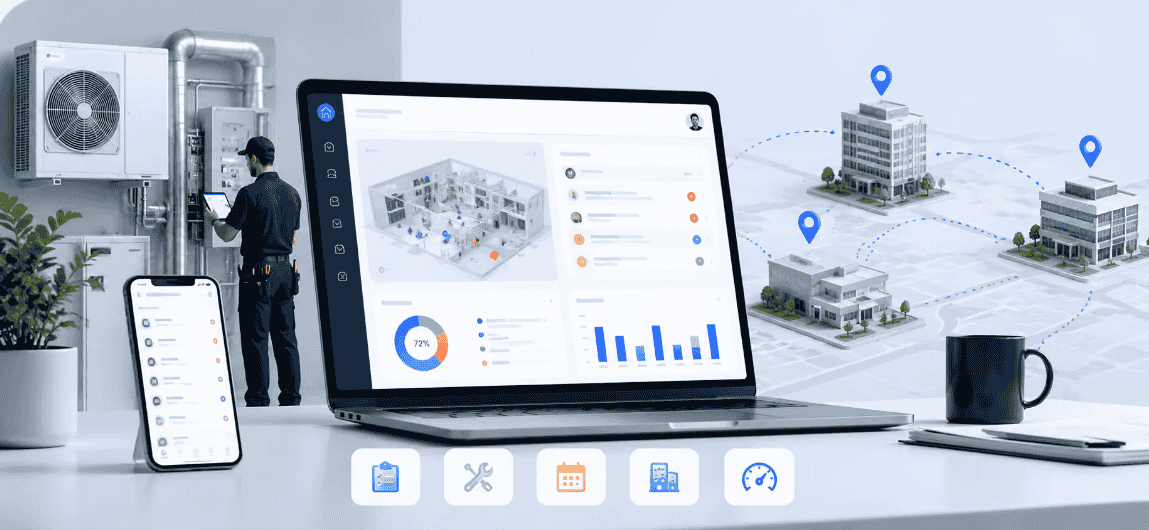
Test work orders on a mobile app before signing anything; PMs and assets should load quickly. A free plan exposes weaknesses early, and local codes and regulations shape your shortlist.
What Is Facility Management Software?
Strip away the vendor pitches and facility management software is a centralized system where supervisors run maintenance workflow, vendor management, and space management together, instead of juggling daily paper-based approaches.
My first rollout taught me that asset management matters more than charts. Preventive maintenance and inspections reduce delays, while work order management gives contractors clear vendor assignments without phone calls.
Schools and universities track elevators, fire codes, and compliance records, where regulatory compliance stays non-negotiable. Pair maintenance history, reporting, and an audit trail with spare parts data, and surprises disappear.
Best Facility Management Software
Choosing the best facility management software comes down to fit, so these top picks are ranked by real user ratings for ease of use, features, value for money, and customer service.
UpKeep
Most school environments I have worked with judge a work order system by how little training it demands. UpKeep wins because non-tech-savvy users can submit requests, attach photos, and report issues from almost any phone.
Pricing deserves scrutiny: the Essential plan at $20/user/month suits small crews, while the Premium plan at $24/user/month adds linked work orders and sign-offs. Higher tiers unlock UpKeep Analytics, though per-user pricing climbs for large teams.
Multiple techs share a single queue, log time against jobs, and track parts from inventory. Over a full term, labor costs and response times become visible, mattering most when student and staff safety is involved.
UpKeep – Intuitive Work Order System
The technicians I have worked with abandon clumsy tools within days, so I always streamline work orders first. A simple functional CMMS on their phones keeps open tasks visible to managers and completion rates climbing.
Reviewers give its interface an Ease of Use 4.6, and 86% recommend it. Honestly, asset tracking and preventive maintenance scheduling sit beside requests, so crews in the field never juggle several separate apps every day.
Branded the #1 mobile-first Facilities Management Software, this mobile-first maintenance management platform scores Overall 4.6, with Customer Service 4.7 and Value for Money 4.5. I’d still weigh Features 4.4 against facility and asset management needs.
MaintainX
A teacher noticed a leaky ceiling tile and a malfunctioning projector, yet manual pen and paper requests left things disorganized and inefficient. A work order management system with intuitive navigation fixed that quickly for us.
The free plan includes unlimited requester users, while Premium version pricing sits at $20/user/month. Mobile apps on iOS and Android helped, though limited customization and lower-tier plans may frustrate maintenance operations teams wanting more depth.
MaintainX – Best for Independent Private Schools
Private school administrators rarely need enterprise bulk; they need work order processing that maintenance staff actually follow. I watched teachers snap photos of a plumbing problem, and MaintainX turned that into real-time work order management.
Its Ease of Use 4.8 rating matches what I saw: fast onboarding, no training marathon. Maintenance task scheduling and asset tracking sit together, so preventive maintenance schedules survive staff turnover, summer breaks, and boiler surprises.
With 92% recommend and Overall 4.8 across 1080 reviews, the MaintainX free plan suits smaller campuses; 2 users can start, though enough users matter later. Customer Service 4.8 and Value for Money 4.7 justify upgrading.
FMX
Districts rarely fail at maintenance through lack of effort; work order requests simply scatter. A drag and drop comprehensive calendar program lets admin users prioritize tasks, so approved work requests reach the correct department quickly.
Teams using custom fields and filter options helped district-wide maintenance departments sort every incident, while autogenerate work orders removed repetitive typing. Pricing stays quote-based, roughly $3,000/year, and helpful support staff keep unlimited users productive daily.
FMX – Best for K-12 School Districts
After watching districts juggle three different systems, FMX wins because one cloud-based facilities management software login handles work orders, events, inventory, fleet, and IT requests, so every campus works from one calendar, not competing spreadsheets.
Adoption is where district rollouts stall, yet FMX earns its Ease of Use 4.7. Facilities managers run maintenance scheduling and asset tracking, administrators watch maintenance requests district-wide, and faculty submit tickets without any formal training.
Districts rarely need more complex features. FMX’s Customer Service 4.9 and Value for Money 4.7, across 426 reviews, explain why 94% recommend it over over-engineered suites demanding dedicated IT resources that school districts seldom have.
Click Maint CMMS
Many delays start with vague tickets. With Click Maint, faculty members scan a QR code, and the new request form opens with location pre-filled at room level, so spills on the carpet get quick turnaround.
Behind that sit asset hierarchies tying rooms to parent floors, plus PM scheduling, purchase orders, and reporting across iOS and Android. At $35/user/month, billed annually, with responsive support, it fits smaller districts and small businesses.
Click Maint – Best for Location-Based Work Orders
Repair delays I’ve audited weren’t skill problems; they were address problems. Click Maint fixes that by anchoring every request to location data, so field technicians arrive at the specific room with critical job details loaded.
The quiet win is fewer phone calls. Staff photograph the leak, those attached images ride with the ticket, and mobile access surfaces the unit’s maintenance history on-site. That kills the relay chain that breeds miscommunication.
It earns its keep across multiple buildings. Contractors receive only their assigned jobs, vendor management stays tidy, and supervisors get visibility into all locations without spreadsheets. Pricing stays affordable; crews find it easy to use.
Benefits of Facility Management Software
Most buildings don’t fail from equipment breakdowns alone. They fail from delayed repairs nobody saw coming. Good facility management software exposes those hidden delays early, so maintenance teams stop guessing and start fixing what matters.
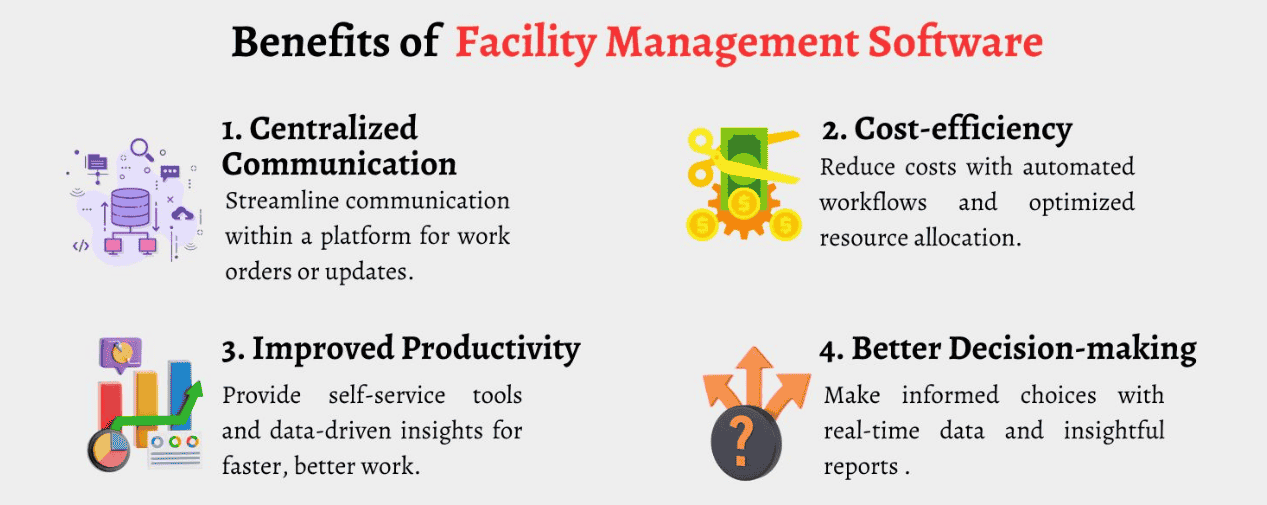
In my experience, the payoff isn’t automation. It’s reliable data. When KPIs and maintenance records live in a centralized database, managers make data-driven decisions, control costs, and get more from the people already on payroll.
Visible space utilization data
Peak days looked crowded on every floor I’ve audited, yet the same buildings sit empty most afternoons. Real-time occupancy data exposes that gap, turning a supposed capacity problem into sharper real estate decisions.
Visibility changes daily space allocation. In hybrid work environments, room booking and desk booking patterns reveal unused spaces quietly draining real estate costs. Planners stop arguing from memory and start matching rooms to actual demand.
Faster vendor and work order coordination
Coordination improves before repair quality does. On every rollout I’ve run, the first win was killing email threads and sticky notes. Work order routing sends tickets, location pre-filled, to the right technicians or vendor portals.
Speed comes from fewer handoffs. When vendors can accept or decline jobs, see the priority level, and post shareable updates, bottlenecks shrink. Repairs aren’t better yet, but nobody waits days to learn who owns them.
Audit-ready compliance and documentation
Last-minute reporting is where costly fines start. I’ve watched teams scramble for inspection results buried in binders while inspectors waited. Preparedness means compliance documentation accumulates daily, so audit results reflect routine work, not weekend heroics.
Discipline reduces exposure. When every job logs the outcome with attachments, signature tasks, and timestamps, code violations surface during checklists, not formal reviews. Accurate records prove corrective actions happened, especially when inspectors check accessibility standards.
Time savings that redirect to higher-value work
Speed alone never impressed me. Shaving minutes off manual workflows matters only when those minutes go somewhere useful. Once a pen-and-paper system disappears, supervisors finally have room to study failure trends and trace root causes.
Key Features of Facility Management Software
That reclaimed attention is the real return. Facility directors shift from reactive maintenance toward preventive maintenance scheduling and plan around asset health. Less daily friction means more judgment applied early, well before unscheduled downtime hits.
Most teams I’ve worked with start with work order processing, because manual work orders collapse under volume. A proper unified maintenance log keeps planned maintenance visible, while asset history tracking shows what failed and when.
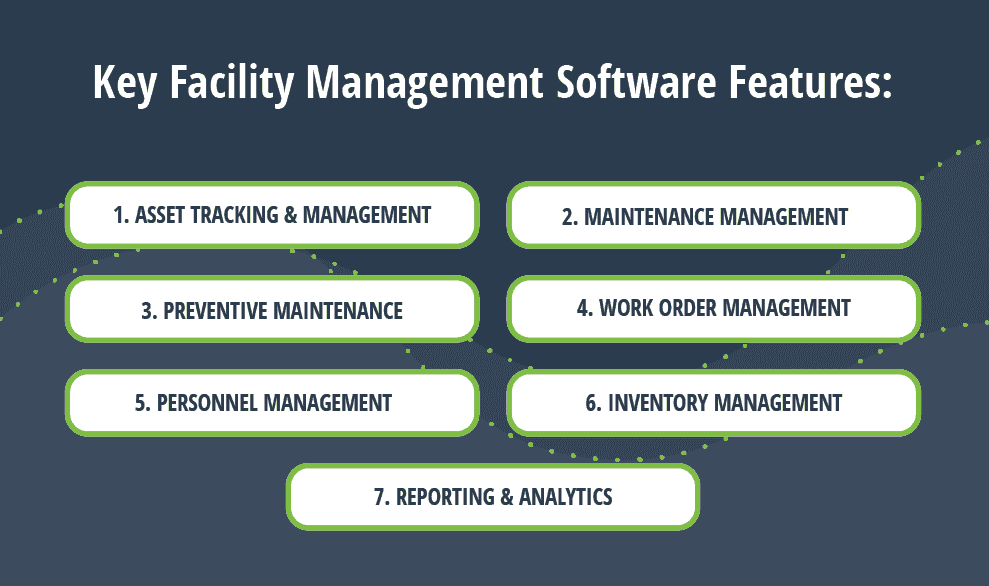
Contrarian view: mobile compatibility beats extensive features almost every time. Technicians on mobile phones close jobs from any location, and real-time sensor data feeds maintenance triggers, so problems surface before anyone ever schedules a walkthrough.
Space data is the feature people underrate. Occupancy patterns and space utilization data replace gut instinct, exposing underutilized rooms and peak demand, which genuinely sharpens real estate decisions long before the lease renewal conversation begins.
In my experience, audit-ready records and role-based access controls truly matter once multi-location operations grow. Consolidated reporting and ERP links let portfolio-level managers quickly compare maintenance costs, while site-level teams keep compliance status reliably current.
Facility Management Software Cost and Pricing
Facility software pricing is rarely as simple as the sticker number suggests. Most software vendors quote per user per month, and the base price rarely tells the whole story. I have watched schools budget $20/user/month, then meet data migration costs and implementation invoices nobody ever mentioned upfront.
Published tiers at least allow comparison. The Professional package runs about $69/user/month, rising to $85/user/month with richer modules, whereas larger teams often negotiate a custom quote, something near $2,200/month for 20 users, in my experience.
Truly free facility management software exists, though limits bite quickly: 5 assets here, two repeating work orders per month there. Room-rental platforms advertise no-cost setup, yet a service fee applies and pricing is not public.
Always compare total cost of ownership, not sticker numbers. A perpetual license with on-premise hosting feels cheaper until upgrades arrive, whereas plans billed annually keep ROI measurable and save extra money, from what I’ve seen.
Choosing the Right Facility Management Software
Buyers start with a feature checklist, and I think that’s backwards. Look at your current process, then your team size, then the right platform follows. A single place for right data beats ten flashy modules.
I’ve watched university administrators pick top solutions from a shortlist, then discover their building type needed something else. Keeping buildings operational matters more than a polished demo, so ask how vendor schedules and reporting behave.
Some organizations want best fit over popularity. A facility’s data tells you more than reviews; test maintenance management and space management with real records from your own buildings, not half-empty sample schedules before signing anything.
For space and workplace management
Honestly, occupancy visibility changed how I advise clients. Once Wisp showed which floors sat idle, expert advisory support helped them plan spaces around reality. Utilization analytics from viewSPACE make that whole conversation far less political.
The contrarian view: space planning isn’t about squeezing desks. Teams using OfficeSpace Software coordinate office days so a quiet Wednesday stops happening, while move management handles the messy reshuffling afterward without a single email thread.
Whatever average office utilization numbers circulate in industry reports, workplace occupancy insights from your own floor plans show where occupancy drops. Room assignments and square foot costs then become arguments backed by data, not hunches.
For maintenance and asset tracking
I once inherited a building with no asset history at all, just breakdowns nobody could explain. EZO EAM bundles a built-in CMMS with preventive maintenance scheduling, so equipment running problems surface before the tenants notice.
Limble earns its reputation as an all-in-one CMMS that helps Facility Maintenance teams streamline communications. AkitaBox leans visual, pairing inspections with asset management and a visual system that makes capital management conversations with finance easier.
Parts are where budgets quietly leak. Track assets and parts together, log maintenance operations against each work order management record, and let Hippo CMMS show asset locations on interactive floor plans so technicians stop hunting.
For multi-site or enterprise operations
Enterprise buyers should respect IBM Maximo for complex multi-site portfolios. It’s an established choice for large-scale asset tracking and regulatory compliance, though implementation investment is very real, so budget for it early, well before kickoff.
Archibus takes a different angle: real estate portfolio tracking plus capital project management across the full facility management lifecycle. The depth of functionality is impressive, yet implementation complexity is the price large organizations quietly accept.
If your team lives in IT, ServiceNow Workplace Service Delivery feels like a familiar environment, with maintenance ticketing and service requests riding on an IT service management platform, though IT-adjacent thinking can overlook operational needs.
For teams that need simplicity over depth
Not every team needs a full IWMS, honestly. Connecteam puts tasks, updates, and GPS time tracking in one app, which suits facility teams who’d rather clock in than configure dashboards for the first three months.
Less Paper surprised me. Its customized field service management and scheduling software suit field service businesses, and the clean interface at Hippo CMMS, plus its straightforward implementation, keeps mid-market facilities teams from drowning in training.
BlueFolder is blunt about it: a user-friendly interface keeps commercial facility management pros on-schedule. Similarly, Easy Storage Solutions bundles access control, call answering, marketing, and accounting, so nobody really needs a consultant on day one.
CMMS vs. CAFM vs. Facility Management Software
From experience, a Computerized Maintenance Management System fixes repairs, while CAFM leans toward space management and occupancy analytics. Facility management software is the broader category, adding lease administration, energy tracking, sustainability reporting across a district.
Additional Facility Management Software Products
Beyond the usual shortlist, I keep meeting teams running Limble, AkitaBox, Connecteam, iSite, GoAudits, Wisp, and BlueFolder for narrow jobs, while IBM Maximo, Planon, and Archibus anchor much heavier enterprise deployments in bigger, slower-moving organisations.
Niche options deserve attention: EZO EAM, Facilio, OpenBlue Workplace, Mitti by SafetyCulture, Asset Panda, Spacewell, Less Paper, Easy Storage Solutions, ResortCleaning, Fracttal One, OfficeSpace Software, Hippo CMMS, MYBOS, Inspect Point, ACTIVENet, viewSPACE, and Joan Workplace.
OpenBlue Workplace
OpenBlue Workplace suits large organizations running facilities and real estate operations, helping teams analyze everyday maintenance data. From 83 reviews: Overall 4.1, Features 4.2, Ease of Use 4.0, Customer Service 4.3, Value for Money 4.2.
Planon
Planon, an IWMS solution, follows a continuous improvement process, keeping stakeholders aligned toward optimum workplace performance. Only 10 reviews score Overall 4.4, Customer Service 4.5, Features 4.1, Ease of Use 4.1, Value for Money 3.9.
ResortCleaning
ResortCleaning is housekeeping software tailored to vacation rentals, where turnover speed and consistency matter. Across 10 reviews it earns Overall 5.0, Features 5.0, Customer Service 5.0, Value for Money 5.0, and Ease of Use 4.9.
viewSPACE
With 0 published reviews to lean on, viewSPACE is difficult to benchmark against rivals. I would run a small pilot, ask for references, and compare it carefully before committing budget or switching any existing workflows.
Wisp
Wisp helps teams move quickly through space requests without chaos. Across 19 reviews it holds Overall 4.9, with Customer Service 5.0 and Features 4.8, a combination I rarely see among smaller facilities tools anywhere else.
AkitaBox
AkitaBox pairs FCA work with maintenance management, which suits teams inheriting older, messy buildings. Across 85 reviews, it posts Overall 4.6, Ease of Use 4.6, Customer Service 4.6, Features 4.4, and Value for Money 4.5.
GoAudits
GoAudits is audit software that lets inspectors save time by generating instant reports on site. Out of 145 reviews, 91% recommend it, and Features 4.6 shows that the checklist-driven approach genuinely works for busy teams.
Asset Panda
Asset Panda is asset lifecycle management software for unique workflows and use cases. Among 1370 reviews: 85% recommend, Overall 4.6, Ease of Use 4.5, Features 4.4, Value for Money 4.6, and save time and money.
OfficeSpace Software
OfficeSpace is an AI workplace platform that I have watched win over hybrid teams. With 61 reviews it posts Overall 4.8, Ease of Use 4.8, Customer Service 4.6, Features 4.6, and Value for Money 4.4.
Inspect Point
Inspect Point targets fire & life safety inspections and compliance, supporting growth. Only 5 reviews exist, giving Overall 3.8, Ease of Use 3.6, Customer Service 3.4, Features 3.2, Value for Money 3.2, so verify claims.
Less Paper
Less Paper earns its name through work order management that removes clipboards. From 30 reviews, Overall 4.9, Ease of Use 4.9, Customer Service 5.0, Features 4.8, and Value for Money 5.0 suggest satisfied maintenance teams.
MYBOS
MYBOS offers smart scalable building management, built to grow across 3,100+ buildings and 780K+ users worldwide. 61 reviews here give Overall 4.3, Ease of Use 4.3, Customer Service 4.5, Features 4.2, Value for Money 4.2.
Limble
Limble is where I send maintenance operations teams wanting less friction. Across 757 reviews it holds Overall 4.8, Ease of Use 4.8, and Features 4.6, which matches what technicians told me after adopting it quickly.
iSite
iSite is a centralised scalable platform to track assets, maintenance, and compliance. 13 reviews give Overall 4.5, Ease of Use 4.4, Features 4.4, and Value for Money 4.5, which feels quite fair for the scope.
Mitti (by SafetyCulture)
Mitti, from SafetyCulture, gives people one operating picture by joining operational data with workflows. 356 reviews also show 84% recommend, Overall 4.6, Ease of Use 4.6, Customer Service 4.5, Features 4.4, Value for Money 4.5.
BlueFolder
BlueFolder, a field service tool, collected 99 reviews that I find believable. It scores Features 4.4 and Value for Money 4.5, a respectable pair for teams dispatching technicians, tracking jobs, and invoicing without enterprise suites.
ACTIVENet
ACTIVENet handles memberships, payments, scheduling, and reporting for recreation-heavy facilities. From 83 reviews, Overall 3.9, Features 3.9, Customer Service 3.8, Value for Money 3.7, and Ease of Use 3.6 suggest a fairly steep learning curve.
Connecteam
Connecteam has gathered 5318 reviews, the largest pool on this list. Its Overall 4.6, Features 4.5, and Value for Money 4.5 point to dependable daily frontline communication, task assignment, and scheduling for distributed teams everywhere.
Fracttal One
Fracttal One helps centralize facility management, schedule tasks, optimize resources, and encourage collaboration with vendors. 1785 reviews show 84% recommend, Overall 4.6, Ease of Use 4.5, Customer Service 4.5, Features 4.5, Value for Money 4.3.
EZO EAM
EZO EAM keeps a full asset history, tying vendors to costs so repair-versus-replace debates end faster. 1546 reviews give Overall 4.6, Customer Service 4.6, Value for Money 4.6, Features 4.5, and Ease of Use 4.4.
Easy Storage Solutions
Easy Storage Solutions focuses on self storage solutions for small & medium sized facilities. With 703 reviews, Overall 4.8, Features 4.6, and Value for Money 4.8 indicate fit for operators managing units, tenants, and payments.
IBM Maximo
IBM Maximo sits among enterprise asset management platforms that cope with complex maintenance workflows across heavy industries. In my experience it usually rewards teams with dedicated administrators and punishes anyone expecting a quick, lightweight rollout.
ServiceNow Workplace Service Delivery
ServiceNow earns its place through integration capabilities across a wider ecosystem, pushing workflows into space management and facility management without separate tools. Buyers who are already invested in the platform usually adopt it the fastest.
Facilio
Facilio is a connected facilities operations platform for commercial real estate operators, merging building management systems and real-time operational data in a single system. Tenant engagement, sustainability tracking, maintenance workflows and data-driven building performance follow.
Hippo CMMS
Hippo CMMS keeps maintenance management simple for small crews, which is exactly why I recommend it to single-site operators. Expect fewer bells, quicker onboarding, and a pricing conversation that rarely turns into a procurement project.
Archibus
Archibus is an IWMS, an integrated workplace management system covering space management, maintenance, and sustainability reporting. From what I have seen, long-standing enterprise users value its real depth, though newcomers often find the configuration demanding.
Spacewell
Spacewell turns building data and environmental data into building intelligence through sensor-based space analytics. The genuinely useful part is operational action: pairing insights with maintenance management, so findings actually reach technicians instead of dashboards.
OperationsHERO – Best for Multi-Facility Campuses
OperationsHERO is school asset tracking software for multi-facility campuses, built for small to mid-sized educational organizations, private schools, and K-12 districts. It is easy-to-use, delivered over the Web, Cloud Hosted, backed by hands on support.
A tagging project starts here: Create Asset, Create with AI from a nameplate photo. AI-powered asset creation reads manufacturer, model, and serial number, cutting transcription errors while a QR or barcode tag gets attached.
Required fields like category and location keep equipment across buildings tied to its whole history. Reliable data shortens inventory days and supports routine maintenance work, though limited customization may often frustrate universities with enterprise needs.
eMaint CMMS – Best for Universities
eMaint CMMS mainly serves higher education institutions and universities with campus facilities, dorms, athletic complexes, and science labs. Hosted on the Web, Cloud Hosted, it comfortably supports multi-location operations, multilingual users, and multi-currency budgets alike.
An asset management module handles high asset volume and unlimited assets, using custom hierarchies, logical structure, and configurable fields. Interactive image mapping and diagrams help technicians find laboratory equipment and instruments, even in offline mode.
Tracking useful life, warranties, labor cost, PM schedules, and purchase orders across entire lifecycles makes document management easier. Customizable KPIs are handy, but limited formatting options and 100GB of document and image storage deserve scrutiny.
Facilitron – Best for Facility and Room Rentals
I have seen Facilitron give schools a community-facing storefront for facility rental scheduling & reservations, turning idle gyms, cafeterias, classrooms, and computer labs into additional income through a simple transactional business model and public reservations.
A calendar schedule shows public availability and current rates, while photos and amenities sell the space. Renters handle booking for recurring weekly or monthly events, school sports practices, and extracurriculars. Double-scheduling disappears when capacity holds.
Facilitron Works adds CMMS software and work order management to a proprietary system on Web, Cloud Hosted. Renting modules cover internal events, community events, for-profit rentals, and a public site, but non-public facilities stay hidden.
MicroMain – Best Reporting Tools
MicroMain is priced per user: $45/user/month for technician licenses, $99/user/month for admin licenses, with unlimited sites. External users need paid login, and careful under budget planning really matters for large K-12 districts, colleges, and universities.
Its reporting module ships 500 standard reports and extensive reporting capabilities, ideal for preventive maintenance histories, maintenance results, inspections, and facilities information. High data volumes are fine, though a large feature set takes real time.
Compliance tracking covers ADA and the Americans with Disabilities Act for ramps, zoning laws, building regulations, environmental protection, and federal state and local codes varying state to state. Energy conservation acts matter here as well.
Brightly Asset Management – Best for Energy Management
Brightly Asset Management pairs asset and facility management software with an add-on module called Energy Manager, giving facility managers and school administrators energy tracking tools to benchmark energy use against ENERGY STAR and ESG initiatives.
Dashboards show near real-time consumption patterns across electricity, gas, and water, flagging unusual spikes, equipment running after hours. Smart meters feed meter readings, exposing resources wasted before utility costs and bills hurt staff and students.
Brightly Asset Essentials can automatically generate work orders from predictive insights, supporting preventative maintenance scheduling for a facility maintenance team. User-friendly interface, intuitive design, and easy navigation help; mobile app issues with adding parts linger.
WebTMA – Best for Large Facilities Teams
WebTMA is a flexible platform for large facilities teams, large multi-campus facilities, and multiple facilities, available on iOS, Android, Web, Cloud or On-Premises. It combines CMMS, EAM, and business software, with native integrations to ERP.
Custodial management includes cleaning route planning, daily duty lists, cleaning categories, room types, and square footage, producing custodial staffing estimates and time needed to clean. Custodial supervisors use mobile inspection forms for quality inspection management.
Requests arrive through a service request portal or service request forms, from a clogged bathroom to HVAC unit failure, marking urgent issues in a busy school year. Yale and Dallas College closely follow APPA guidance.
Relevant Facility Management Trends
Unmanned aerial vehicles, or UAVs, now routinely handle roof and exterior inspections on high-rise buildings and commercial buildings. Camera-enabled drones also fly autonomously along predefined paths, helping busy facility owners assess facilities without manual efforts.
The Internet of Things, or IoT, links internet-connected devices like lights, security alarms, and temperature levels. Artificial intelligence and AI algorithms drive business automation, letting operators handle monitoring of asset conditions remotely to streamline operations.
Industry Challenges
The education industry faces obstacles when managing school facilities, and facilities management software for schools exists because challenges pile up quietly. Anyone who has walked school facilities after winter knows how fast small issues grow.
Aging infrastructure
In U.S. public schools, the average main instructional building is 49 years old; 38% were built before 1970. Aging HVAC systems, electrical wiring, and plumbing demand frequent repairs, replacements, upgrades. Old infrastructure hurts students and staff.
Budget constraints
Budget constraints squeeze U.S. public schools, where a projected shortfall of $85 billion limits yearly funding for high-cost assets. Districts reach for lower-cost temporary solutions that repair today but never upgrade, leaving lingering problems behind.
Inefficient Work Order Management
Inefficient work order management costs schools more than most administrators admit: tickets scatter across email and sticky notes, so the maintenance department chases problems instead of preventing them, producing noticeably longer equipment downtimes every season.
Frequently Asked Questions
How much does school facility management software cost?
MicroMain lists $45/user/month for maintenance staff and $99/user/month for admins, while Brightly uses custom quotes. In my experience, most vendors don’t publish pricing, so expect a short sales conversation before you see any real figure.
Is there free facility management software for schools?
Maintenance Care is a viable free starting point if your school’s requirements stay modest, offering basic tracking of requests. Before relying on it, check limits such as 2 per month, since plans rarely scale gracefully.
What integrations should I look for in facility management software?
Prefer integrations with Google Workspace, Microsoft 365, single sign-on, user management, calendar system integration, building management system integration, ERP integration, financial reporting, facility costs, reservations; a separate tool hurts adoption in any large enterprise environment.
Can Small Businesses Use Facility Management Software?
Small businesses can absolutely use facility management software without enterprise-level budgets. Look for straightforward onboarding, clean interfaces, and pricing matched to actual needs; smaller teams gain little from a platform scaled for hundreds of locations.
Is Facility Management Software Worth It for a Single-Site Operation?
For a single-site operation, facility management software earns its place when manual coordination dominates. Its value case rests on maintenance history, space usage, and visibility, plus clear return from space planning and data, not observation.
How Long Does It Take to Implement Facility Management Software?
Enterprise IWMS implementations take three to twelve months; mid-market CMMS platforms need two to eight weeks; simpler workplace management platforms go live in a couple of weeks. Organizational complexity and data migration stretch implementation timelines.
Do Schools Need Separate Software for Facility Space Rentals and Community Use?
Schools need separate tools for facility space rentals, since general facility maintenance software rarely handles community use, reservations, or collecting payment out of the box. Facilitron stops double bookings when renting out a school gym.