


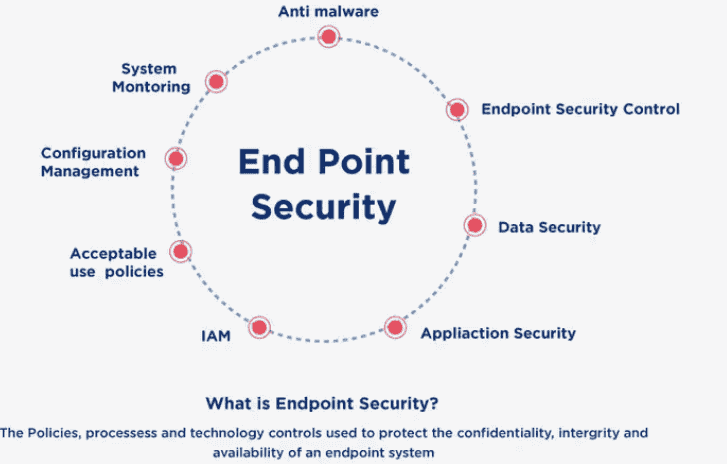
Endpoint protection is a cybersecurity solution that secures and monitors the devices connecting to an organization’s network. Instead of relying on traditional antivirus alone, it blends prevention, detection, and automated response to stop threats across laptops, desktops, smartphones, and servers—giving security teams one place to protect every endpoint.
- What is Endpoint Protection?
- Why Endpoint Protection is Important
- Benefits of Endpoint Security
- Types of Endpoint Protection
- Endpoint Security vs Antivirus
- Key Components of Endpoint security
- How Does Endpoint Protection Works
- How to Choose the Right Endpoint Protection Solution
- Implementing Endpoint Protection
- Endpoint Security Best Practices / Strategies
- Common Endpoint Security Mistakes
- Endpoint Security Use Cases
- Best Endpoint Security Tools
- Frequently Asked Questions
- What Does Endpoint Protection Mean?
- What Counts As An Endpoint?
- What Are Endpoint Protection Features?
- What Types Of Threats Does Endpoint security Defend Against?
- Can Endpoint Security Slow Down Devices?
- What Should I Look For In An Endpoint Security Solution?
- What Happens If A Threat Is Detected On An Endpoint?
- Is Endpoint Security A Firewall?
The modern version of this field has changed a lot. What started as signature-based antivirus systems now leans on Artificial Intelligence, behavioral monitoring, and cloud-managed platforms. For any organization sorting through a crowded market and long feature sheets, understanding how these pieces fit together is the difference between buying the right solution and buying a logo.
What is Endpoint Protection?
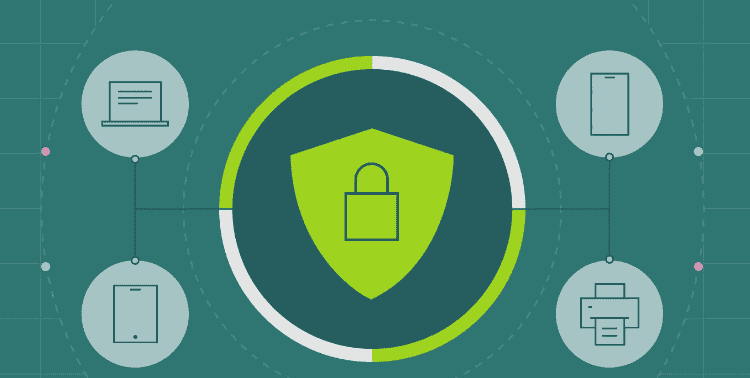
Endpoint protection is security software that monitors, prevents, and remediates cyber threats on endpoints—laptops, desktops, smartphones, tablets, and PCs—connected to a network. An endpoint security platform gets deployed on individual devices to stop malware before it runs and to investigate dynamic security incidents after they start.
Here’s a distinction people often miss: It is an umbrella term, not a single feature. It covers any device the user accesses to reach data or applications from an external source. That’s different from firewalls, which protect networks by blocking traffic rather than watching processes running on a computer.
Most platforms work across three layers:
The Three Layers Of Endpoint Defense
- Endpoint Security Platform (EPP): Handles prevention—blocking malware, ransomware, exploits, plus device control and data loss prevention. It uses static analysis and signature-based antivirus for known threats, and machine learning for file-less malware and zero-day exploits a scheduled scan would miss.
- Endpoint Detection and Response (EDR): Catches suspicious behavior that slips past prevention, then helps teams investigate and contain it.
- Extended Detection and Response (XDR): Correlates signals across email, network, identity, and cloud so security operations teams see the full picture, enforce security policies, and maintain compliance and visibility.
That layered logic matters because no prevention layer is perfect. The EDR and XDR layers exist precisely because some malicious activity will always reach the attack surface.
Why Endpoint Protection is Important
It matters because the network perimeter no longer exists the way it used to. Remote work and BYOD policies mean employees reach company networks from personal devices, and each one becomes a doorway for cyber attacks if left unwatched.
The real cause of concern is lateral movement. Once a cyberattack breaches an endpoint, attackers rarely stop there—they spread attacks toward valuable assets like databases and sensitive customer information. Good endpoint security shortens dwell time by spotting anomalous behavior early, isolating infected devices, and locking down key services before damage spreads.
This is where Zero Trust security principles come in. Continuous verification of devices and users assumes no endpoint is automatically safe. That mindset shift is part of why antivirus producers moved beyond shipping an “antidote” for each new piece of malware. Hackers change their attack strategy faster than any virus database can keep up, so real-time monitoring and automated response capabilities now protect business continuity and high-value assets better than reactive scanning ever did.
Benefits of Endpoint Security
The core benefit of endpoint security is a stronger security posture for the whole business, because every device connected to the network gets monitored against unauthorized access from one place. Centralized management lets IT admins update policies, check compliance, and act from a single dashboard.
A few benefits stand out in day-to-day practice:
- Securing Remote Work: An advanced endpoint security platform extends multi-factor authentication, data encryption, and mobile device management to remote devices, keeping productivity and uninterrupted work intact.
- Fewer Disruptions: Robust antivirus/malware software and network security reduce the chance malware, phishing, or cyber attacks break the workflow.
- Data Protection: Data Loss Prevention (DLP) watches for sensitive data moving in ways it shouldn’t. It scans keywords, patterns, and predefined labels or tags, then blocks, quarantines, or alerts when someone tries to access, copy, or transmit protected information.
- Encryption And Detection: Encryption keeps data in a coded format both at rest and in transit, while anomaly detection and automated responses handle threats before staff notice them.
The under-discussed benefit is asset identification. Many teams don’t realize how many devices touch their network until a multi-strategy protection tool maps them. You can’t protect what you can’t see.
Types of Endpoint Protection
It comes in several types that build on one another, from basic prevention to full response services. Choosing among them depends on how much a team can manage internally.
Main Types Compared
| Type | What It Does | Best Suited For |
| Endpoint Protection Platform (EPP) | Combines antivirus, firewall, device control, and application control on a single platform | Teams wanting prevention-first coverage |
| Endpoint Detection and Response (EDR) | Continuously monitors, detects, investigates, and automates responses to threats | Teams needing visibility after prevention fails |
| Extended Detection and Response (XDR) | A cybersecurity framework that correlates data across security tools and the entire infrastructure | Organizations with network security and DLP already running |
| Managed Detection and Response (MDR) | Adds human expertise, 24×7 threat hunting, and incident response services | Teams without a full in-house security staff |
| IoT Protection | IoT security for embedded software on devices that exchange information over the internet | Environments full of connected sensors and hardware |
The practical takeaway: most mature setups blend several of these. EPP handles the three layers of prevention, EDR adds detection and response, and MDR fills the staffing gap that many smaller teams can’t.
Endpoint Security vs Antivirus
Endpoint security covers a far broader scope than antivirus, which mainly uses signature-based detection against known malware. Endpoint security protection adds behavior analysis, AI, machine learning, firewalls, intrusion prevention systems, device control, and encryption to catch threats the antivirus never sees.
Where The Two Differ
- Detection Methods: Antivirus checks files against a virus database. Endpoint platforms use an AI-based baseline and deviation detection systems to flag unknown threats, file-less malware, and zero-day exploits that have no signature.
- Scope Of Threats: Antivirus stops known threats. Endpoint security handles a broader range, including stolen credentials, inappropriate use by authorized users, and attackers abusing legitimate tools—cases where behavioral detection and EDR shine.
- Scalability: Antivirus suits small businesses. Endpoint security scales to large, complex networks across many individual devices.
People sometimes call endpoint security a replacement technology for antivirus. That’s fair, but it’s more accurate to say antivirus is now just one component inside a larger platform—not a competitor to it.
Key Components of Endpoint security
The key components of endpoint security platforms form a layered defense system, combining familiar tools with advanced elements. Each layer catches what the previous one misses.
- Antivirus/Anti-Malware Software: Blocks known viruses, worms, and ransomware.
- Firewall: Filters traffic to and from the Internet using preset security rules.
- Intrusion Detection/Prevention System (IDS/IPS): Watches network systems for suspicious activity.
- Device and Application Control: Governs which hardware, apps, and programs run on endpoints.
- Behavioral Analysis and Machine Learning: Learn unusual patterns from past data to flag threats, including file-less malware and zero-day exploits.
- Endpoint Detection and Response (EDR): Runs 24/7 to investigate and respond to known and unknown threats while supporting compliance, security policies, and visibility.
A lesser-discussed point: these components only deliver value when tuned together. A firewall and an IDS/IPS that don’t share context just create more alerts for someone to ignore.
How Does Endpoint Protection Works
An endpoint security solution works by placing an agent on each endpoint that reports to a central security system, often a server, for centralized monitoring and management. This design keeps control in one spot without crushing productivity on the device itself.
Here’s the typical flow in practice. The agent handles automatic threat spotting and quick threat handling in the background, running a scheduled scan while watching processes running on a computer for anomalous behavior. When something looks wrong, application control can lock down key services, isolate affected files and systems, and prevent tampering. Global update deployment then pushes fixes everywhere at once.
Above the single device, EDR studies suspicious behavior so users and IT teams can investigate and contain incidents. XDR takes the signals from email, network, identity, and cloud and lets security operations teams correlate events across the whole estate. The strength here is connection—one weak signal means little, but several correlated signals reveal an attack.
How to Choose the Right Endpoint Protection Solution
Choosing the right endpoint security solution starts with matching features to actual risk and budget, not buying the longest feature package. Smart buyers compare EPP vendors on coverage, cost, and how the platform scales before they ever watch a demo.
A Simple Evaluation Checklist
- Coverage And Detection Quality: Does it handle behavior tracking, baselining, asset identification, anomaly detection, and zero-day attacks with a multi-strategy approach and automated responses?
- Fit And Cost: Weigh comprehensive coverage against budget, scalability, ease of use, and hassle-free integrations. Consider total cost of ownership, not just the sticker price.
- Response And Recovery: Check the strength of response and recovery, threat hunting, and reporting.
- Vendor Signals: Look at vendor support, software performance, market reputation, and honest user reviews.
- Proof Before Purchase: Use a free trial or demo as a risk-free assessment to confirm value for money and a reliable protection system at a fair price.
One trade-off worth naming: more features usually mean more management overhead. Sometimes consolidation into one vendor’s wider platform beats stitching together best-of-breed tools, especially for lean teams.
Implementing Endpoint Protection
A sound endpoint security strategy means deploying security solutions that detect, analyze, and respond to threats at the device level, in a clear sequence. Rushing deployment is the most common cause of gaps later.
Implementation Steps In Order
- Identify all endpoints across the environment—nothing gets protected if it isn’t counted.
- Assess vulnerabilities on those devices.
- Select endpoint security solutions that match the findings.
- Deploy and configure solutions carefully rather than using defaults.
- Monitor and review security protocols on a regular schedule.
Alongside those steps, teams should patch fast, strip local admin rights, monitor endpoints continuously, segment the network, and test your response plan. Segmentation is the quiet hero here—it limits how far an attacker moves even after a successful breach.
Endpoint Security Best Practices / Strategies
The best endpoint security strategy layers several habits rather than trusting one tool. Layered security, user education, and discipline around updates do more than any single premium feature.
- Keep Up With Regular Updates And Patches: Patch fast, since unpatched software causes a large share of breaches.
- Educate Users: People remain the most exploited weakness, so training reduces phishing success.
- Use Mobile Device Management (MDM): Extend control to phones and tablets.
- Reduce Privilege: Strip local admin rights so one compromised account can’t own everything.
- Watch Continuously: Monitor endpoints continuously and segment the network.
- Plan For Incidents: Build incident response planning and test your response with a tabletop exercise at least once a year.
That tabletop exercise is underrated. Teams that rehearse recover faster, because they’ve already made their worst decisions on paper instead of during a live attack.
Common Endpoint Security Mistakes
The most damaging endpoint security mistakes are quiet ones that go unnoticed until a breach. Most trace back to neglect rather than bad tools.
- Unmanaged Endpoints: Devices nobody tracks become easy entry points.
- Alerts Nobody Reads: Noise drowns real warnings; too many alerts are as bad as none.
- Local Admin Rights Everywhere: Excess privilege turns a small compromise into a full one.
- Treating Antivirus As The Whole Security Strategy: Signature scanning alone leaves modern threats wide open.
- Coverage Gaps By Operating System: Forgetting Linux, macOS, or mobile leaves blind spots attackers love.
Endpoint Security Use Cases
Endpoint security earns its keep in everyday scenarios, from fixing problems remotely to supporting investigations. The use cases below show where it delivers the clearest value.
- Providing Remote Remedies: IT can resolve issues on distant machines without a desk visit.
- Forensic Investigations: Detailed logs support after-the-fact analysis of what happened.
- Supporting A Hybrid Workforce: A cloud-managed endpoint security platform gives visibility and policy enforcement whether staff sit in the office or at home.
Best Endpoint Security Tools
The best endpoint security tools range from dedicated specialists to modules inside broader security vendors, so the right pick depends on team size and existing stack. The names below cover both ends of that spectrum.
- NinjaOne Endpoint Security
- ThreatLocker
- ManageEngine Vulnerability Manager Plus
- ManageEngine Log360
- ESET Endpoint Security
- Bitdefender GravityZone Endpoint Security
- CrowdStrike Falcon
- Guardz
- Barracuda XDR
- CoSoSys Endpoint Protector
- Sophos Endpoint
- Trend Micro Apex One
- N-able EDR
- Check Point Harmony Endpoint
- Symantec Endpoint Detection and Response
- Panda Endpoint Protection
- CounterTack GoSecure ESL
- Malwarebytes Endpoint Protection
- Cylance Protect
- Cisco Secure Endpoint
- Carbon Black
- Cybereason
- ESET Inspect
- ThreatDown
- Microsoft Defender for Endpoint
- Symantec Endpoint Security Complete
- Trend Vision One Endpoint Security
- WatchGuard EPDR
A practical note: broader platforms like Microsoft Defender for Endpoint appeal to teams wanting to consolidate, while specialists like ThreatLocker or Malwarebytes suit those needing deep control in one area.
Frequently Asked Questions
What Does Endpoint Protection Mean?
It means a system that prevents cyber threats by activating on an endpoint—a desktop workstation, laptops, smartphones, or tablets. It stops malware and manual intrusion right where a device meets the network.
What Counts As An Endpoint?
An endpoint is any device that connects to a network. That includes laptops, desktops, phones, tablets, servers, routers, and IoT devices.
What Are Endpoint Protection Features?
Core endpoint protection features include proactive detection, endpoint scanning, and behavioral analysis. Strong platforms also add BYOD risk management, security performance optimization, secrets protection, credentials leakage prevention, zero trust implementation, and centralized endpoint data security.
What Types Of Threats Does Endpoint security Defend Against?
Endpoint security defends against malware, ransomware, zero-day exploits, and fileless attacks. It also helps block phishing attempts and data exfiltration.
Can Endpoint Security Slow Down Devices?
Modern endpoint security is built to minimize slowdowns. Lightweight agents and cloud-based processing reduce impact so users rarely notice it running.
What Should I Look For In An Endpoint Security Solution?
Look for real-time monitoring, automated response capabilities, and integration with existing systems. Centralized management, behavioral analysis, exploit prevention, ransomware protection, and strong technical support round out a solid choice.
What Happens If A Threat Is Detected On An Endpoint?
When a threat is detected, the solution can automatically isolate the infected device and quarantine the malicious file. It then sends alerts and creates logs for investigation, stopping the threat from spreading.
Is Endpoint Security A Firewall?
No. A firewall guards the network perimeter by controlling traffic, while endpoint security secures individual devices against malware, ransomware, and cyberattacks. They work best together, not as substitutes.