


This mailerlite review confirms it’s one of the most affordable, easy-to-use email marketing platforms around — trusted by over 1.2 million businesses to build newsletters, automations, landing pages, and signup forms without draining a small budget.
- MailerLite Review: A Complete Platform Worth Your Attention
- What Is MailerLite?
- Core Features
- Creating And Sending Emails
- Email Templates In MailerLite
- MailerLite Login
- MailerLite App
- MailerLite Bookings
- Marketing Automation
- Growing Your List
- Website And Landing Page Builder
- Reporting And Analytics
- Integrations
- Customer Support
- MailerLite Pricing
- Monetization Features
- AI Features
- Pros And Cons
- Who Is MailerLite For?
- Deliverability
- GDPR And Compliance
- Dynamic Content Blocks
- Spin-The-Wheel Pop-Ups
- Frequently Asked Questions
Picture this: you’ve got a growing list, a product to sell, and roughly zero appetite for wrestling with clunky software. That’s the exact spot where this tool tends to shine. Founded back in 2005 and grown impressively since, it now serves more than 1,000,000 companies with a complete platform covering email marketing, automation campaigns, websites, and lead generation.
What follows is a practical walk through the features, pros, cons, MailerLite pricing, and the review methodology behind the scoring. You’ll see where it genuinely earns a spot as a best email marketing service, and where it stumbles. Marketers, small businesses, and agencies chasing sales, stronger customer relationships, and steady revenue all get a look here. There’s a free 14-day trial with premium features and no credit card required, plus 30+ new features including monetization tools and AI functions on a fresh account. Let’s dig in.
MailerLite Review: A Complete Platform Worth Your Attention
MailerLite is an email marketing software built to help you grow your audience and drive revenue using digital marketing tools that don’t require a manual. It bundles email marketing, automations, landing pages, and signup forms into one place, backed by 24/7 award-winning support.

Here’s the honest truth about most email tools: they either cost a fortune or feel like homework. This one lands in a rare middle ground — affordable enough for a solo blogger, capable enough for an agency juggling clients. That balance is the story this whole review keeps circling back to.
What Is MailerLite?
MailerLite is an email marketing service that lets you build professional campaigns using easy-to-use marketing tools — emails, newsletters, landing pages, opt-in forms, and automation workflows. It started as a web design agency in 2005, then rebranded in 2010 to focus on exclusive email marketing services.
Today the company runs with 100+ employees spread across 35 countries, serving 1.2 million businesses and sending roughly 1 billion emails each month. It was named the 5th fastest-growing SaaS business in 2019, with an estimated annual revenue near $12 million.
So what does that mean for you? A tool with real staying power. The drag and drop editing, over 70 ready-to-use templates, and 130+ integrations make high-converting campaigns feel achievable even on day one. Customer service response time is genuinely reasonable, and the pricing plans stay friendly to smaller budgets. The one recurring gripe? Content editors can be slow to load — more on that later.
Core Features
At its heart, MailerLite gives you four core products: forms, emails, websites, and marketing automation workflows. You send email campaigns, build automations, grow your list, and track results — all under one login.
Think of it as a toolkit rather than a single hammer. Here’s what you actually get:
- Send campaigns that fit the moment — email newsletters, promotions, RSS digests pulling in blog content, and A/B tests on subject lines and email content.
- Segment subscribers like a tidy closet — a bit of Marie Kondo energy here, grouping people by age, gender, country, or activities like emails clicked and opened so relevant messages actually land.
- Build a web presence — landing pages, opt-in forms, and mini sites you can host to sell digital products, downloads, ebooks, or bookings.
- Automate the busywork — a welcome email flow or a ten-stage, multi-flow-step onboarding built in a drag-and-drop automation builder with 15 ready-made templates.
- Write faster with AI — headlines, product descriptions, or full newsletters drafted into engaging content.
- Measure what matters — a visual reporting tool for custom reports, letting you group and filter data by campaign, time period, or subscriber group, then compare metrics, save reports, and export results.
On value for money, it’s among the cheapest email marketing services going. The Comfort plan starts at $12/month for 500 subscribers, while the Power plan runs $25/month with unlimited monthly emails. Solid support rounds it out: 24/7 email support and 24/7 live chat support, quick and responsive even for free users during the trial period.
Creating And Sending Emails
Creating emails here means picking from 5 types of email campaigns, naming the campaign, choosing a target group of subscribers, and building with a drag-and-drop email editor stocked with over 40 pre-built modules. The result is beautiful email campaigns that stay easy to use.
Ever felt boxed in by a rigid editor? You’ve got options:
- The main canvas editor — drag modules onto the page for full control.
- A Simple editor — a rich-text, writer-style newsletter setup where you paste from Google Docs or Notion and the AI tool keeps formatting intact.
- A custom HTML editor — now with a cleaner interface, live preview, syntax highlighting, an AI agent that responds to plain language, and ZIP imports up to 10MB.
The testing options run deep. Beyond A/B splits, multivariate campaigns let you test subject lines, content, sending time, and From name variations across up to 8 email variations. Auto resend campaigns quietly resend to non-openers to increase opens and clicks — one ecommerce store selling vegan food to 50,000 subscribers reportedly saw a 45% lift on limited-time product promotions this way, driving 90% of sales.
Then there’s the content itself. Dynamic content blocks handle personalization, video blocks and animated GIFs add life, and you can drop in YouTube email embeds, countdown timers, survey blocks, product feature blocks, or social media posts. The AI writing assistant helps beat writer’s block, localize translations, and shape engaging content.
Before sending, you send a preview to colleagues, share a link, or download a PDF, checking both desktop and mobile modes. Scheduling gets clever too — advanced logic and targeting can fire by static time, subscriber time zone, or the same local time for everyone. RSS campaigns automate blog emails for low-maintenance newsletters, a small gift for busy bloggers.
Coming from Mailchimp? You’ll find this friendlier for well-crafted, multi-purpose campaigns, with over 70 templates spanning ecommerce, announcements, deals, events, holiday, survey, and healthcare and wellness. Intuitive controls handle images, headings, buttons, social links, and columns, and you can connect an ecommerce store to import products into customizable product email blocks.
Email Templates In MailerLite
MailerLite offers more than 100 free email newsletter templates on any paid plan — a variety of modern, mobile-responsive designs that give beautiful email a head start. Templates span a wide range of use cases: ecommerce product launches, event announcements, holiday promotions, healthcare and wellness newsletters, inspirational digests, and plain text-style newsletters for writers who prefer a minimal look. Every design is built with intuitive controls so you can swap images, adjust colors, rearrange columns, and update fonts without touching a line of code. You can also create your own template from scratch with the drag-and-drop email editor, import HTML through the custom HTML editor, or reuse any previous campaign as a starting point — a small habit that saves a surprising amount of time over months of sending.
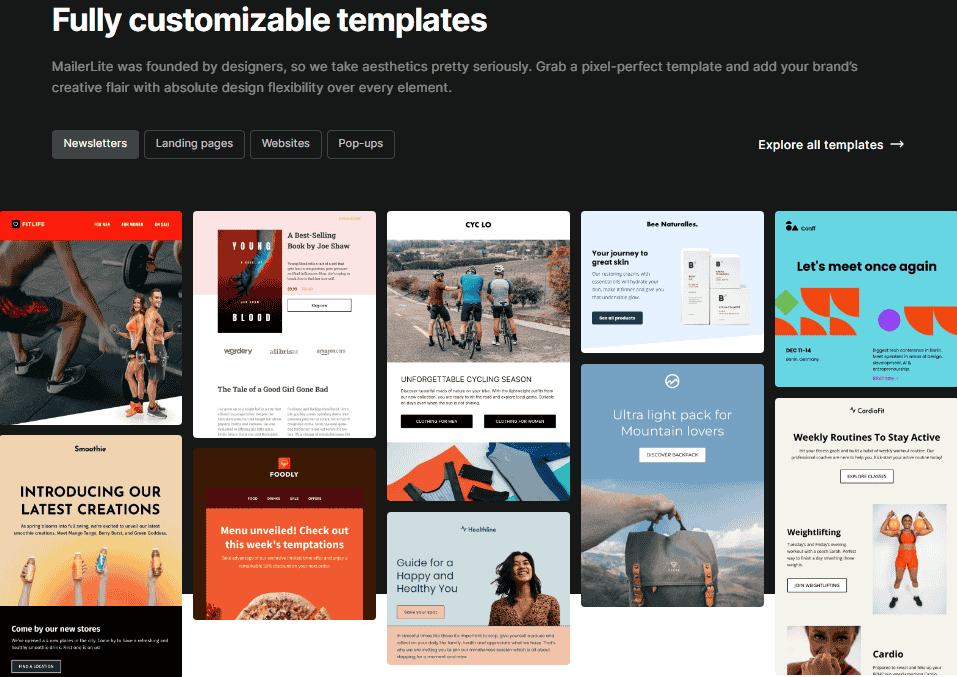
The real time-saver is brand styles. Save your logo, fonts, colors, and social links once, and they apply automatically to new emails, landing pages, and pop-ups. Update your saved styles in account settings and everything stays consistent.
Templates sort neatly into categories — newsletters, landing pages, websites, and pop-ups — so you jumpstart new web pages and designs instead of starting cold. Reusing previous emails works too, which quietly saves hours over a year.
MailerLite Login

The MailerLite login lives at accounts.mailerlite.com — one URL, one password, and everything you need is waiting on the other side. Once signed in, you land in a clean dashboard covering campaigns, automations, subscriber lists, forms, landing pages, the website builder, and reporting tools. There’s no separate portal for analytics, no different app for automations. Free plan users get core features straight away; paid plan users see the full suite — AI writing assistant, advanced automation triggers, and monetization tools — right from the first screen.
MailerLite App
The MailerLite app brings your email marketing into your pocket, available for both iOS and Android. It lets you check campaign stats, monitor subscriber growth, and review automation performance without sitting at a desk. Building complex automations or designing templates from scratch is still better handled on a larger screen — but for day-to-day oversight, approving scheduled sends, or spotting a spike in unsubscribes, the mobile app handles it cleanly. Think of it as a control room you carry around, not a full creation studio.
MailerLite Bookings
MailerLite Bookings is the native, all-in-one scheduling tool built directly into MailerLite, letting businesses sell and manage 1:1 or group appointments without relying on external third-party software. Instead of connecting a separate calendar app, email tool, and payment processor, everything sits under one roof — reducing the friction of extra logins or a standalone booking subscription.
This kind of built-in scheduling reflects a broader shift where platforms are expected to do more than send newsletters. For anyone already using MailerLite, having appointments managed natively removes a meaningful chunk of tool-stack complexity, making the platform more worth it for businesses that rely on consultations or group sessions as part of their workflow.
Marketing Automation
Marketing automation is arguably MailerLite’s biggest recent update, built around a drag-and-drop interface where each workflow chains a trigger, email, delay, condition, or action — and you can reorder steps freely. It ships with 15 ready-made automation templates for welcome sequences, re-engagement, online courses, reviews, and ecommerce.
Why does this matter? Because good automation is the difference between chasing every subscriber by hand and letting the system nurture them while you sleep.
The ecommerce depth stands out. Separate triggers handle abandoned cart and abandoned checkout, and purchase-frequency rules can fire on a 3rd or 5th purchase milestone. The Buys specific product trigger even targets a product variant — say a red hoodie, size L — matching by SKU, color, or material. That variant targeting works across Wix, Shopify, WooCommerce, BigCommerce, PrestaShop, and Shoper through the ecommerce API.
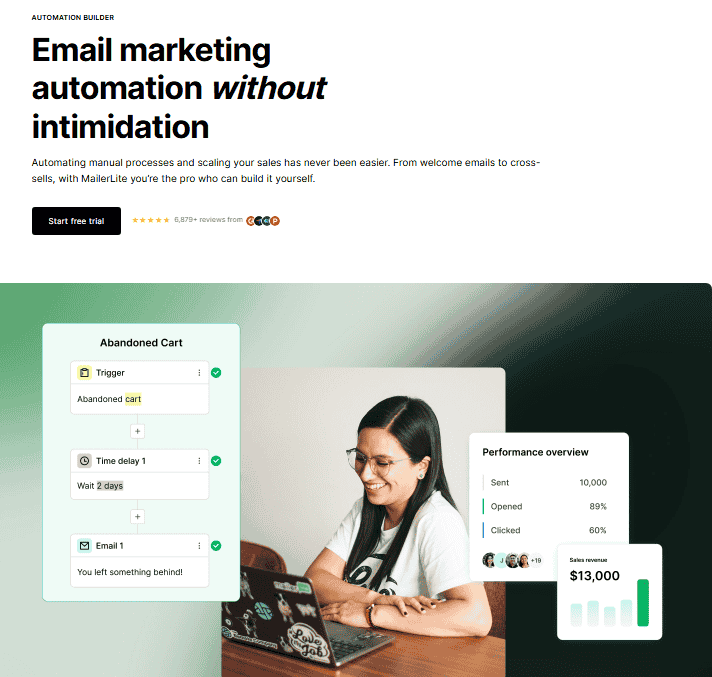
Automation triggers you can build around:
- Subscriber joins a group or completes a form
- Clicks a link or has a field updated
- Anniversary of a date, or an exact match on a particular date
- Joins a segment, buys any product, or buys from a specific category
Actions then send automated email, update custom fields, add tags, move a subscriber group, or remove people from lists. Post-purchase emails, product-specific campaigns, and loyalty emails all become easy. Multiple automation triggers in a single workflow is a Power plan feature and takes about four steps with conditions to set up.
Here’s the fair comparison. In the Mailchimp vs MailerLite debate, MailerLite usually wins on price and simplicity. ActiveCampaign still edges ahead for the most advanced, sophisticated setups — its automation builder handles heavier conditional logic. But with tutorial videos included and automation on every plan, MailerLite is great value for money, and creators running 5-figure monthly sales through upsells and testimonials rarely feel short-changed.
Growing Your List
Growing your list comes down to two form families — pop-up forms and embedded forms — built in a single form and pop-up editor with templates. You customize fonts, text, color, images, and form fields like email address, names, addresses, and customer preferences.
Let’s be practical about what converts. Site visitors ignore boring boxes, so MailerLite gives you variety:
- Three types of forms — promotional forms, pop-up forms, and embedded forms, each with a job to do.
- 24 pre-built pop-up templates — full-screen popups, slide-ins, and half-screen popups for simple sign-ups, holiday discounts, or product launches, all built in a user-friendly popup editor with content blocks, countdown timers, social links, and dividers.
- 13 promotion form templates — aimed at products, webinars, announcements, and limited-time offers.
- Embedded forms — built in a form editor with no templates, so they inherit website themes; you can override styling on headings, colors, fonts, and layout.
Design options cover padding width, colors, and fonts, while appearance settings control timing, frequency, and when you publish. Pop-ups appear based on time on page, scroll depth, certain pages, or exit intent as someone moves to leave the webpage. Formats include default, horizontal, or card with image.
The follow-up matters as much as the capture. An opt-in form can trigger a follow-up flow to confirm subscription with automated follow-up emails — you set double-opt-in on a form-by-form basis for flexibility. That’s handy when a Europe form needs GDPR legislation compliance while a US form follows different email laws. WordPress plugins, a Shopify integration, and a simple snippet get forms live on all plans, with advanced pop-up software to automate advanced campaigns. One founder launching an iPhone case reportedly gathered hundreds of signups, then converted those into 15,000 sales on the first day through launch emails.
Website And Landing Page Builder
MailerLite includes a website and landing page builder that works as a light CMS — no WordPress needed. You can host on a free .mailerpage.com domain, display pages on your site, add extra landing pages to an existing website, or migrate a whole minisite into its hosting.
Building a landing page from scratch is quick, or you start from 30 premade landing page templates on a paid plan. The page editor mirrors the email editor with modular content blocks and a drag-and-drop builder. Landing page settings cover the page title, URL, SEO settings, page metadata, social sharing descriptions, and Google Analytics tracking codes.

The full website builder makes simple websites with multiple pages, connecting a subscriber group and forms across multiple groups. Site templates map to industries and use cases:
- Real estate — a five-page template with featured properties, a homepage, listing pages, and a meet the team page.
- Landing pages — 44 templates in the landing page editor, with product blocks, urgency, and countdown timers for marketers.
- Functional websites — 14 templates for art galleries, food, products, agencies, and authors.
You edit templates by business type, arranging primary navigation and pages like FAQs, about us, testimonials, sign up forms, and maps — often in about 20 minutes. Add favicons, SEO titles, descriptions, social media titles, and analytics tracking, then go live. It’s a genuine way to grow your audience, sell products, drive revenue, and match your brand without a separate hosting bill.
Reporting And Analytics
Reporting runs through a visual reporting tool that builds custom reports — group data, filter data, then compare metrics across a campaign, time period, or subscriber group before you save reports or export results. It’s clearer than most tools at this price.
You get standard email metrics — opens, clicks, unsubscribes, bounces, and spam complaints — plus click maps showing which links pulled weight, and breakdowns by location and device. The clear reports cover campaign performance, subscriber growth, click activity, location reports, device reports, and campaign comparison reports.
The point isn’t the numbers themselves. It’s that these reports help you understand your audience, monitor performance, and improve future campaigns without a spreadsheet detour.
Integrations
MailerLite connects to 130+ integrations, syncing data with the tools you already use. Direct integrations cover ecommerce platforms like Shopify, WooCommerce, and BigCommerce, plus CRM, analytics, and content management systems.
For everything else, there’s flexibility:
- WordPress plugins and a Shopify integration with ready form snippets and pop-up snippets.
- Zapier to reach thousands of apps.
- An API for developers building custom connections.
Connect an ecommerce store to your marketing tools and you save time on data you’d otherwise move by hand.
Customer Support
Support here is a strong point: 24/7 email support and 24/7 live chat support, available to free users during the trial period, with a support team that’s quick and responsive when a deadline looms. Response times are genuinely good.
Prefer to solve things yourself? The knowledge base is deep — a library of guides, step by step tutorial videos, and video tutorials that help you get started fast. It’s the kind of award-winning support that turns a frustrating afternoon into a five-minute fix.
MailerLite Pricing
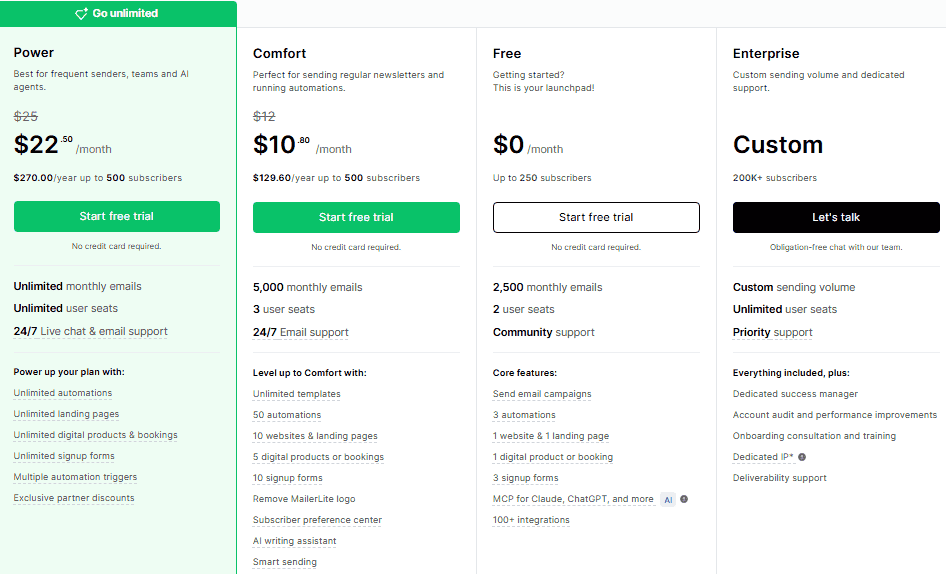
MailerLite is among the cheapest email marketing services with clear value for money. There’s a free plan with core features, a Comfort plan at $12/month for 500 subscribers, and a Power plan at $25/month with unlimited monthly emails.
| Plan | Cost | Best For |
| Free | $0 | Core features, testing the waters |
| Comfort | $12/month (500 subscribers) | Small businesses starting out |
| Power | $25/month | Unlimited monthly emails, multiple automation triggers |
A few things stay generous across the board. Email automation is included in every plan, along with 100+ email templates and 30 landing page templates. The multiple automation triggers option is the main Power plan feature worth the upgrade for advanced automation.
Pricing is simple and reasonable, scaling with your number of subscribers. You pay monthly or save on an annual plan, and the free 14-day trial of premium features needs no credit card — friendly territory for small businesses, agencies, and anyone watching a budget.
Monetization Features
MailerLite’s monetization tools let you turn a subscriber list into a revenue engine without a separate storefront. You sell digital products, ebooks, and downloads, take bookings so people book time, and run paid newsletter subscriptions with recurring payments.
That last piece matters for creators. Set a price point once, and recurring payments keep income steady month to month — a quiet way to make your list pay its own way.
AI Features
The AI writing assistant is the standout addition, drafting headlines, product descriptions, and full newsletters, then helping you localize content with translations. It’s a real time-saver when writer’s block hits and you just need engaging content on the page.
There’s more under the hood. MailerLite rebuilt the custom HTML editor with an AI agent that takes plain language instructions and can suggest ideas — handy when you’d rather describe what you want than code it.
Pros And Cons
The short version: MailerLite delivers excellent value for money and an easy-to-use experience, with a few limits that only bite advanced users. Here’s the honest breakdown.
The Pros
- Genuinely affordable — among the cheapest email marketing services, easy to use with drag-and-drop editors, and friendlier than most for Mailchimp users switching over.
- Automation on every plan — email automation included across all tiers, plus 100+ email templates that are mobile-responsive.
- A full web presence — website builder, landing page builder, hosting, advanced forms, pop-ups, spin-the-wheel, and exit-intent capture.
- Ways to earn — monetization features covering digital products, paid subscriptions, and bookings.
- Smart help and connections — an AI writing assistant, 24/7 email support and live chat support with fast response times, and 130+ integrations plus Zapier and an API.
The Cons
- Editors can lag — content editors are sometimes slow to load, which tests your patience.
- A couple of quirks — the web page visits trigger and dynamic content blocks duplicating behavior aren’t perfectly polished.
- Not for the most complex needs — if you need the deepest workflows, ActiveCampaign handles complex needs better, though you’ll unlock multiple automation triggers on the Power plan here.
Who Is MailerLite For?
MailerLite fits marketers, small businesses, and agencies wanting a powerful yet affordable platform for email marketing, lead generation, sales, customer relationships, and automation campaigns. It sits comfortably where power meets simplicity.
Where does it hit the sweet spot?
- The small business owner — professional campaigns without a big budget.
- The blogger — automate RSS newsletters and grow traffic on autopilot.
- The ecommerce store — connect products and recover abandoned carts.
- The creator — sell digital products and run paid subscriptions.
- The agency — manage multiple clients, only reaching for heavier tools when complex needs demand it.
Deliverability
Deliverability here holds up well because MailerLite pairs clean list-building tools with sensible sending options — a healthy list plus double opt-in keeps your engagement high, and high engagement is what lands beautiful email in the inbox.
Timing helps too. You can schedule sends at a static time, by subscriber time zone, or so everyone gets it at the same local time. Combine that with tidy segmentation, and your reputation stays healthy — the quiet foundation every campaign depends on.
GDPR And Compliance
Compliance is flexible: you can switch on double opt-in on a form-by-form basis rather than all at once. That flexibility lets a Europe form meet GDPR legislation while a US form follows its own email laws.
It’s a small setting with big peace-of-mind value — you stay on the right side of the rules without forcing every subscriber through the same hoop.
Dynamic Content Blocks
Dynamic content lets you show a block to only one group inside the same email — instant personalization without building two separate campaigns. Send one version to men, another to women, all from a single send.
There’s one caveat worth naming. Editing two blocks with variations can occasionally lead to duplicating, which means a little extra tidying. It’s no deal-breaker, just something to watch when you’re moving fast.
Spin-The-Wheel Pop-Ups
Spin-the-wheel pop-ups gamify list growth by inviting visitors to enter an email address and spin for discounts or prizes. It turns a plain signup into a small game — and games convert.
You set 4 to 8 wheel slices, control the winning probability, then email winners a coupon code automatically. It’s fun, and more to the point, it’s effective at turning idle browsers into subscribers.
Frequently Asked Questions
1: Why Did MailerLite Terminate My Account Without Warning?
MailerLite can terminate an account without warning because its compliance rules enforce strict, server-wide protections for email deliverability. When usage breaches these standards, MailerLite acts to protect its shared sending reputation, sometimes suspending or ending accounts before issuing any prior warning.
2: Is MailerLite Safe to Use in 2026?
MailerLite remains a safe and legitimate platform to use in 2026, trusted by many small businesses and creators. Its deliverability standards stay strong, though strict enforcement means senders who violate policy can still lose access without much notice.
3: What Are the Best MailerLite Alternatives?
Among the leading MailerLite alternatives, Kit suits creators, Brevo offers budget pricing, and ActiveCampaign delivers advanced automation. The best pick depends on specific needs — list size, volume-based pricing preferences, and whether you’re running a solo newsletter or a larger operation.
4: Does MailerLite Refund a Terminated or Suspended Account?
MailerLite typically doesn’t refund a terminated or suspended account, since its Terms of Service treat a policy breach as forfeiting the paid plan. Refunds are considered case-by-case, but accounts terminated for violations rarely see money returned.
Other Post
Brevo Review 2026: Cost, Features And Is It Worth it?
Beyond Demographics: A Practical Framework for Behavior-Based Email Segmentation
10 Best Startup Accounting Software Tools: Costs, Features & Growth
LLC vs. Sole Proprietorship: Key Differences in Taxes, Costs & Asset Protection
Bootstrapped Startup Funding Alternatives: What Founders Can Use