

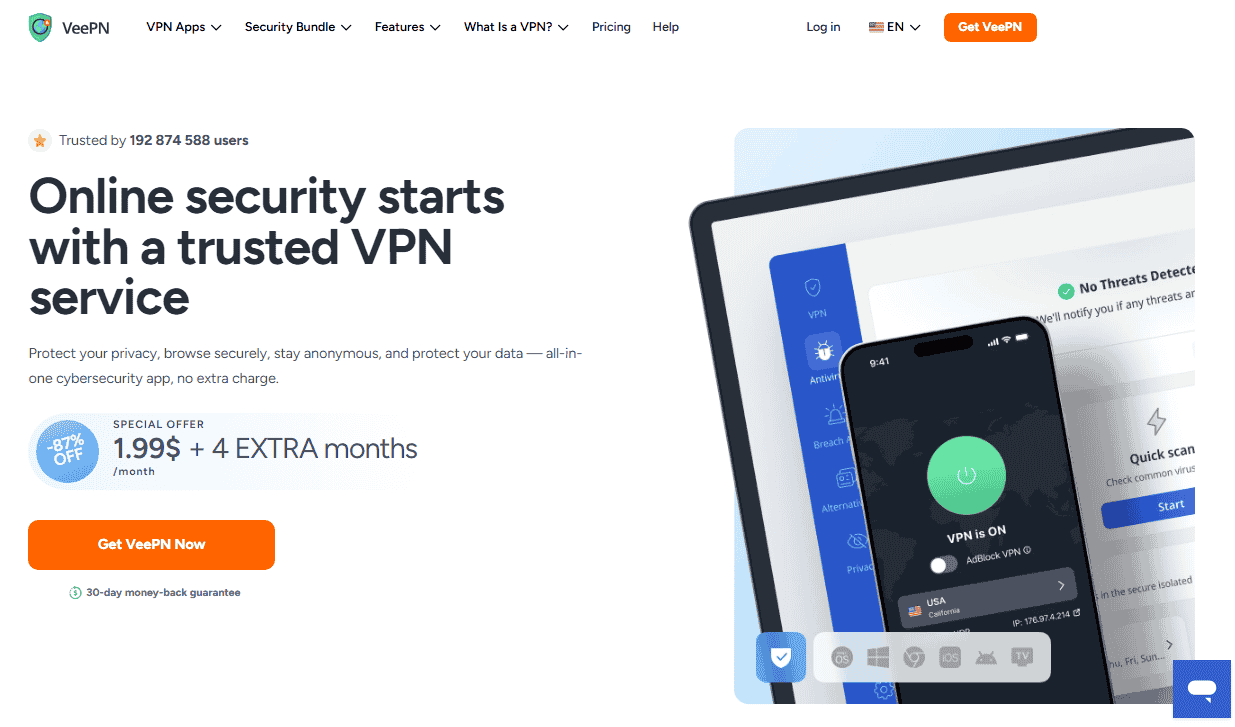
VeePN is a privacy-focused VPN service that encrypts a device’s internet connection, hides the user’s IP address, and routes traffic through a global server network so that browsing, streaming, and torrenting stay private from hackers, advertisers, and ISPs. Heading into 2026, the crowded VPN market makes it hard to separate genuine security value from marketing noise, and this breakdown looks at what VeePN actually does, what it costs, and how real testing and user reviews stack up.
- What Is VeePN?
- Veepn Features
- Core Modules
- Privacy Protection
- Encryption Protocols
- Performance & Monitoring
- Usability Features
- Compliance Management
- Advanced Firewall Features
- Administrative Features
- Server Count & Countries
- No-Logs Policy, Headquarters & Security
- Pricing & Plans
- Compatibility & Supported Platforms
- Customer Support
- Ratings & Reviews
- Alternatives / Competitor Comparisons
- Bottom Line
- How Tests & Ratings Work
- Speed Test Results
- Netflix / Streaming Test
- DNS Leak Test
- WebRTC Leak Test
- Kill Switch Test
- Change Log / Test History
- Company Details
- Best Alternatives Summary
- FAQs
- How Do I Download VeePN?
- How Do I Log In To VeePN?
- Is There A VeePN App For Android?
- What Does The VeePN Chrome Extension Do?
- Does VeePN Have A Free Version?
- Is The VeePN Proxy Extension The Same As The Full VPN?
- How Much Does VeePN Cost?
- Is VeePN Legal To Use?
- What Devices Does VeePN Work On?
- How Does VeePN Actually Work?
- Who Typically Uses VeePN?
- How Secure Is VeePN?
- What Payment Methods Does VeePN Accept?
- Is VeePN Good For Travel?
What Is VeePN?
VeePN is a virtual private network built to encrypt a user’s connection and mask their real IP address, giving individuals and businesses a way to browse without exposing their location or personal data to outside observers. At its core, the service creates a secure tunnel between the device and a remote server, which is the mechanism that hides identity, unblocks geo-restricted content, and keeps activity away from prying networks.
A few things separate VeePN from a bare-bones, no-frills VPN:
- Multi-hop routing — traffic passes through two servers instead of one, adding a second layer of obfuscation.
- Split tunneling — lets a user decide which apps go through the encrypted tunnel and which use the regular connection.
- Ad and cookie blocking — built into the apps rather than requiring a separate browser extension.
- Policy-based user management — useful for distributed teams that need to enforce access rules across many accounts.
VeePN also positions itself as more than a fast VPN for streaming or torrent downloading on public Wi-Fi; it’s marketed as a reliable, secure option for both casual individuals and businesses managing remote staff. The company states it follows a no-logs policy and is headquartered in Panama, a jurisdiction outside the Five/Nine/Fourteen Eyes Alliance — a detail privacy-conscious users tend to weigh heavily, since it affects what a government can legally compel the provider to hand over. The apps themselves lean toward a clean, user-friendly interface rather than a dense settings menu, which matters for anyone who isn’t already familiar with VPN protocols.
Veepn Features
VeePN’s feature set is built around AES-256 encryption, a no-logs policy, and a server network of more than 2,600 servers spread across 148 countries, paired with unlimited bandwidth and support for up to 10 devices on one subscription. That combination — encryption strength, server footprint, and device allowance — is usually the first thing worth comparing across VPN providers, since it defines both security and everyday usability.

Beyond the basics, VeePN bundles in tools that go past traditional VPN functionality:
- Real-time antivirus scanning and a malware blocker
- A breach alert system that flags exposed accounts
- An alternative ID / persona generator for sign-ups that don’t require a real identity
- An AI assistant built into the app for quick troubleshooting
- A kill switch and split tunneling on the VPN settings screen
- Protocol switching between OpenVPN, IKEv2, WireGuard, and Shadowsocks
- An ad blocker that filters malicious websites, trackers, and pop-up ads
The Windows app tends to carry the deepest feature set, while the macOS app and browser extension (built around a lighter engine called NetGuard on some platforms) cover the essentials — ad blocking, privacy toggles, and streaming-optimized servers, including double VPN servers for extra multi-hop security. Independent test scores have placed VeePN’s feature depth around a 4.75 rating in some review breakdowns, reflecting a wider toolkit than a plain encryption-only competitor.
Core Modules
Split tunneling, an automatic kill switch, and DNS/IPv6 leak protection form the backbone of VeePN’s core modules, and together they’re what stop data leaks from exposing a user’s real identity even if the VPN connection briefly drops. The kill switch cuts internet access the moment the encrypted tunnel fails, rather than silently falling back to an unprotected connection — a detail that matters far more than most casual users realize.
Other modules worth knowing about:
- Multi-hop VPN — adds a second layer of routing for higher-risk activity.
- P2P support — built for anonymous, high-speed torrenting rather than throttled connections.
- Ad and cookie blocker — strips unwanted ads and trackers on untrusted public networks.
- Port forwarding — allows remote access to specific ports on remote devices, useful for remote systems management.
- Smart DNS — an alternative routing method for reaching geo-restricted content without full encryption overhead.
Privacy Protection
VeePN’s privacy protection layer centers on automatic reconnection, multi-factor authentication, and a strict no-log policy that avoids storing IP addresses, activity history, or connection history tied to an account. If the VPN connection restoration process fails silently, that’s exactly the scenario the kill switch and auto-reconnect features are designed to prevent.

Additional protections include:
- WebRTC leak protection, which stops a browser from leaking a real IP address during video or voice calls
- Privacy-focused DNS servers that avoid third-party tracking
- Obfuscated servers for censorship bypass in regions with network restrictions
- A mix of static and dynamic IP addresses depending on privacy needs
- Deep web and dark web monitoring that checks whether personal data has shown up in compromised data sets
Encryption Protocols
VeePN supports multiple encryption protocols, letting users balance speed against security depending on the task at hand. OpenVPN remains the gold standard protocol for security and compatibility across networks; IKEv2/IPsec is generally preferred for mobile and cross-network connections because it reconnects quickly after a dropped signal; and WireGuard, the newer, leaner protocol, tends to deliver the fastest speeds without giving up top-tier security.
| Protocol | Strength | Best For |
| OpenVPN | Strong, well-audited | General security, compatibility |
| IKEv2/IPsec | Strong | Mobile devices, switching networks |
| WireGuard | Strong, lightweight | Fast speeds, modern devices |
| SSTP | Combined with SSL encryption | Secure tunneling on Windows |
| L2TP | Combined security | Legacy device support |
| PPTP | Weakest | Low-risk, non-sensitive activities only |
That last row matters: PPTP is an older protocol and shouldn’t be relied on for anything sensitive — it’s really only relevant as a legacy fallback.
Performance & Monitoring
VeePN doesn’t impose data caps or throttling, so connection speed for browsing and streaming performance depends mainly on server load and distance rather than an artificial bandwidth ceiling. A large pool of global servers helps here, since load balancing and traffic distribution across more locations generally means fewer overloaded nodes and better connection stability.
For users in more restrictive regions, a stealth mode using deep packet inspection evasion helps bypass censorship without tipping off network monitors that a VPN is active — a feature that matters far more in some countries than others, and one plain VPNs sometimes skip entirely.
Usability Features
VeePN’s apps are built for quick setup rather than a steep learning curve, with a single account covering multiple devices across Windows, macOS, Android, iOS, and Linux, plus browser extensions for Chrome and Firefox. Settings sync across platforms, so switching from a phone to a laptop doesn’t mean reconfiguring privacy preferences from scratch — a small thing, but one that separates a genuinely multi-device household setup from a service that only feels finished on one platform.
Compliance Management
VeePN’s business-facing side leans on GDPR compliance for EU data protection, HIPAA compliance for healthcare data transmission, and PCI DSS compliance for handling payment data, all backed by periodic security audits. This matters most for organizations, since it determines whether the VPN can legally sit inside a regulated data pipeline rather than just protecting an individual’s browsing.
Advanced Firewall Features
The advanced firewall layer blocks phishing attempts, fake login pages, and DDoS-style large-scale attacks before they reach the device, aiming for uninterrupted access even under attack. A malware blocker screens for malicious files and malicious websites in real time, and device scanning watches for anomalies that might indicate a compromised endpoint — functionality that starts to overlap with a full endpoint security tool rather than a plain encryption app.
Administrative Features
For organizations, VeePN adds user access management, letting an admin set access privileges for individual users or entire user groups, control global content access to region-restricted websites, and enforce policy management and security rules organization-wide. Reporting and analytics give usage, threat, and performance visibility, while session management, traffic prioritization, and content filtering round out the controls an IT team would expect from a business VPN rather than a consumer app.
Server Count & Countries
VeePN runs a network of over 2,600 servers spread across 148 countries, which is a mid-to-large footprint compared with budget competitors but noticeably smaller than category leaders. Server count on its own isn’t the full story — reliable performance depends more on how well those servers are distributed and maintained than on the raw total.
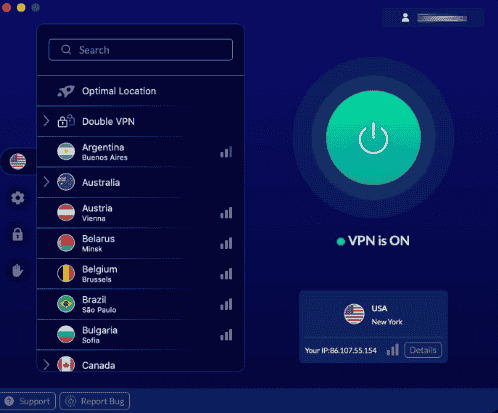
Within that network, streaming-optimized servers and double VPN servers (which route through two hops for an extra security layer) are separated out from the general pool, which is a practical touch: a user chasing a fast connection for video doesn’t want to accidentally land on a multi-hop server built for anonymity instead of speed. Third-party experts who track server rankings tend to treat total server count as a secondary signal behind actual measured speed and stability.
No-Logs Policy, Headquarters & Security
VeePN says it operates a no-logs policy backed by military-grade AES-256 encryption, and it’s based in Panama — a jurisdiction with no mandatory data retention laws and no membership in the Eyes Alliance intelligence-sharing network, which is one reason privacy-focused users treat the headquarters location as more than a footnote. According to the provider, sign-up data is limited to what’s needed for billing (name, email address, and payment information), while browsing activity, connection history, and IP address logging tied to VPN sessions are explicitly excluded from what’s retained. Device type and general feature usage frequency may still be collected in aggregate for product improvement, which is a common and reasonable middle ground, not the same as tracking a person’s browsing history.
Security layers stack on top of the no-logs claim:
- Cookie, DNS, IPv6, and WebRTC leak protection to prevent accidental identity exposure
- Multi-factor authentication for account access
- Compliance coverage across GDPR, HIPAA, and PCI DSS
- A reported 5.0 privacy score in some independent review breakdowns, alongside claims of independent audit activity
The Panama base and the zero-logs privacy stance work together: even if a government requested user records, there wouldn’t be data retention laws forcing VeePN to have kept them in the first place.
Pricing & Plans
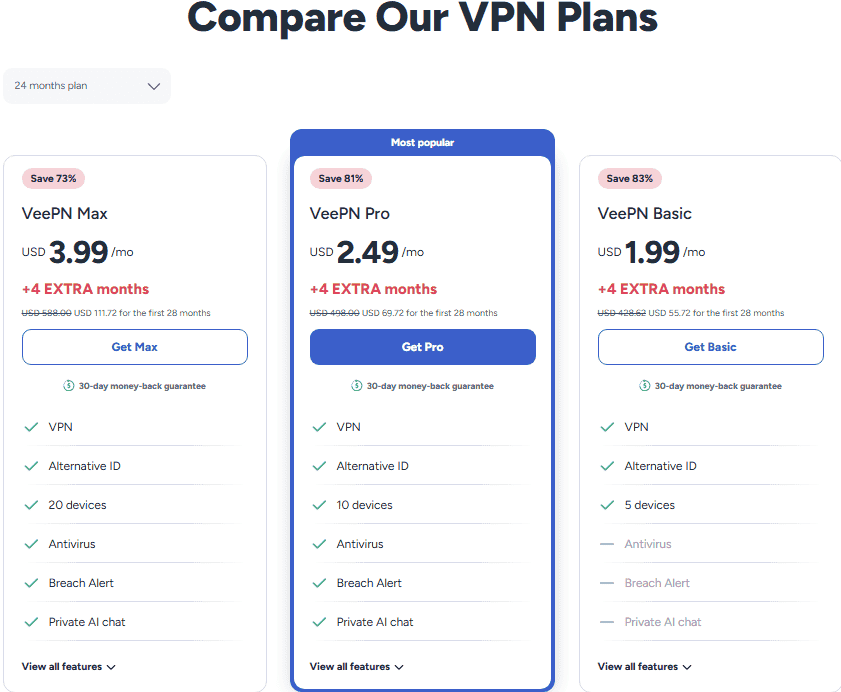
VeePN’s pricing runs across three consumer tiers — Basic, Pro, and Max — with the lowest advertised rate sitting around $1.99 per month under a long-term promotional discount of roughly 87% off, typically bundled with several extra free months and a money-back guarantee window.
| Plan | List Price | Devices | Highlights |
| VeePN Basic | $15.45/month (promo from ~$1.99/month) | 5 devices | Ad blocker, no-logs policy, alternative persona generator, anonymous email, spam and tracker protection, 30-day money-back guarantee |
| VeePN Pro | $17.95/month | 10 devices | Everything in Basic, plus virus and malware removal, scheduled scans, real-time protection, email breach alerts |
| VeePN Max | $20.65/month | 20 devices | Everything in Pro, plus 2,500+ fastest servers, strict no-logs policy, unlimited bandwidth, full feature access, 14-day money-back guarantee |
Billing cycles typically run 1-month, 12-month, and 24-month terms, with the deepest discounts reserved for the longer commitments — a fairly standard tiered-pricing model across the VPN industry, where the advertised monthly figure only applies once a multi-year term is paid upfront. Business pricing is structured differently, closer to $6.00 per user per month, which puts it in a similar range to competitors like UTunnel VPN rather than the flat consumer tiers above.
On value-for-money scoring, independent breakdowns have placed VeePN around a 5.0 value score at the promotional rate, though that number naturally drops if someone renews at the non-discounted long-term price rather than shopping the periodic 87%-off campaigns.
Compatibility & Supported Platforms
VeePN runs on Windows, macOS, Linux, iOS, and Android, plus Smart TVs (including Fire TV, Android TV, and Apple TV), routers, and gaming consoles like Xbox and PlayStation, with browser extensions for Chrome, Firefox, and Edge. A single subscription typically covers up to 10 devices, and coverage extends to desktop, mobile, and tablet form factors, including iPad.
Minimum system requirements generally look like:
- Windows 10 and above (a legacy app exists for Windows 7-8)
- macOS 12 and above
- Linux distributions including Ubuntu, Debian, Fedora, CentOS, and Arch Linux
- Android 9 and above
- iOS 17 and above
For businesses, cloud-based deployment is available across company sizes and industries, which matters for IT teams rolling VeePN out across a mixed device fleet rather than a single household.
Customer Support
VeePN offers live chat and 24/7 email support, backed by a knowledge base of setup instructions and support articles for common connection issues. For straightforward problems, the support ticket and troubleshoot-now flow tend to resolve things without waiting on a human agent, though some users report the initial responses lean on boilerplate instructions before escalating to something more tailored. Training videos and community resources fill in the gaps for less common setup scenarios. In independent scoring, VeePN’s support channels have been rated around 5.0 for customer service in some comparison tables — a strong showing relative to budget competitors that only offer email tickets.
Ratings & Reviews
VeePN holds a 4.6 rating from roughly 31,600 ratings on Google Play and a 4.5 rating from around 5,000 Apple App Store ratings, alongside a reported 4.8 expert review average and figures as high as 4.9 on third-party platforms like Sitejabber and Reviews.io. The company also states it serves around 192.8 million users worldwide, with more than 10,000 positive reviews cited across platforms.
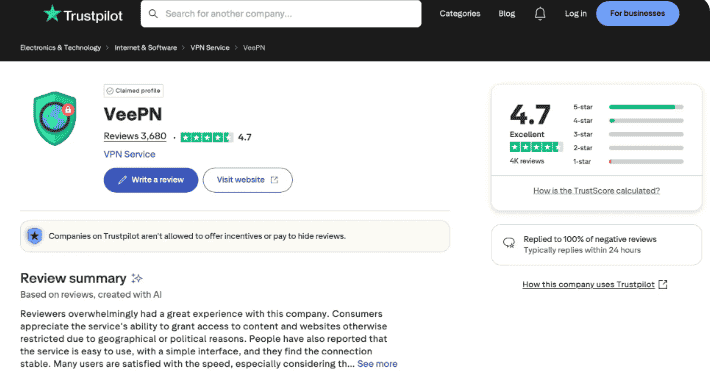
A more detailed weighted scorecard (built from features, value, ease of use, and support) breaks down roughly like this in independent testing:
| Category | Score |
| Features | 5/5 |
| Value for money | 4.5/5 |
| Ease of use | 5/5 |
| Customer support | 5/5 |
| Overall editorial rating | 4.7 |
It’s worth flagging that ratings vary meaningfully by platform — a 3.8 out of 5 rating from a small sample of 5 verified reviews on one site sits well below the 4.4–4.9 range seen on Google Play, Trustpilot, and Apple’s App Store. Small-sample ratings like that shouldn’t be weighted the same as scores built on tens of thousands of reviews; a handful of cancellation-process complaints can swing a low-volume average dramatically. Reading review volume alongside the score itself, rather than the score in isolation, gives a much more accurate picture.
Alternatives / Competitor Comparisons
VeePN sits in a competitive field where NordVPN, Surfshark, and Proton VPN are generally considered the strongest all-around alternatives, each with a larger server network and a higher overall rating.
| Provider | Rating | Price Range | Servers / Countries |
| NordVPN | 5.0 | $3.49–$29.99/month | 8,400+ servers, 160+ countries |
| Surfshark | — (best value) | $2.49–$21.85/month | 4,500+ servers, 100 countries |
| Proton VPN | — (best privacy) | $2.99–$9.99/month | 20,700+ servers, 149 countries |
| VeePN | 4.6–4.8 (platform-dependent) | ~$1.99–$20.65/month | 2,600+ servers, 148 countries |
Beyond those three, the wider landscape includes Mullvad, Cyberghost, Planet VPN, Avast SecureLine VPN, ZenMate VPN, ClearVPN, Private Internet Access, Astrill VPN, and TorGuard VPN for consumer use.
On the business side, endpoint-security-oriented VPNs post their own scores: Bitdefender Premium VPN ($34.99/year, 4.3 rating), Norton Secure VPN ($39.00/year, 4.7 rating), FortiClient (4.4 rating, 295 reviews), Cisco AnyConnect (4.6 rating, 979 reviews), UTunnel VPN (5.0 rating, 69 reviews, $6.00 per user/month), ExpressVPN (4.6 rating, 288 reviews, $12.95/month), TunnelBear (4.5 rating, 470 reviews, $138.00/year), OpenVPN Access Server (4.5 rating, 202 reviews, $5.00/month), GoodAccess (4.9 rating, 103 reviews, $7.00 per user/month), and Perimeter 81 (4.8 rating, 80 reviews, $8.00 per user/month) — together drawing over 1,599 verified reviews across these business-focused tools.
The practical distinction: NordVPN, Surfshark, and Proton VPN tend to win on raw server count and top-line ratings, while VeePN differentiates with its bundled antivirus, breach alerting, and alternative ID tools baked into the same subscription rather than sold separately.
Bottom Line
VeePN comes across as a reliable basic VPN — strong on IP masking and casual streaming — but with a performance-issues history that has shown recent improvement in more current testing rounds. Server connection reliability and kill switch success have both trended upward in recent test cycles, though non-competitive pricing at full price keeps it positioned as more of a second-tier recommendation next to the category leaders, unless the bundled antivirus and breach-alert tools are genuinely useful to the buyer.
How Tests & Ratings Work
Independent VPN test scores are typically built from a weighted scorecard covering seven criteria: features (30.5%), test results (20%), editor’s score (15%), value (11%), privacy and security (15.5%), customer service (5%), and compatibility (3%). Understanding that weighting matters, because a provider can score high on features while still landing a middling overall grade if its measured speed or leak-test results underperform.
Speed tests are usually run as a baseline comparison against connections to US, Canada, UK, and Australia servers, alongside Netflix library access checks and leak tests for WebRTC and DNS using tools like BrowserLeaks. Testing cycles for a given provider are commonly repeated on a twice-yearly basis across Windows, macOS, and mobile, since VPN performance shifts as server networks and app versions change.
Speed Test Results
In one independent round of testing, VeePN posted a baseline download speed of 559.24 Mbps and a baseline upload speed of 205.98 Mbps with 15ms of baseline ping before connecting to any VPN server. Once connected, performance dropped as expected — VPN encryption always costs some speed, and the real question is how much.
| Route | Download | Upload | Ping | Download Drop |
| US to US | 465.20 Mbps | 234.21 Mbps | 49ms | -16.81% |
| US to Canada | 393.03 Mbps | 228.65 Mbps | 75ms | -29.72% |
| US to UK | 426.38 Mbps | 212.14 Mbps | 124ms | -23.76% |
| US to Australia | 395.43 Mbps | 196.62 Mbps | 302ms | -29.29% |
The pattern here is normal for any VPN: latency increases and download speed drops as physical distance to the server grows, while upload stability holds up relatively well across all four routes. A roughly 17–30% download speed impact is squarely in line with what mid-tier VPNs typically post on long-haul international routes.
Netflix / Streaming Test
VeePN was able to unlock US, UK, Canada, and Australia Netflix libraries in testing, though not always on the first attempt. Connecting to a streaming-optimized server generally worked immediately, but on regular (non-optimized) servers, an endless loading screen sometimes required troubleshooting — switching the protocol to IKEv2, clearing the browser cache, using an incognito window, or manually switching to a different regular server.
DNS Leak Test
VeePN passed DNS leak testing with no leaks detected, meaning the internet service provider’s own DNS servers weren’t exposed during the connection, and the real IP address stayed masked throughout the check.
WebRTC Leak Test
VeePN also passed the WebRTC leak test, with no real IP address exposure detected through the browser’s real-time communication features — the same pathway that video chat and voice services rely on, and a common weak point in VPNs that don’t specifically patch for it.
Kill Switch Test
The kill switch test connected to an Austrian server, then used ipleak.net to force an Australia server switch and check whether the true location stayed hidden during the transition. Results here have been inconsistent across test rounds — some cycles show the kill switch preventing any connection drop exposure, while others log an unexpected disconnection without full protection, which is reflected in the change log below.
Change Log / Test History
| Test Date | Kill Switch Result |
| March 27, 2026 | Passed |
| November 18, 2025 | Failed |
| September 5, 2025 | No changes recorded |
| May 19, 2025 | — |
| January 3, 2025 | Automatic fail |
| May 28, 2024 | — |
The back-and-forth pattern in kill switch results across these dates is worth taking seriously — it suggests the feature’s reliability has fluctuated between app updates rather than staying consistently solid, which is exactly the kind of detail a one-time review would miss but repeated testing catches.
Company Details
VeePN was founded in 2017 and currently operates with somewhere between 1 and 100 employees, based on available company-size data; specific founder names aren’t publicly disclosed by the company.
Gallery / Video Review
Third-party video reviews of VeePN typically walk through a safe-connection screenshot, a multi-location server screenshot, and a protection-features screenshot as part of a broader product demo. One point worth flagging for accuracy: some video reviews online carry misattributed video credit, so it’s worth checking the actual channel or reviewer before treating a video’s claims as authoritative — third-party video ratings (some as high as 4.9) don’t always come from vetted sources.
Why Choose A Premium VPN Instead Of A Free One
A premium VPN like VeePN is generally worth choosing over a free VPN because free services routinely rely on weak encryption, missing security features, and revenue models built on data collection or selling user data to third parties. That trade-off is the real cost of “free” — a privacy risk that defeats the entire point of using a VPN in the first place. Paid tiers fund server infrastructure and ongoing security audits in a way ad-supported free apps generally can’t match.
Best Alternatives Summary
Among the wider competitor set, UTunnel VPN is generally regarded as the best overall alternative, TunnelBear as the best free plan, Norton Secure VPN as the best budget pick, and Cisco AnyConnect as the most reviewed option in the business VPN space.
Top Free Alternatives
For users who want to test before committing, UTunnel VPN, TunnelBear, and OpenVPN Access Server all offer free trials, and TunnelBear additionally provides a genuinely free (if bandwidth-limited) version, as does OpenVPN Access Server in a scaled-down form.
Top Alternatives for SMBs
For small and midsize businesses (roughly 1–200 employees), UTunnel VPN, GoodAccess, and Perimeter 81 post the strongest SMB-specific ratings — 4.9, 4.9, and 4.8 respectively, drawn from 36, 92, and 46 SMB reviewers. All three lean on 24/7 customer support and broad gateway coverage (GoodAccess alone lists 35+ gateway locations), which tends to matter more for remote work ease than raw server count once a team is spread across multiple regions.
FAQs
How Do I Download VeePN?
VeePN can be downloaded directly from its official apps page for Windows, macOS, Android, iOS, and Linux, or installed as a browser extension for Chrome, Firefox, or Edge. Most platforms offer a short free trial before requiring a paid plan, and a single subscription supports installs across up to 10 devices, so downloading on a phone and a laptop under the same account is standard.
How Do I Log In To VeePN?
Logging in requires entering subscription account credentials on the login page, and VeePN supports multi-factor authentication for an added layer of login security on top of a password. Because one account can cover multiple devices, the same credentials are used for remote access login across a phone, laptop, or router install — worth remembering if a device gets reset and needs the account signed back in.
Is There A VeePN App For Android?
Yes — VeePN has a dedicated Android app for phones and Android TV, requiring Android 9 or later, and it currently holds around a 4.4 rating on Google Play. The Android app covers the same core VPN and device-protection features as the desktop apps, adjusted for a mobile interface.
What Does The VeePN Chrome Extension Do?
The VeePN Chrome extension is a free, lightweight browser-based VPN that includes an ad blocker and cookie blocker along with privacy protection toggles, separate from the full desktop or mobile app. It’s rated around 4.6 on the Chrome Web Store and works well for quick browser-only privacy without installing the full VPN client, though it doesn’t cover system-wide traffic the way the desktop app does.
Does VeePN Have A Free Version?
VeePN doesn’t offer a fully free standalone app, but it does provide short free trials by platform — typically a 1-day trial on Windows, 7-day trials on macOS, Android, and Fire TV, and a 3-day trial on iOS — plus a genuinely free VPN proxy extension for Chrome, Firefox, and Edge. Free VPN browser extensions in general tend to come with data-collection trade-offs, so the free trial period on the full app is usually a better way to evaluate real performance before upgrading to a premium plan.
Is The VeePN Proxy Extension The Same As The Full VPN?
No — the VeePN proxy extension is a lightweight, browser-based proxy tool available for Chrome, Firefox, and Edge that masks a browser’s IP address and offers server location choices, but it doesn’t encrypt traffic system-wide the way the full VPN app does. It’s a reasonable option for quick, low-stakes browsing privacy, not a substitute for full device-level encryption.
How Much Does VeePN Cost?
VeePN’s plans list at $15.45/month (Basic), $17.95/month (Pro), and $20.65/month (Max), though promotional discounts — sometimes around $1.99/month — and a 14- to 30-day money-back guarantee are common depending on the campaign running at the time.
Is VeePN Legal To Use?
VeePN is legal in most countries, but VPN use is restricted or banned in a handful of jurisdictions, including North Korea, Belarus, Oman, Iraq, and Turkmenistan, and it’s subject to tighter restrictions in countries like Russia and China. Anyone traveling to or living in one of those regions should check current local law before relying on a VPN there, since enforcement and restrictions can change.
What Devices Does VeePN Work On?
VeePN supports Windows, macOS, Android, iOS, and Linux, plus browser extensions for Chrome, Firefox, and Edge, along with smart TVs, routers, and gaming consoles.
How Does VeePN Actually Work?
VeePN works by creating an encrypted tunnel between a device and a remote VPN server, masking both the device’s IP address and its physical location so that websites see the server’s location instead. All traffic routing runs through that tunnel, which is what unblocks geo-restricted content and shields data from anyone monitoring the same network.
Who Typically Uses VeePN?
VeePN is used by privacy-seeking individuals who want everyday browsing protection, along with remote workers who need secure access to a company network from outside the office.
How Secure Is VeePN?
VeePN relies on AES-256 encryption, a no-logs policy, and a kill switch, backed by its Panama headquarters, antivirus scanning, and breach alerts with an alternative ID option — a combination that puts it in line with what’s generally considered a safe VPN setup.
What Payment Methods Does VeePN Accept?
VeePN accepts credit cards, PayPal, and Bitcoin, giving users a semi-anonymous payment option if they’d rather not attach a card directly to the subscription.
Is VeePN Good For Travel?
VeePN is commonly used for protecting hotel Wi-Fi connections and accessing home-region content while abroad, though travelers should note that VPNs face restrictions in specific countries — North Korea, Belarus, Oman, Iraq, and Turkmenistan among them — and tighter regulation in Russia and China.