

Kofax software is a document capture and process automation platform that reads paper and electronic documents, extracts and checks their data, and routes the result into business systems.
- What Does Kofax Capture Actually Do?
- How Does Kofax RPA Automate Work Without Heavy Coding?
- How Does Kofax Handle Accounts Payable Automation?
- How Do VRS and Kodak Scanning Tools Improve Image Quality?
- How Does Kofax Capture Compare With Built-In Scanning Features?
- Which Systems Can Kofax Connect To?
- What Does a Kofax Implementation Involve?
- Why Is Kofax Now Sold Under a Different Name?
- How Does Kofax RPA Work in a Real-World Deployment?
- Where Is Kofax Used in Practice?
- How Much Does Kofax Cost?
- Why Choose Kofax Capture Over Simple Scanning Tools?
- What Document Sources Can Kofax Capture From?
- Does Kofax Run in the Cloud or in Your Own Data Center?
- How Does Kofax Work With Laserfiche?
- What ROI Can You Expect From Kofax?
- Is Kofax the Same as Tungsten Automation?
- How Long Does Kofax Implementation Take, and What Support Follows?
- How Do Kofax’s Three Offerings Differ From One Another?
- Can Kofax Read Handwritten Text and Run OCR?
- Is Kofax Recognized by Analysts for Document Processing?
I first met it on projects where staff retyped invoices and forms by hand, a habit that is slow and plainly inefficient. Kofax removes that keying with optical character recognition and field-level data extraction, then holds the output behind checking steps before anything reaches the receiving system. Vendors group this capability under intelligent document processing, meaning recognition combined with rules.
The single platform also reaches beyond capture. Its AI-powered automation layer deploys software robots, and an archive such as Laserfiche can take over once content is sorted and checked. Kofax began as a pioneer of scanning and intake before widening into workflow automation, and WCD now positions it as a platform that reduces mistakes and effort in information-heavy business processes.
What Does Kofax Capture Actually Do?
Kofax Capture collects documents from many sources, converts them into structured data, and delivers that data to the systems that need it. WCD describes it as a platform that processes all types of documents securely and consistently from virtually any source and location.
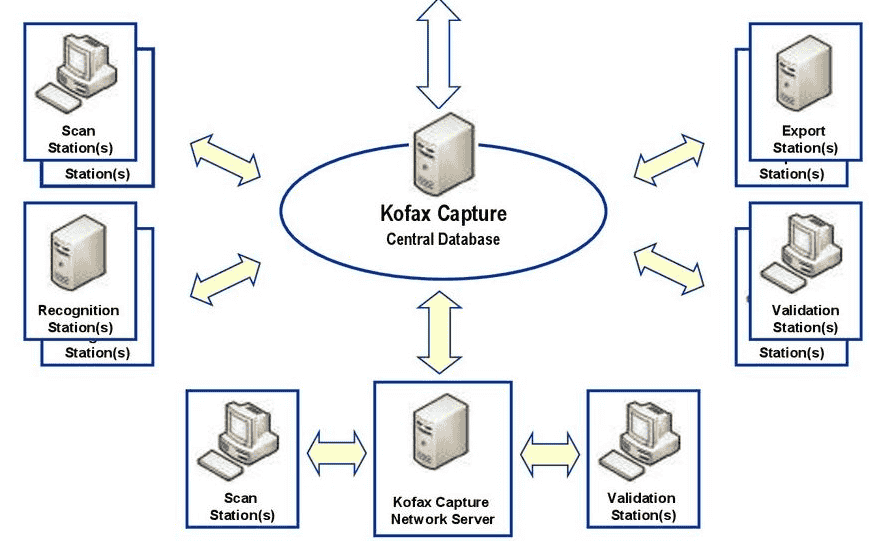
The intake side is broad. Production scanners and desktop scanners handle paper, while email attachments, monitored folders, print streams, and mobile devices bring in electronic files. Where an operator once relied on manual folder selection to decide where each scan belonged, Kofax applies auto-indexing and rule validation before release.
The recognition layer is part of what WCD lists as cognitive capture. Teams build extraction templates for recurring document types such as invoices, then deliver the output into workflows and downstream systems during the last mile of the process. The same data results no matter which channel a document arrived through.
How Does Kofax RPA Automate Work Without Heavy Coding?
Kofax RPA automates repetitive digital tasks by building robots that operate across systems and screens without complex coding. WCD’s team builds, deploys, and manages these robots on one managed server, which keeps the logic in a single place rather than scattered across individual machines.
The software is described as purpose built for information-intensive work, the kind where a person reads a request, looks up a record, and keys an update. A typical example is an energy company handling customer requests such as changing address or moving between providers. The same pattern fits anywhere a rule can describe the decision.
Across WCD’s and Reynolds’ descriptions, the platform pairs robotic automation with process orchestration, machine learning, and case management, which is how a robot can pass an awkward item to a person instead of guessing. KMWorld reports the vendor calls its workflow software robust, though I would still test any bot against messy real inputs before trusting it.
How Does Kofax Handle Accounts Payable Automation?
Kofax automates accounts payable by capturing invoices, matching them to purchasing records, and sending problem items to staff for review.
Reynolds Business Systems lists invoice processing as a core use for its accounts payable module, supported by business rules that decide when an invoice may move forward and validation logic that checks fields against approved data. KMWorld adds that the vendor stresses e-invoicing alongside traditional invoice handling.
On the finance side, the payoff is measured in effort. Reynolds states that organizations typically see a 50% reduction in cost per invoice and a better chance of capturing early payment discounts, while lower labor costs come from invoices no longer being keyed by hand. Approved invoices can land in finance systems such as Workday and NetSuite, both of which appear on the connector list Reynolds publishes.
How Do VRS and Kodak Scanning Tools Improve Image Quality?
VRS improves image quality by cleaning, straightening, trimming, and enhancing each scan before text is extracted. As-scanned output from basic setups is often poor, and Reynolds says built-in scanning features are prone to quality control issues.
For production scanning, Kodak Capture Pro adds Intelligent Quality Control (IQC), indexing, and dual-stream scanning output when paired with a compatible Kodak scanner. The pairing works best as a configured system, meaning settings are tested against your own documents and approved quality criteria instead of being left at defaults.
Cleaner images feed advanced OCR, which Reynolds says can read machine print, handprint, and cursive handwriting. In my experience, most recognition trouble starts at the scanner rather than in the OCR engine, so I would test hardware settings before blaming the software.
How Does Kofax Capture Compare With Built-In Scanning Features?
Kofax Capture differs from built-in scanning by adding classification, extraction, and checking so that a scan becomes usable data rather than a bare image.
Basic scanner software only creates images, which leaves staff to sort, retype, and verify each page. That manual work is where errors and lost documents tend to start, especially when files also arrive by email or digital fax and each channel needs different handling.
| Capability | Built-in scanning | Kofax Capture |
| Sorting documents | Staff pick the destination by hand | Rules decide the document type |
| Reading data | Staff retype it | OCR and field extraction |
| Image quality | Often poor | Output measured against approved criteria |
| Speed | Depends on the person | Measured on the selected system |
| Checking | None, or manual review | Database lookup plus rule checks |
| Scale | One workstation | Whole-organization deployment |
Image quality is the row people underestimate. VRS can apply auto-rotate, deskew, and cropping to each page, and the combined effect, per Reynolds, is stronger data accuracy before anything is routed.
Which Systems Can Kofax Connect To?
Kofax connects to content-management, ERP, workflow, and line-of-business systems through packaged connectors and open interfaces. WCD counts more than 140 connectors, naming IBM among the vendors, and Reynolds frames the same reach as 140+ business applications.
For finance and operations, Reynolds assesses environments including SAP and Dynamics. Beyond packaged connectors, Kofax can reach databases and web services, and its robotics side interacts with internal enterprise systems without custom integration code, according to WCD.
KMWorld mentions a global partner ecosystem and describes the software as reliable, but a connector list on a vendor page is not a guarantee. Reynolds states that it validates versions, field matching, access rights, and connector support for each proposed design, which is the step I would insist on before signing anything.
What Does a Kofax Implementation Involve?
A Kofax implementation runs through four stages: assessing sources and volumes, setting up capture rules, testing the connection to destination systems, and launching with support.
WCD frames the work as a digital transformation roadmap, with its Professional Services team helping deploy and support the environment. Reynolds Business Systems, a certified partner, structures the same journey as a sequence with a project schedule confirmed only after the assessment.
- Assess document sources, volumes, and routing needs, and document the current process.
- Set up capture sources, sorting rules, and indexing rules, then connect the target systems.
- Run representative scans through the full flow while checking mappings and permissions.
- Launch with support and instruct operators, administrators, and managers.
Reynolds attaches a written quote to the agreed work and says most organizations reach payback within 18 months. Because rollout requirements differ by site, treat that figure as a planning reference, not a promise.
Why Is Kofax Now Sold Under a Different Name?
Kofax is now sold under the Tungsten Automation name because the company rebranded in 2024 to reflect its shift from a capture specialist toward broader workflow automation. Reynolds Business Systems adds that Kofax was acquired before the change.
KMWorld reported the news on January 19, 2024. The company began by helping businesses move from paper-based processing to automated data entry, enabling document management and smoother operations, and it now describes itself as a global provider of intelligent workflow automation.
Older marketing still carries the earlier branding. WCD sells the platform as Intelligent Automation under the tagline Work Like Tomorrow, and it describes a combination of robotic automation, business process management, and cognitive document automation. Reynolds says the products remain under continued development and that it supports both names.
How Does Kofax RPA Work in a Real-World Deployment?
A Kofax RPA deployment places robots on a centralized server, where they log into existing systems, read incoming work, and complete the steps a person would. WCD’s case study of a large energy provider shows the pattern, with robots picking up inbound requests from customers automatically.
Before building anything, a team needs a process map of the current path, because robots reproduce whatever the process already does. WCD says the approach works across internal systems, websites, and applications without scripting or complex integration code, and it calls the platform market-leading.
The benefits cited are operational quality, processing speed, and cost. Sensible design adds workflow routing for items the robot cannot settle, and outputs can update systems such as Salesforce, which Reynolds lists as a supported destination. Reynolds adds that the broader platform includes AI-driven document processing, and WCD links the same family to customer engagement gains.
Where Is Kofax Used in Practice?
Kofax is used wherever organizations process large document volumes, from finance and insurance to human resources. KMWorld reports that the vendor serves over 25,000 customers, which is the clearest published sign of its breadth.
| Use case | Typical documents | What Kofax does |
| HR onboarding | New-hire paperwork | Captures forms and routes them to the right system |
| Claims intake | Insurance claim packets | Sorts pages and extracts key fields |
| Forms processing | Benefit and permit applications | Reads fields and checks them against rules |
WCD says the platform helps mitigate compliance risk and combines capture with analytics, while delivering output into repositories where compliance policies apply. Reynolds adds exception routing for items needing human review, ties pricing to transaction volume, and offers hands-on workshops for operators and administrators. For accounts payable, it reports 80% faster processing.
How Much Does Kofax Cost?
Kofax has no single public price, because Reynolds Business Systems quotes each project separately based on the product, document volume, users, and how the system is deployed.
A typical engagement starts with a discovery session, which WCD uses to find where an organization sits on its digital journey, or with a capture audit, as Reynolds calls its assessment of sources, volumes, and routing. Deployment shape changes the quote: Reynolds says its full automation platform runs on-premise, in a private cloud, or as hosted SaaS, while Kofax Capture is typically deployed in-house.
A larger enterprise-wide deployment adds more work to price, and security and retention requirements also shape the design, so I would raise them in the first conversation.
Why Choose Kofax Capture Over Simple Scanning Tools?
Kofax Capture is the better fit when documents must be sorted, read, checked, and delivered automatically rather than simply saved as files.
Reynolds compares the two across six workflow capabilities, and basic setups tend to be operator-dependent and tied to a single workstation. That dependence is fine for a few pages a day but becomes a bottleneck when volumes rise.
Image preparation is part of the gap. The patented VRS technology applies noise removal and adjusts brightness, contrast, and sharpness before extraction. A lightweight desktop tool is enough for smaller batch jobs, and I would not push a full capture platform onto a team scanning only a handful of pages.
What Document Sources Can Kofax Capture From?
Kofax Capture can take in documents from scanners, MFP devices, email, fax, and system interfaces, which Reynolds Business Systems describes as virtually any source.
That multi-channel reach underpins mailroom automation, where paper mail is scanned and routed while electronic items arrive by other routes. Barcodes help index pages, and a high-volume mailroom benefits most because one intake design replaces several manual handling steps.
Integration is the other half. APIs and custom APIs let Kofax receive and deliver content, and the robotics side can read web portals. WCD also lists mobility among the technologies combined in its Kofax solutions, so phone-based intake can sit inside the same design.
Does Kofax Run in the Cloud or in Your Own Data Center?
Kofax can run either in the cloud or in-house, depending on the product and on how your IT team wants to operate it.
Reynolds Business Systems says the full automation platform can be hosted or run privately, while Kofax Capture is typically deployed in-house. The deployment model also affects how Kofax is licensed, since licensing reflects the product, document volume, and number of users.
Support after launch is part of the choice. Reynolds lists a help desk, remote troubleshooting, software updates, and periodic health checks, backed by a team averaging 14 years of capture experience. Reynolds also lists the lack of an audit trail as a mailroom problem that capture is meant to solve.
How Does Kofax Work With Laserfiche?
Kofax and Laserfiche divide the work: Kofax handles the first mile of capture, and Laserfiche manages workflow and content afterward.
Reynolds Business Systems says Kofax supports capture and extraction while the records platform supports configured workflow and records controls. Many of its clients use Kofax to feed documents into that platform.
This is not the only pairing. WCD says Kofax exports to ECM and workflow solutions from vendors including Oracle, Microsoft, OpenText, Hyland, and Pega, and Reynolds lists SharePoint among supported content systems. If your organization already runs a DMS, the real question is less whether Kofax can feed it and more who owns the sorting and indexing decisions.
What ROI Can You Expect From Kofax?
The ROI from Kofax depends on the project, which is why Reynolds Business Systems builds an ROI analysis from validated volume and labor inputs before recommending a design.
The clearest published example comes from WCD: 75% of incoming requests at a large energy provider are completed without human intervention, freeing call-centre staff to respond within minutes rather than days.
Accounts payable returns rest on matching and coding: PO matching can run as 2-way or 3-way where the process supports it, and GL coding is assisted by trained models. Fewer manual touches mean lower costs, but Reynolds cautions that performance depends on the validated source documents. Treat any single percentage as an example, not a forecast.
Is Kofax the Same as Tungsten Automation?
Yes, Kofax and Tungsten Automation refer to the same software family under a new corporate identity.
According to Reynolds Business Systems, product names many buyers know, including Kofax Express, AP Essentials, and TotalAgility, remain in use under the newer brand. Reynolds Bish, the CEO, told KMWorld the change marks a turning point for a growing portfolio. KMWorld also reports over 2,200 employees across 32 countries.
In practice, expect the old and new names to appear in documentation, quotes, and support portals for some time, so search under each when you look for guides. Reynolds says it is a partner for the full capture and automation portfolio under either brand.
How Long Does Kofax Implementation Take, and What Support Follows?
Kofax implementation takes as long as the scope demands, and Reynolds Business Systems confirms a schedule only after assessing the project.
Reynolds says timing depends on document volume, integrations, checks, and rollout, and it publishes no fixed number. A narrow project with few exceptions moves faster than a broad one, in my experience, because every path that needs review also needs its own rule and test.
Plan time for integration requirements, IT-staffing availability, and operator training, then expect a short window of hypercare after go-live. Reynolds describes launch support as part of the final stage, so ask what that window covers before you sign.
How Do Kofax’s Three Offerings Differ From One Another?
Kofax’s three main offerings differ by scale: a small entry-level scanning tool, an enterprise capture platform for broad intake, and a full automation platform that adds workflow and decision handling on top.
Reynolds Business Systems helps buyers choose among editions because each product tier carries its own cost structure, and there is no public list price to compare. The scoping starts from your volume and processes rather than from a brochure.
The portfolio keeps widening. KMWorld lists document productivity and serverless print management among emphasized areas, and the robotics side can work with desktop applications as part of a longer strategic roadmap. The reading engine can also be trained with a learn-by-example approach on your own forms.
Can Kofax Read Handwritten Text and Run OCR?
Yes, Kofax reads typed and handwritten text, and Reynolds Business Systems says the engine can be trained on your own document types.
Before recognition, Virtual ReScan can clean up background noise, bleed-through, and other artifacts, then adjust the page for readability. A basic scan-and-OCR tool skips that preparation, which is why photocopied or double-sided forms can produce disappointing results there.
OCR alone is not the whole job. The extracted fields still need checking against approved rules and reference data before they are routed, and Reynolds says that checking happens before the result reaches your line-of-business systems.
Is Kofax Recognized by Analysts for Document Processing?
Yes, Gartner recognized Kofax, now Tungsten Automation, as a Leader in its inaugural Magic Quadrant for Intelligent Document Processing, according to Reynolds Business Systems.
The AI in that category pairs OCR with ICR, short for intelligent character recognition, so typed and handwritten data can be extracted rather than just imaged. WCD adds process mining to the same portfolio, alongside robotic automation.
Reynolds implements the platform for healthcare, government, and manufacturing clients across the Mid-Atlantic, and lists Epic and Tyler Technologies among supported destinations. An analyst ranking is one input; fit with your own documents matters more.