

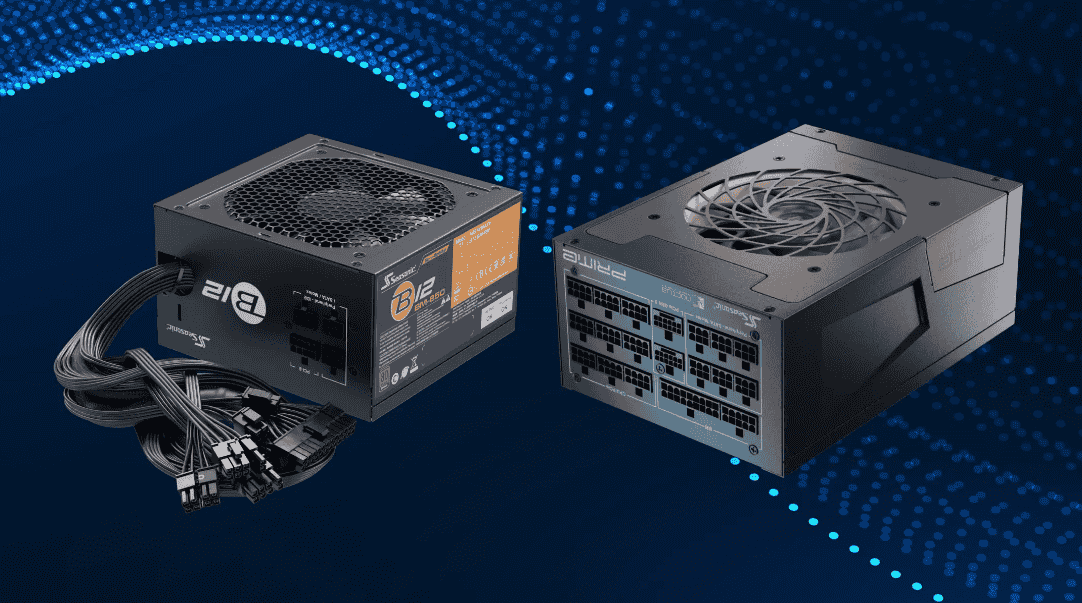
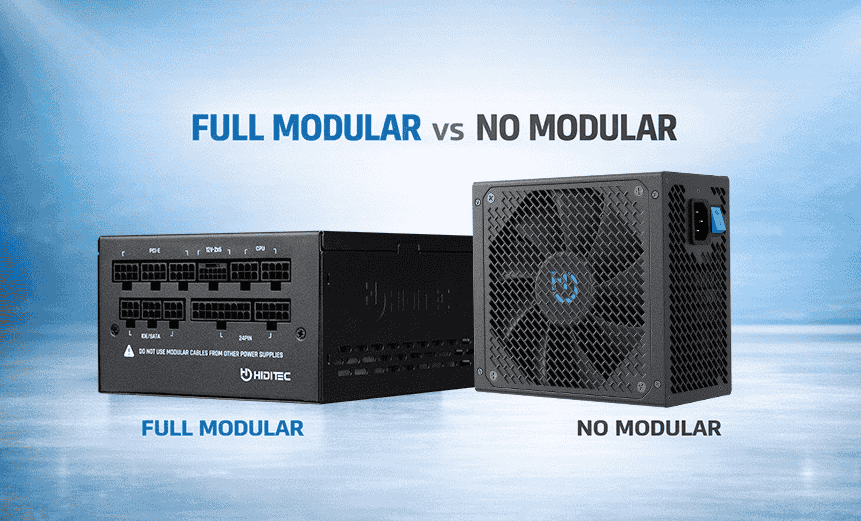
A modular power supply has detachable cables, so you connect only the ones your PC needs, while a non-modular power supply has every cable soldered to the unit. For most gaming rigs and upgradeable builds a modular or semi-modular unit is the better choice, and for basic office machines or tight budgets a non-modular unit still does the job.
- What Exactly Is a Non-Modular Power Supply?
- What Is a Modular Power Supply and Who Needs One?
- Where Does a Semi-Modular PSU Fit Between the Two?
- What Are the Pros and Cons of Each PSU Type?
- Does Modularity Change How a PSU Performs or Lasts?
- Which PSU Type Matches Your Kind of Build?
- What Do Real-World Builds Look Like for Each Tier?
- Which PSU Connectors Does a PC Actually Use?
- How Do You Install a Modular PSU Step by Step?
- What Should You Weigh Before Buying a PSU?
- Does Going Modular Help a Cramped PC Breathe Better?
- Can a Non-Modular PSU Hold Back Your Next Graphics Upgrade?
- Is Semi-Modular a Smarter Long-Term Buy Than Fully Modular?
- Why Are Modular Cables From Other PSUs Off Limits?
- How Can You Tell if Your Case Supports Neat Wiring?
The real trade-off is greater flexibility against price. A non-modular design is the more economical one, yet its pre-attached cables stay inside the case whether you use them or not.
ORM Systems states that modular or non-modular design does not affect raw performance, which depends on the unit’s internals and build quality. Seasonic adds that all types power components equally stably.
Match the type to your plan: mid-range systems fit a semi-modular unit, and anyone expecting GPU upgrades later should lean toward full modularity.
What Exactly Is a Non-Modular Power Supply?
A non-modular power supply is a PSU whose cables are permanently attached, so none can be removed or swapped.
Because the leads cannot be unplugged, unused cables stay inside the case and add clutter even when a build needs only a few connections. The payoff is a design that stays affordable and simpler to build around, and Seasonic credits it with fewer contacts where a weak link or break could occur.
Installation needs little thought: seat the unit with the correct orientation and hook up the leads that came with it. For an entry-level office system, ORM Systems points to the ATX PSU JPSU-150-AC-AFO, which it says delivers stable output at a reasonable cost.
ORM Systems lists the lowest upfront cost as the first reason to pick this type, and it frames the gap between equal-quality units as usability rather than output. Cable design is seldom behind a failure anyway, a point the reliability discussion below expands on.
What Is a Modular Power Supply and Who Needs One?
A modular power supply is a PSU that lets you plug in only the cables your PC needs, which keeps the case easier to work in.
That freedom improves cable management, and ORM Systems notes that many builders choose modular units for gaming PCs, workstation builds and upgradeable systems. It also adds upgrade flexibility: adding a GPU or another drive means attaching one more lead. In a full modular design every lead is removable.
Fewer leads in the case mean better airflow, and the interior looks tidy, with a stronger aesthetic appearance behind a windowed side panel.
Fitting one takes slightly more effort: mount the PSU first for stable positioning before any leads go on. For a high-end rig, ORM Systems suggests the fully modular PWR-C6-1KWAC=, a 1000W class unit, for its freedom over cabling and room to grow.
Where Does a Semi-Modular PSU Fit Between the Two?
A semi-modular PSU sits between the two extremes: its core leads are attached and the optional ones come off.
The attached set is the 24-pin motherboard cable and the 8-pin CPU cable, while extras such as additional PCIe cables, SATA cables and Molex connectors attach only when needed. Molex is mostly legacy, though ORM Systems says it still turns up in some fan and accessory setups.
Seasonic recommends this format for mainstream PCs, noting that semi-modular units cost less yet deliver almost the same settings as fully modular ones. ORM Systems describes the type as a balance of price and cleanliness inside the case. Its example, the semi-modular CP-PWR-CUBE-4=, keeps wiring manageable while allowing a stronger GPU and extra storage.
In ORM Systems’ real-world testing, units of equivalent quality showed no performance difference between semi-modular and fully modular.
What Are the Pros and Cons of Each PSU Type?
Modular units win on control over the build, while non-modular units win on price and simple installation.
Seasonic notes that custom cables and a clean layout favor fully modular units, which also suit cases that flaunt RGB lighting. ORM Systems adds premium looks for glass cases and better scalability for demanding systems. ORM Systems says modular units typically cost 25–60 more than comparable non-modular ones, and Logicbus sees the price premium and extra connecting work as the main drawbacks.
| Feature | Non-modular | Semi-modular | Fully modular |
| Cable removal | None | Partial | Full |
| Wiring neatness | Poor | Good | Excellent |
| Installation ease | Easy | Moderate | Moderate |
| Room to upgrade | Low | Medium | High |
| Interior air movement | Limited | Improved | Best |
| Price range | Lowest | Mid | Highest |
| Ideal for | Budget builds | Everyday systems | Demanding systems |
The non-modular downside is mostly layout: Seasonic says extra cabling can block proper ventilation, and making such a build look neat can be difficult in a case with limited room for wiring. The same fixed layout can limit your options when parts change, although Seasonic credits it with less chance of weak contacts.
Does Modularity Change How a PSU Performs or Lasts?
No: modularity does not change how a PSU performs, because the electrical side depends on the unit’s internals, not on how the cables attach.
Seasonic says all three types power components equally stably, and it describes semi-modular units as built to deliver stable voltage and keep thermals in check.
Where modular does help is cooling: fewer obstructions in the path of the case fans mean a cooler interior, and ORM Systems says lowering temperatures by a few degrees under sustained workloads is realistic in compact setups.
Efficiency matters more than cable style. Efficiency ratings show how effectively a PSU converts power with minimal energy loss, and ORM Systems says higher-rated units run with less heat and cut long-term energy costs, which supports lifespan. Logicbus recommends an 80 Plus certified model or better to save energy.
Which PSU Type Matches Your Kind of Build?
Choose non-modular for simple low-power PCs, semi-modular for everyday gaming and work systems, and fully modular for demanding, upgrade-heavy builds.
Price and how neat the interior looks are the real differentiators, according to ORM Systems, so your budget and upgrade plans usually settle the matter.
- Non-modular: Seasonic places it in budget builds needing around 600-650W or below, in office desktops and in simple home systems used by students for web browsing and light games.
- Semi-modular: Seasonic lists home media systems, standard workstations and gaming rigs in the middle of the market, and ORM Systems rates its price-to-flexibility ratio as a selling point, since only the essential cables are fixed.
- Fully modular: Seasonic points to premium PSU lines, AI workstations, compact systems and premium builds with performance GPUs.
A build that stays simple rarely benefits from modularity; Seasonic even suggests spending the savings on the video card or RAM instead.
What Do Real-World Builds Look Like for Each Tier?
Real-world builds fall into three tiers: a basic office PC, a mainstream gaming or productivity machine, and a high-end gaming or workstation rig, each with a natural PSU type.
The entry tier leans on the classic format of the non-modular unit, where wattage needs stay modest; a power calculator is the easy way to confirm how much you need, as Logicbus advises.
The middle tier uses semi-modular units. Seasonic’s version fixes the main board and processor lines plus at least one 8-pin PCIe line in place, protecting the vital connectors, and leaves the rest to attach on demand. With moderate upgrades ahead, that arrangement copes well.
The top tier suits fully modular units: Seasonic says they support ATX 3.1 with 12V-2×6 cables for high-end GPUs and suit heavy jobs such as 3D rendering.
Check connector counts before choosing. A PSU with insufficient connectors for newer GPUs turns future upgrades into a purchase of a new PSU, according to ORM Systems.
Which PSU Connectors Does a PC Actually Use?
A PC power supply uses five cable families, covering the main board, the processor, graphics, storage drives and older accessories.
| Cable family | Feeds | Note |
| 24-pin lead | Main board | Required for every ATX system |
| 8-pin processor lead | CPU | High-end CPUs may need extra connectors |
| Graphics leads | GPU | Modern GPUs may need multiple 8-pin connectors |
| Drive leads | Storage and accessories | Powers drives and add-ons |
| Older accessory plug | Fan and accessory setups | Mostly seen on older hardware |
Use only the cables supplied for that exact unit, because modular cables are wired differently by manufacturers. Mixing them across brands can cause incorrect voltage and permanently damage components. For graphics, Seasonic lists PCIe 6+2-pin leads.
Keep tight bends away from the connectors to avoid long-term connector damage, and recheck the CPU and GPU plugs to prevent boot issues and shutdown issues.
How Do You Install a Modular PSU Step by Step?
Install a modular PSU in this order: seat it in the case, connect only the required cables, route them behind the board tray, avoid sharp bends, then recheck the CPU and GPU plugs.
Most modern desktops follow the ATX standard, so this sequence works for a typical build:
- Seat the PSU first. Seasonic says this makes every later connection easier.
- Power the board and processor. Connect the main 24-pin ATX lead, then one or more 8-pin EPS leads, adding a 4-pin extra if a high-end CPU needs one.
- Power the graphics. Use the lead types your GPU needs, including newer 12-pin designs.
- Add storage and extras. Connect SSDs, HDDs and accessories like RGB controllers with SATA power leads.
- Finish the wiring. Do your cable routing behind the board tray and recheck the CPU and GPU plugs.
A clean installation leaves fewer leads between the intake fans and the hot components, and Seasonic notes it can help internal temperatures. ORM Systems adds that it makes future upgrades and troubleshooting easier, which is a matter of convenience and maintenance rather than output.
What Should You Weigh Before Buying a PSU?
Weigh internal quality and efficiency first, because they matter more than whether the cables detach.
ORM Systems cites independent hardware reliability analysis showing that most PSU breakdowns trace to internal component quality, capacitor aging and thermal stress, not cable design.
Modularity shapes layout, not electrical output or power delivery; ORM Systems says cooler running can indirectly support long-term stability, but the internals still decide the outcome.
Higher efficiency tiers cluster in premium lines. Seasonic observes that fully modular units dominate the Gold, Platinum and Titanium segments, so high-end builds chasing those tiers will usually land on modular models. Before paying, double-check that the connector count fits your GPU and drive plans, and weigh the wattage, brand and warranty alongside.
Does Going Modular Help a Cramped PC Breathe Better?
Yes, a modular power supply unit helps a cramped PC breathe because the leads you leave out no longer sit between fans and parts. ORM Systems says owners of compact builds notice the difference most. How much it helps also depends on rear routing channels and PSU shrouds, which hide the leads you do use.
Can a Non-Modular PSU Hold Back Your Next Graphics Upgrade?
Yes, it can: some non-modular units lack enough PCIe connectors for newer cards, and since their cables cannot be disconnected or supplemented, you may end up buying a new PSU. That is the cost of less flexibility, offset by the fact that a non-modular unit is easier to install. For a multi-drive setup or graphics cards that need several 8-pin connectors, count the leads first. It stays a practical and long-term choice only when the system will not be upgraded often, as ORM Systems points out.
Is Semi-Modular a Smarter Long-Term Buy Than Fully Modular?
For many users, yes, because semi-modular PSUs cost less than fully modular ones while keeping the case reasonably clean, and ORM Systems reports no performance difference at equal quality. A fully modular unit has zero fixed cables, so it is more expensive and more complex to install, while Seasonic notes the semi-modular main leads have fewer connection points on critical power lines. Let fear of missing out play no part; quality matters more, so look for a reliable brand, good reviews and a solid warranty, as Logicbus advises.
Why Are Modular Cables From Other PSUs Off Limits?
Modular cables from a different unit should never be used, because wiring is not the same from one maker to the next, and a mismatch can send the wrong power to components. A bad mix can wreck parts like GPUs, and the fix may mean replacing the PSU too. Compatibility matters here: use only the cables supplied with that unit.
How Can You Tell if Your Case Supports Neat Wiring?
A case supports neat wiring when it has tie-down points for anchoring leads and room behind the board to hide them, along with the cable-hiding case features ORM Systems lists. These make modular and semi-modular units far more effective. The motherboard tray is the usual hiding spot, keeping the main chamber clean. In small cases there is less room to hide leads, and glass side panels make untidy wiring obvious, so a visually appealing interior depends on them.