


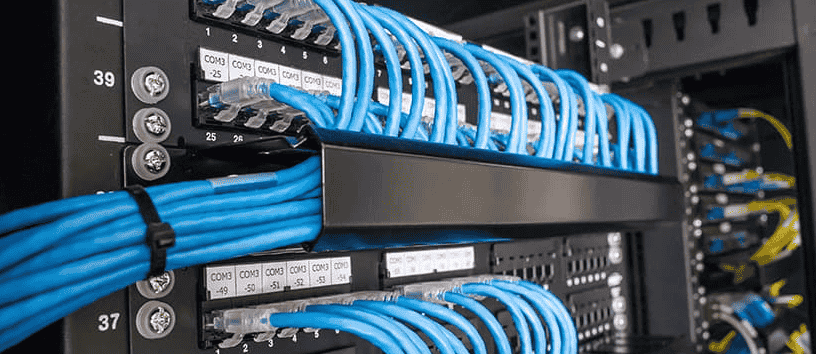
Server rack cable management means planning the layout first, routing patch cables through vertical cable managers and horizontal cable managers, keeping power runs away from data, labeling both ends of every cable, and leaving airflow unblocked.
- Why Does Server Rack Cable Management Matter?
- What Does Poor Rack Cabling Look Like in Practice?
- Which Tools and Components Does a Clean Rack Need?
- How Should You Plan a Server Rack Layout Before Pulling Cables?
- What Is the Right Order for Installing Rack Cables?
- Why Must Power and Data Cables Stay Apart in a Rack?
- How Do You Label, Color-Code, and Document Rack Cables?
- How Do Cables Affect Airflow Inside a Server Rack?
- Which Cable Management Mistakes Should You Avoid?
- Why Is Cable Management Important in Server Racks?
- What Is the Best Way to Organize Server Rack Cables?
- What Is the Difference Between Horizontal and Vertical Cable Managers?
- Why Should Power Cables and Network Cables Be Separated?
- Are Velcro Straps Better Than Zip Ties for Server Racks?
- Why Is Cable Labeling Important in Server Racks?
- How Does Poor Cable Management Affect Airflow and Cooling Costs?
- What Is the Most Important Rule for Server Rack Cable Management?
- What Is the Minimum Bend Radius for Ethernet and Fiber Cables in a Rack?
- Why Are Blanking Panels Important for Cable Management?
- How Often Should You Audit Server Rack Cable Management?
- What Standards Govern Server Rack Cable Management?
A rack that hosts firewalls, UPS systems, and patch panels can hold dozens or hundreds of cables before anyone notices a problem. Then one switch port fails, someone on the team unplugs the wrong one of several identical cables, and the clutter shows its price: heat buildup behind the doors and damaged ports and connectors at the front.
I have seen the same recurring patterns on site more often than any single product failure, which is why the checklist near the end is written in audit format. Each cable should carry a unique identifier, printed beside the port numbers it serves, so tracing never depends on memory. Straps matter as well: Velcro straps apply uniform gentle pressure and suit active IT environments, whereas nylon zip ties demand a lighter hand.
Why Does Server Rack Cable Management Matter?
Server rack cable management matters because it protects airflow, speeds up fault tracing, and keeps cables from being damaged as equipment changes.
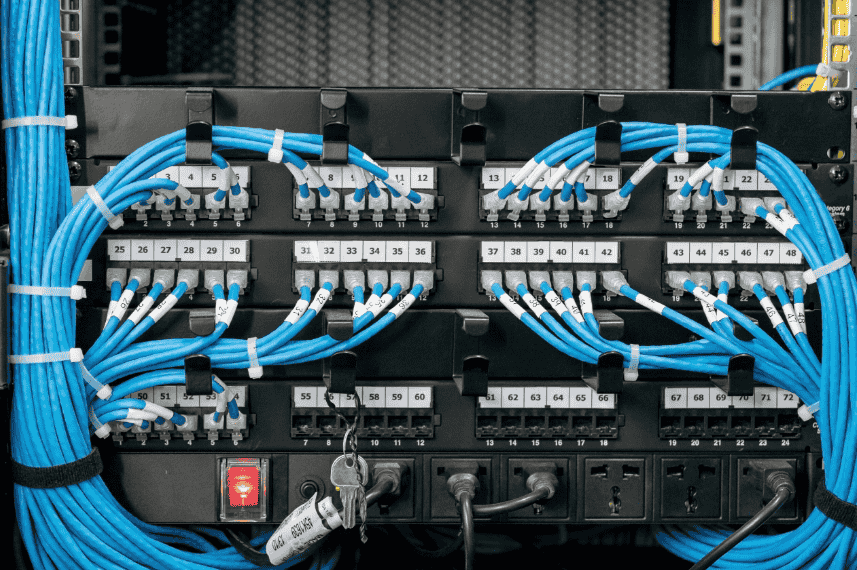
For SMBs, tidy cabling is rarely a cosmetic issue; it decides how many accidental disconnections and how much downtime a team puts up with. Heat is the quiet part of the problem. In AMPCOM’s account, overheating led to cable jacket degradation, which hurts equipment reliability long before anyone sees a fault and seeds future failures.
Planning is the cheapest defense. AMPCOM claims a disciplined planning phase removes about 80% of later cabling problems, which I treat as the vendor’s estimate rather than a measured result. Fix the physical layout, settle port assignments early, keep pathways organized, and reserve 20-40% spare capacity, because scalability and infrastructure expansion both depend on room to grow.
Bundles that are strain-relieved also stop one bad link from reaching several users. Records that fall behind the rack breed false confidence, which AMPCOM rates as worse than having no documentation at all.
What Does Poor Rack Cabling Look Like in Practice?
Poor rack cabling looks like a tangled system that grew incrementally, with every addition made ad hoc and no cabling plan behind it.
AMPCOM describes a logistics business whose repeated network trouble came from cabling around its servers, not from faulty equipment, and a structured rebuild ended it. ShowMeCables describes the same drift: slack hangs over ventilation openings, and when a port fails the IT staff pull the wrong link, turning one repair into a wider fault. Cables should never route across the intake vents, yet that is exactly where shortcuts tend to put them.
The physical signs are sag, cable strain, and larger cable bundles tugging on ports. Each of the maintenance windows gets longer, and every round of equipment upgrades gets riskier.
A rebuilt rack reverses all of it: short runs through patch panel rows, function color-coded in Blue and Yellow, and the installation date and certification testing result recorded for every run. That discipline protects equipment lifespan as well.
Which Tools and Components Does a Clean Rack Need?
A clean rack needs hardware that routes, supports, seals, and identifies cables, and each piece should be chosen for what it must protect.
Start with the management hardware, because it forms the skeleton of the installation. Managers that run along the sides of the rack carry backbone routing, while organizers placed across the front of the rack keep short links tidy. That separation of roles keeps one pathway from swallowing the other. Panels come in fixed-port, tool-less keystone, and pass-through modular types, and the right one depends on port density and how often connections change.
Sealing hardware deserves equal attention. Flexible bristles let cables pass while closing the opening, brush grommets close the gap around a floor tile cutout in raised-floor data centers, and inflatable seals do similar work where cables are added often. Unsealed gaps invite thermal short-circuiting, and cables that block ventilation pathways make it worse.
Finish with cable protection: appropriate cable lengths and secure fastening methods keep jackets from bending too far, and printed labels outlast handwritten ones.
How Should You Plan a Server Rack Layout Before Pulling Cables?
Plan a server rack layout by deciding where equipment, power, and cable pathways will sit before any cable is pulled, because a clear layout simplifies every later task. Racks that skip this step drift toward overcrowded racks held together by temporary fixes, and adding new switches then forces a reorganization.
The sequence below is the order I follow on site:
- Reserve rack U positions for every device and leave 1U or 2U between rows for horizontal organizers; consider Angled Patch Panels where the front gets congested.
- Measure each run and order properly sized patch cables, planning the longest, thickest cable runs first because they need the most room.
- Mark service loops at the rear and keep groups apart to avoid random crossing.
- Hold space for future expansion, and check cooling demands before filling the rack.
- Reserve carrier entry points: in AMPCOM’s color scheme, Orange marks Demarc and ISP handoff links.
Capture the result in digital cable maps, which make future maintenance quicker and show where each new cable belongs.
What Is the Right Order for Installing Rack Cables?
Install rack cables in a fixed order: sealing panels first, then equipment, backbone runs, patch cables, power, and final sealing, with labels added once runs are secure. Even a new build deserves the discipline of a structured re-cabling project, because skipping a step creates problems downstream.
- Fit Brush Strip Panels at the cable entry points before any equipment goes in.
- Confirm component placement, then finish a cable length calculation that includes vertical distance; one short cable means a re-pull.
- Follow the structured routing pathways you defined, securing runs every 150-200mm with adjustable straps that apply non-crushing pressure. AMPCOM cites a copper bend limit of 8 times the cable diameter, so check the manufacturer specification and avoid excessive bending.
- Group patch cables by VLANs and keep service slack at the rear, tied neatly.
- Cross power and data at 90-degree angles to reduce coupling surface area.
- Close with Blanking Panels in unused U spaces, then verify links.
Why Must Power and Data Cables Stay Apart in a Rack?
Power and data cables must stay apart because close parallel runs let power cabling disturb data traffic and create faults that are slow to trace.
Set up dedicated cable pathways: power down one side of the rack, data down the opposite side, and at least 2 inches between adjacent runs. Managers on the rack sides make that layout permanent, and backbone copper or fiber trunks follow the data side.
On copper Ethernet such as Cat6 / Cat6A, a rack can meet its bandwidth requirement on paper and still lose throughput to signal degradation and attenuation from poor routing. Support heavy cable bundles with Metal Cable Management Panels so weight never pulls on ports, and use reusable straps so a bundle can be reopened without cutting it.
Check incompatible shielding types during cable pathway design, since shielding alone does not remove the need for distance. A color scheme also helps the eye: Green for network connections and Purple for shared devices keep the two groups visible and lower infrastructure risks during changes.
How Do You Label, Color-Code, and Document Rack Cables?
Label both ends of every cable, use color as a second identifier, and record each run in documentation that is updated after every change.
Begin with a complete inventory of routers, KVMs, PDUs, storage devices, and telecom equipment, with each device’s port count held in a DCIM platform or a spreadsheet.
Labels have to survive the rack. Thermal transfer labels printed at 300 DPI last, wrap-around self-laminating labels suit copper, and flag labels suit fiber, all kept as readable labels for the life of the run. Color should never be the only identifier, though it can separate uplinks, VoIP systems, and management networks at a glance.
When an IT administrator or technicians trace a fault, troubleshooting shrinks from guesswork to lookup, provided the records are updated after every moves, adds, and changes (MACs) event.
How Do Cables Affect Airflow Inside a Server Rack?
Cables affect rack airflow in three ways: they block the front of equipment, leave openings that let exhaust air return, and clog the rear where air leaves. In AMPCOM’s example, a medium-sized logistics company had cables trapping heat in front of its servers, which weakened the jackets of neighboring runs.
| Failure mode | What happens | Fix |
| Cables across the front of equipment | Lower devices starve for cooling air | Route cables through side managers |
| Open gaps in the rack frame | Hot exhaust drifts back to the cold aisle | Seal gaps with sealing panels |
| Dense bundles at the rear | Blocked airflow paths raise exhaust temperatures | Thin out the bundles |
Keep unobstructed airflow by following manufacturers’ airflow requirements and settling airflow direction before racking anything. Leave at least 1U between high-heat devices to prevent thermal stacking, a point AMPCOM stresses.
For Power over Ethernet (PoE), cables carrying 90W (Type 4) generate heat, so reduce bundling density to avoid thermal buildup. Keep service areas clear so blocked paths never grow into cooling failures.
Which Cable Management Mistakes Should You Avoid?
The mistakes that do the most damage are mixing power with data, skipping labels, ignoring bend limits, leaving slack, and installing parts that do not match. Small lapses compound into unexplained network outages or intermittent signal failures that take hours to trace.
| Mistake | Consequence | Correction |
| Mixing power and data runs | Alien crosstalk, packet errors, and lost effective bandwidth from noise and EMI | Keep separate pathways, even with shielded Ethernet cables such as S/FTP or F/UTP |
| Inconsistent labels | Slow, error-prone tracing | Label both ends the same way |
| Excess cable slack | Clutter that blocks access and airflow | Choose lengths that fit |
| Mismatched connectors and wrong cable categories | Bundles must be pulled again | Check every connector against its port |
| Tight bends in fiber | AMPCOM gives 10 times the jacket diameter for long-term installs and 20 times during pulling | Follow the maker’s limits |
Make a quick visual check after every change and run a full cable audit every 6 to 12 months. Racks audited this way make safer maintenance routine rather than risky.
Why Is Cable Management Important in Server Racks?
Cable management is important because it keeps a rack reliable, cool, and easy to service as equipment is added. It supports operational efficiency and stops compounding problems that begin with a few extra cables.
The pressure grows with density. AMPCOM notes rack densities rising from 15kW (2022 average) to 40kW+ in AI-optimized halls, so every obstruction matters more. Treat cabling as a lifecycle task, since tidy routing is what supports long-term growth.
What Is the Best Way to Organize Server Rack Cables?
The best way to keep server rack cables organized is to give every cable a planned path, a label, and a color. A properly organized rack supports a stable infrastructure environment because cable flow stays predictable.
Group runs by destination VLAN or server row, and write naming conventions that carry VLAN assignments. For color, Red marks critical systems while White and Gray mark first- and second-level backbones in AMPCOM’s scheme. Applying them identically everywhere matters more than the shades chosen.
What Is the Difference Between Horizontal and Vertical Cable Managers?
Horizontal cable managers organize patch cables between switches and panels, while vertical managers route heavy runs beside the equipment.
Horizontal units keep switch-to-patch-panel connections and fiber jumper routing tidy, which cuts front-panel clutter and unnecessary slack; cabling in logical groups helps further. Vertical units take the bulk runs. A setup that combines both gives better equipment access and consistency.
Why Should Power Cables and Network Cables Be Separated?
Power and network cables should sit at least 50mm apart because electromagnetic coupling can induce electrical interference on data lines.
AMPCOM raises the gap to 100mm for runs longer than 5 meters or near high-current feeds, and links the practice to EMC Directive 2014/30/EU. Avoid tight bundles that mix both cable types, and follow the applicable installation requirements for your site.
Are Velcro Straps Better Than Zip Ties for Server Racks?
In most working racks, yes: Velcro straps are the better choice because they can be reopened and retightened without harm. Nylon zip ties crush cable jackets when over-tightened, and hook-and-loop fasteners avoid deforming cable jackets during moves and upgrades. ShowMeCables reaches the same view for most IT environments.
Why Is Cable Labeling Important in Server Racks?
Cable labeling is important because it lets someone identify a connection within seconds instead of tracing it by hand.
AMPCOM says a recognized labeling framework reduces MTTR by 60-70%, a vendor figure worth checking locally. Pair labels with digital documentation to build a baseline for future upgrades. That framework’s classes run from Common Equipment to Terminated Outside Plant, the latter shown in Brown.
How Does Poor Cable Management Affect Airflow and Cooling Costs?
Poor cable management blocks air movement, so equipment runs hotter and cooling systems work harder.
Rear bundle congestion narrows the exhaust path, while cables across the front of equipment cut off proper cooling. Routing through designated pathways avoids both. AMPCOM reports that sealed cable entries, managed bundles, and blanking panels together can improve PUE by 0.03 to 0.05 and reduce cooling energy by 20-30%.
What Is the Most Important Rule for Server Rack Cable Management?
The most important rule is to keep cables out of the airflow in front of equipment.
Cables routed across the front of servers block server intakes and the cold air path, creating temperature gradients that trigger thermal alarms and weaken the containment system. In AMPCOM’s example the root cause of repeated network trouble was this routing, not defective hardware; side managers are the fix.
What Is the Minimum Bend Radius for Ethernet and Fiber Cables in a Rack?
The minimum bend radius depends on the cable type, so check the rated limit for each product before routing.
A Cat6A UTP patch cord, an OS2 duplex jumper, and an OM4 MPO trunk each carry their own limits, and fiber limits are larger during pulling, so respect pulling-tension requirements too. When the product sheet and a general rule disagree, the product sheet wins.
Why Are Blanking Panels Important for Cable Management?
Blanking panels matter because they stop warm exhaust air from flowing back to the front of the rack.
Without them, thermal mixing raises inlet temperatures as warm air can recirculate through empty positions, even when the cables are perfect. AMPCOM puts a panel at $10-20 and says it prevents hundreds of dollars of wasted cooling energy per year.
How Often Should You Audit Server Rack Cable Management?
Audit server rack cabling after every equipment change and again on a regular schedule, using records that tie each cable to its source port, destination port, and label ID.
Whether those records live in Nlyte, Sunbird, Docusnap, or a simple sheet, compare them with the physical rack and update test results and test records. An audit is also the moment to remove abandoned cables, but only after confirming they are no longer in use.
What Standards Govern Server Rack Cable Management?
Server rack cable management is shaped by TIA standards in the US and by ISO/IEC and DIN EN standards in Europe.
TIA-942 covers data center infrastructure, TIA-568 covers structured cabling, TIA-606-C covers labeling, and TIA-607 covers grounding and bonding. ISO/IEC 11801 is the international cabling standard, and in Europe, DIN EN 50173 and DIN EN 50600 apply, with EN 55032 and EN 61000-6-2 cited for electromagnetic compatibility.