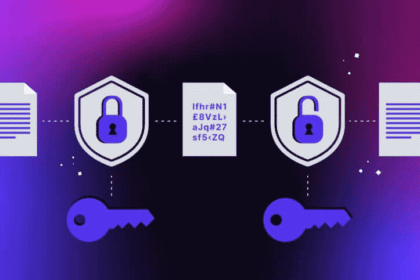


A VPN connection is a protected link that routes your internet traffic through another computer, so outsiders see that machine’s address instead of yours while your data stays scrambled in transit.
- What Is a VPN Connection in Plain Terms?
- How Does a VPN Connection Actually Work?
- What Do You Gain From Using a VPN?
- When Does Using a VPN Make Sense?
- Which Types of VPN Can You Use?
- What Should a Good VPN Offer Before You Trust It?
- How Secure Is a VPN, and What Does It Leave Exposed?
- Can Anyone Still Track You Through a VPN?
- What Are the Downsides of Using a VPN?
- Is It Legal to Use a VPN?
- How Do You Set Up a VPN on Your Devices?
- Where Did VPNs Come From?
- If HTTPS Already Encrypts Traffic, Why Bother With a VPN?
- Where Is Enterprise VPN Heading?
- Do You Actually Need a VPN?
- Can a VPN Help Enterprises Meet GDPR?
The appeal starts with what happens inside that link. A VPN pairs AES-256 encryption, the standard Kaspersky says protects everything from online banking to government communications, with a proxy server that swaps your address for its own. That swap enables location spoofing, which is how a traveler can bypass borders to reach regional content such as U.S. Netflix or Spanish or American content.
Privacy is the quieter payoff. Advertisers, ad networks and data brokers assemble user profiles and ad targeting profiles from browsing trails, and a tunnel starves that process. Forbes surveyed users and found almost half of web users run a VPN day to day, yet strong and unique passwords remain necessary alongside it.
For companies, Fortinet lists improved remote access, a better total-cost-of-ownership, safer data sharing and independence from strict Internet access laws. Done well, a VPN preserves confidentiality and integrity, blocks unauthorized viewing, curbs data leakage, keeps hackers out of reach and offers peace of mind.
What Is a VPN Connection in Plain Terms?
A VPN connection is a link in which your device reaches the internet through a private, encrypted tunnel to a server run by someone else.
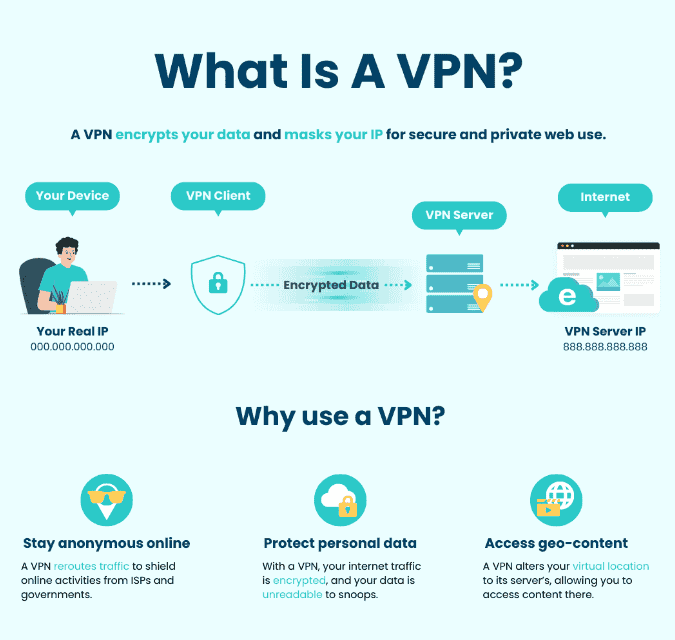
The mechanics rest on tunneling. Your VPN client scrambles each packet into unreadable gibberish, and only a device holding the right encryption key can reverse it. The remote machine acts as an intermediary: it decrypts the traffic and forwards it, so your ISP, whether Proximus or Telenet, sees only a sealed stream. Different services use different encryption processes, but the pattern holds.
Two long-standing standards carry much of that work. IPSec, short for Internet Protocol Security, relies on pre-shared keys, while SSL, the secure sockets layer, swaps keys through public key cryptography. Combell also lists OpenVPN, IKEv2/IPsec, L2TP/IPsec, WireGuard, PPTP and SSTP, each defining how data encapsulation happens.
In practice, the VPN provider runs connection gateways that you choose from, and Mozilla VPN offers more than 30 countries.
How Does a VPN Connection Actually Work?
A VPN connection works by sending everything you do online through a relay that swaps in its own address and scrambles the contents on the way.
The name explains the design. The abbreviation expands to Virtual Private Network, which Combell notes is Virtueel Particulier Netwerk in Dutch, and the outcome is an encrypted internet connection running inside a closed tunnel. Websites see the VPN server instead of your real IP address, because the service masks your origin and places you in a different location, which is why geographical restrictions stop mattering.
- Connect: start the VPN and a secure tunnel forms between your device and the internet.
- Route: your traffic joins the VPN’s network and picks up the server’s address.
- Browse: the encrypted link stays active while you work or surf.
Fortinet’s angle is the Internet protocol layer. On a public wi-fi connection that is unsecured, your browsing history and endpoint devices, such as a Windows computer or an Android smartphone, are exposed to identity theft and other nefarious activities. A VPN protocol keeps secure and encrypted connections running, and some employers add a VPN blocker to protect productivity from social networking distractions. Performance follows geography: the closer servers sit and the more strategically placed they are, the less the tunnel slows you.
What Do You Gain From Using a VPN?
Using a VPN gives you private browsing on networks you do not control, plus access to services that depend on where you appear to be.
Start with public WiFi. In cafés, airports, hotels and libraries, one bad actor on the same network can snoop on what you do, and a hotspot in a store carries the same risk. People lean on these hotspots when they cannot get any bars on your phone, which is exactly when a tunnel earns its keep.
Home is not risk-free either. On a home network, everyday browsing still passes through your provider, and Kaspersky notes a VPN can help avoid ISP bandwidth throttling while gaming and add protection against some DDoS attempts. For online shopping it may sidestep location-based pricing differences, and travelers reach region-specific services the same way. Some plans also bundle ad-blocking.
For remote work, the tunnel shields company systems and confidential files wherever the laptop happens to be.
When Does Using a VPN Make Sense?
A VPN makes sense whenever you handle sensitive information on a network you did not set up yourself, or when you want less data collection by sites and advertisers.
Think about an ordinary week: streaming, watching videos, paying bills, and holding confidential video calls, whether you run your own business or work for someone else. Each task moves personal data across public networks, and a VPN host running a remote server can shield it. The protected network connection works in real time, so you never switch it on task by task, and it covers you at home and at work.
A VPN will disguise your online identity, make it harder for cybercriminals to eavesdrop or intercept traffic, and reduce tracking. Whether traveling or at a desk, the private tunnel behaves the same way. It leaves you short of completely anonymous, so cybersecurity habits such as cautious clicking still matter.
Which Types of VPN Can You Use?
VPNs come in several forms, from software on one device to a router-level setup that covers every gadget on your network.
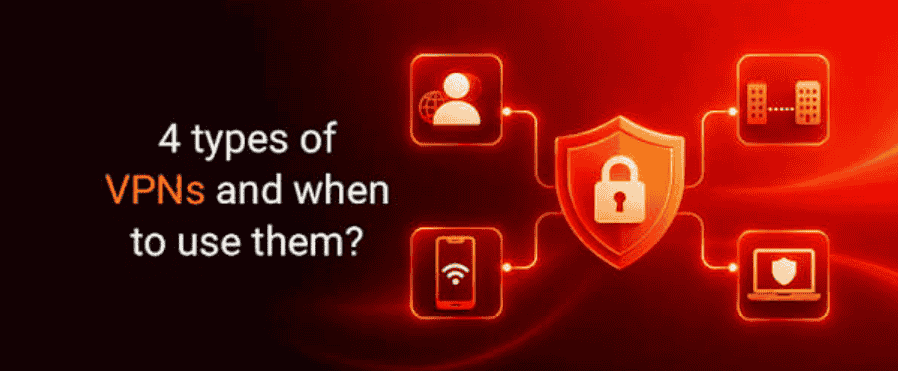
Most individuals begin with standalone VPN clients. On an iPhone you install an app from the iOS App Store, while Android VPNs work the same way, and switching on feels like a light switch on the home screen. Behind it sit server switching, advanced setup options and diagnostics for people who want them.
| Option | Coverage | Catch |
| Standalone VPN clients | Whole device, every app | Software must be installed and configured |
| Browser extensions | Traffic inside one browser only | Less comprehensive than a full client |
| Router VPN | Every device on the router, including smart TVs | May need a more advanced setup |
| Company VPN | Internal systems and files | Run by the IT team; activity may be logged |
Browser extensions for Google Chrome and Microsoft Edge are quick, yet they protect only that browser, leaving email clients and cloud backup services on the normal connection. Worse, fake VPN extensions are a tool of data harvesters. A router VPN covers smart TVs and similar devices, and a company VPN relies on an authorized connection, with staff proving identity through credentials or a certificate. Mozilla VPN offers an unlimited connection for up to five devices.
What Should a Good VPN Offer Before You Trust It?
A good VPN is one that keeps its promises verifiably: fast, simple to use, and transparent about how it treats your data.
Not everyone needs one. A VPN becomes an essential tool if you are concerned about online security, frequently use public hotspots, or want content restricted by location, since it lets you connect safely and, to a degree, anonymously.
Mozilla’s pitch shows what transparency looks like in practice. It says it follows its Data Privacy Principles, keeps no network activity logs and avoids third parties that profile users, and it presents itself as a mission-driven company obsessed with privacy since 1998. Treat any such claim as a starting point for checking, not an endpoint.
How Secure Is a VPN, and What Does It Leave Exposed?
A VPN is a sound tool for protecting traffic while it travels, but it is only as dependable as the company running it, and it does not stop every threat.
Provider trust comes first. Kaspersky’s checklist for a trustworthy service starts with three items:
- No-logs policy: the provider explains what information it collects.
- Independent security audits: third parties verify the claims.
- Transparency reports: published results back up the privacy promises.
Ask also whether the service keeps traffic logs or will throttle data, and check capacity and scale, since limits can cap business use. Safety features follow: a kill switch is the last line of defense when a tunnel drops, DNS leak protection is another feature Combell calls essential, and split tunneling lets chosen apps skip the VPN.
Logins matter too. Two-factor authentication (2FA) and multi-factor authentication rely on a one-time password (OTP), an authentication app or a fingerprint, which counts because phishing attacks can walk straight past a tunnel. Finally, weigh cross-platform support, simultaneous connections, a VPN router for home devices, user-friendly software, strong performance and speed, trial periods and money-back guarantees.
Can Anyone Still Track You Through a VPN?
Yes: a VPN hides your address, but sites can still recognize you through the accounts you sign in to and through details your browser reveals.
Kaspersky points to cookies, browser fingerprinting and logged-in accounts as the usual leaks. None of them depend on your IP address, so a VPN cannot touch them. Clearing cookies and choosing a stricter browser narrows the exposure, but it never reaches zero.
Other risks sit outside the tunnel entirely. A VPN will not stop a phishing link, infected downloads, compromised software, fake websites or scammers, and it cannot remove spyware or malware already on the device. Combell adds spoofing and a major hack to that list, and Mozilla warns about misinformation campaigns.
Layer antivirus software, anti-malware software, firewalls, EDR (Endpoint Detection and Response) and regular backups, as Combell recommends, because a VPN is not an insurance policy, a miracle solution or a cure for a false sense of security. Even then, choose a trustworthy VPN: weak security or poor privacy practices at the provider leave your data exposed.
What Are the Downsides of Using a VPN?
The main downsides of a VPN are slower connections, blocked services and legal limits in a few countries.
In China and Russia, Combell warns, using a VPN is illegal, while Mozilla notes it is legal in most countries, including the United States, the UK, Canada and New Zealand, though some places regulate or restrict it. Anyone planning to travel should check local laws first, because it is your responsibility to do so.
That caution applies to both individuals and businesses, which Kaspersky says use VPNs widely. Rules can differ between where a provider operates and where you sit, so a tool that is fine at home may need a second look abroad.
Is It Legal to Use a VPN?
Using a VPN is legal in many countries, but it does not shield you from the law, and the rules change from one place to another.
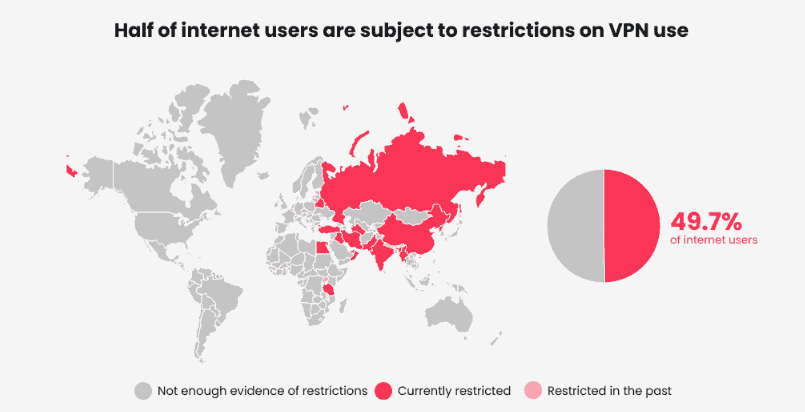
Kaspersky stresses that VPNs are privacy tools, not anonymity tools or legal shields. Reputable providers encrypt traffic, yet they must comply with the laws of the countries in which they operate, which means a promise of privacy has limits set by jurisdiction.
Anyone with direct access to your devices can view your activity too, and law enforcement, depending on local legal authority, may monitor devices or require a service to give up records of your actions, according to Fortinet. Investigators also use legal and technical methods that go beyond an address alone.
Your ISP sees how much data is being transmitted through an encrypted connection but not the specific websites inside it. A VPN does not make you invisible: if you sign in to Google, a social media platform or an online store, that profile ties activity to you, and privacy-focused browsers reduce the rest.
How Do You Set Up a VPN on Your Devices?
Setting up a VPN means choosing what you connect (a single device, a whole office network or a browser session) and then installing the matching software or hardware.
A remote access VPN links one device to a network from outside the office, and organizations with changing addresses use dynamic DNS (DDNS) to keep it stable. Cloud VPNs reach applications through a browser, while an SSL VPN uses SSL/TLS. Kaspersky recalls that during the coronavirus crisis in Spring 2020, firms let staff use private devices through an HTML-5-capable browser, guarded by username and password, often via a hardware box.
A client-to-server VPN works like an extension cable from home to the office. A site-to-site VPN instead joins branch locations to a central office, linking each local area network (LAN) across a Wide Area Network (WAN) so people reach shared email servers, even between separate intranets, whether intranet-based or extranet-based.
Fortinet separates individual VPN from business VPN, the latter often backed by a Managed Security Service Provider (MSSP). Distance can raise latency and cause signal-quality degradation.
Where Did VPNs Come From?
VPN technology started life as a corporate tool and reached everyday users much later, as encryption spread across the wider web.
Mozilla describes the early picture: companies used VPNs for remote access to internal services and proprietary data, long before ordinary people needed one. Then HTTPS changed the baseline. Today most connections to websites are secured, which means the content is encrypted, but not the source or destination IP address.
That gap is why a VPN still delivers additional privacy: it stops websites and outside observers from learning your real address, something HTTPS alone never attempted. In practice, the two layers complement each other rather than compete.
If HTTPS Already Encrypts Traffic, Why Bother With a VPN?
HTTPS protects what you exchange with a website, but it does not hide who is connecting, and a VPN covers that missing piece.
The gap traces back to how the internet was built. The US Department of Defense funded encryption research in the 1960s, which led to ARPANET, a packet switching network, and then to Transfer Control Protocol/Internet Protocol, or TCP/IP, with four levels. Connecting local networks at the internet level made the exposure risk obvious.
Kaspersky then lists the VPN milestones. In 1993, a team from Columbia University and AT&T Bell Labs produced swIPe; in 1994, Wei Xu developed IPSec; and in 1996, a Microsoft employee, Gurdeep Singh-Pall, created the Peer-to-Peer Tunneling Protocol.
Businesses adopted VPNs in the early 2000s, alongside anti-virus programs, but the consumer market only picked up after a flood of security breaches, especially in the early 2010s.
Where Is Enterprise VPN Heading?
Enterprise VPNs are being reworked around tighter access rules, because traditional tunnels carry limits that grow with scale.
Remote access business VPNs suffer lag time that grows with the distance from the central network. Fortinet warns that intensive data transmissions such as conference calls hit disruptions, reduced speed and bandwidth trouble, and the result can slow you down at the worst moment.
Security shifts too. Perimeter-based security alone is a poor fit for cloud work, where cloud network security matters and any unencrypted transmission can end in a data breach.
Provider quality is the other thread. Some websites block VPN visits, some services rank poorly on privacy, and some sell your data to marketing firms. Less stable providers are another worry, so read the terms you’re agreeing to and check reputation before committing.
Do You Actually Need a VPN?
You need a VPN if you often use networks you do not control, handle sensitive data remotely, or want fewer outsiders seeing your location and activity.
Combell frames the case around privacy, a secured connection and freedom from location locks, and it is strongest for people who rely on public hotspots. Before paying, compare providers: weigh price and features included, read reviews, and favor a company based in a country with strong privacy laws.
If none of those situations match your routine, a VPN is a nice extra rather than a necessity, and habits such as strong passwords buy more protection per minute spent.
Can a VPN Help Enterprises Meet GDPR?
Yes, a VPN helps enterprises work toward GDPR compliance by encrypting data in transit and securing remote access, which reduces breach risks and supports compliance, though it is one control among several.
Fortinet projects the global VPN market to exceed $534.22 billion by 2034, driven by hybrid work and cloud adoption. Yet traditional VPNs expose broad network access, which raises the risk of unauthorized access.
So organizations are modernizing their enterprise VPN solutions and pairing them with ZTNA, or Zero Trust Network Access, built on zero trust principles: identity-based access, better visibility and application-level access.
Fortinet’s FortiClient, inside its Security Fabric alongside a next-generation firewall, supports both VPN and ZTNA with compliance monitoring. Its warning is blunt: every dropped VPN session is a window of exposure on an unguarded endpoint.