

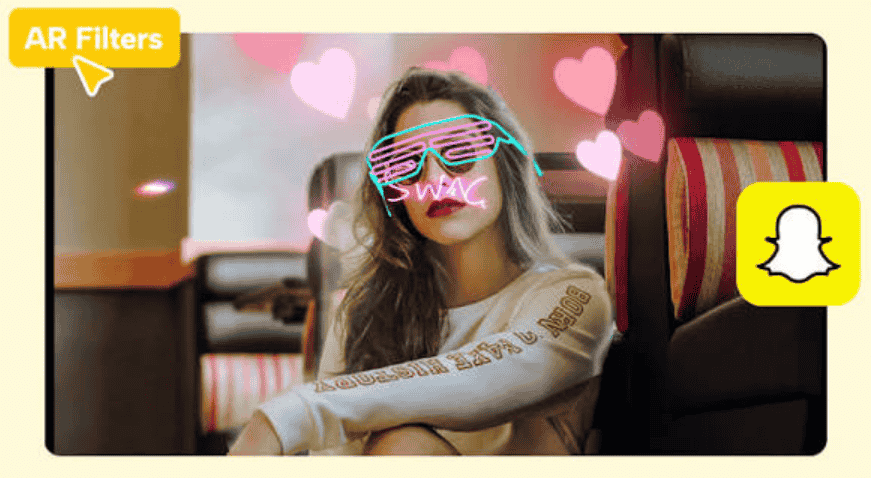
Snapchat augmented reality filters, officially called Lenses, are interactive filters that use facial recognition through front-facing cameras to track a face and attach animated effects to live video as it changes.
- What Are Snapchat Lenses and How Do They Work?
- What Technology Makes Snapchat AR Filters Work?
- What Types of AR Filters Can You Use on Snapchat?
- How Do Snapchat AR Try-Ons Work for Online Shopping?
- How Do Brands Use Snapchat AR Filters?
- How Do AR Filters Help Communities and Social Causes?
- Who Builds and Uses Snapchat AR Filters?
- What Are the Pros and Cons of AR Filters?
- What Challenges Come Up When Testing Snapchat AR Filters?
- How Do Snapchat Lenses Differ From Other AR Filters?
- Where Is Snapchat AR Heading Next?
- How Do You Get Started Making AR Filters?
- What Role Does Lens Studio Play in AR Development?
- Can Snapchat Lenses Be Integrated With Other Apps or Platforms?
- Do Snapchat Lenses Use Cloud Computing for Real-Time Processing?
- Why Do Brands Like Snapchat Lenses for Marketing Campaigns?
- Are Snapchat Lenses Optimized for Older Smartphones?
Most people first meet them as a beauty touch-up on selfies, yet the same technology also drives branded experiences aimed at consumers who simply want something fun to send a friend. The gap between a Lens that feels magical and one that feels broken usually comes down to tracking quality rather than artwork.
Behind every effect sits advanced technology, and Lens Studio is the workspace where Snapchat’s effects get assembled. The sections below take that machinery apart piece by piece, starting with what a Lens actually is.
What Are Snapchat Lenses and How Do They Work?
A Snapchat Lens is a camera effect that reacts to your face and surroundings in real time rather than sitting still on top of a photo like a sticker.
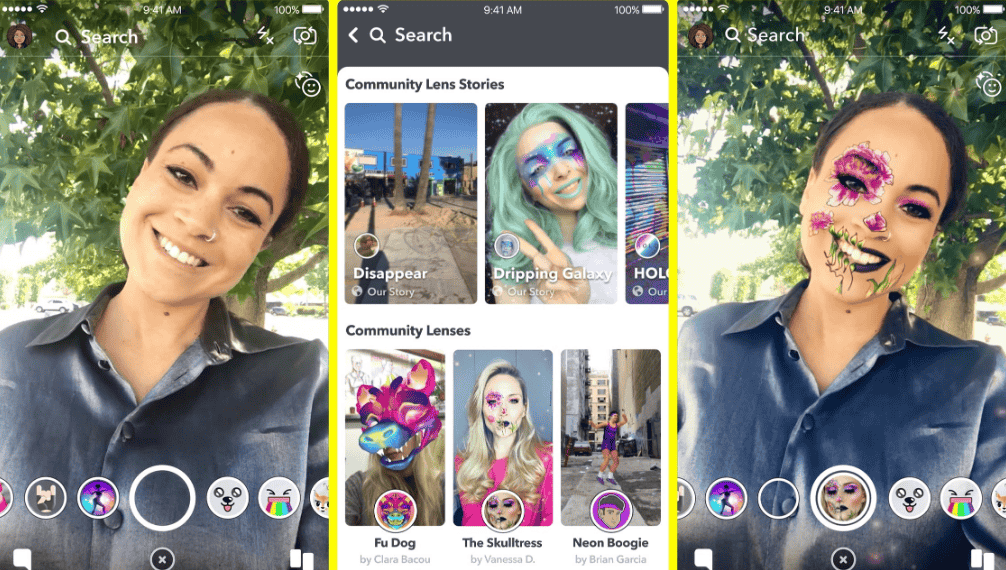
Augmented reality blends digital elements such as text, graphics, and audio with the real world, and Snapchat was among the first to see its value. The dog face filter from 2016 is the textbook case: a silly effect that showed how far a single Lens can travel.
Not every Lens aims for polish. Some lean on distorting a face or adding a goofy hat, others act as light virtual overlays, and a few chase realistic AR experiences that place the user inside a virtual environment. People usually share the result on stories, so I judge a Lens by how good it looks in a short clip.
What Technology Makes Snapchat AR Filters Work?
Snapchat AR filters work by passing camera frames through machine learning algorithms that find a face and update the effect quickly enough to feel instant.
Machine learning engineers build the tracking layer that follows expressions and movement, and 3D tracking allows a brand to assemble a filter from ready-made assets supplied by Snapchat. Underneath, real-time image processing applies each effect without noticeable delay.
Tracking has predictable weak spots. Beauty and face filters can fail in low light, so odd lighting conditions are the first thing I check when a Lens drifts. Artists handle visuals through 3D design and finished 3D models, then rely on adaptive rendering so an effect still runs on weaker hardware, with cloud computing in a supporting role.
What Types of AR Filters Can You Use on Snapchat?
AR filters on Snapchat fall into five working groups: beauty, dress-up, silly, branded, and virtual fitting.
| Filter group | What it does | Example |
| Beauty | Changes facial feature size and smooths skin for an airbrushed finish | Real-time touch-ups |
| Dress-up | Reshapes your features to match a fictional figure, down to costumes | A popular fictional persona |
| Silly | Warps the face or adds comic accessories | Comically altered faces |
| Branded | Lets you interact with a brand through calls to action | Marketing overlays |
| Virtual fitting | Previews wearables through the camera | Eyewear, sunglasses, and goggles from Amazon Fashion |
Unlike Pokemon Go, which overlays a game on the physical environment, these filters target the user’s own appearance, and much of the appeal is plain entertainment driven by playful creativity.
Beauty effects carry a cost. Bold Glamour on TikTok produces a highly realistic, glamourized version of the user, and Coursera links that polish to damaging mental health effects and unrealistic expectations.
How Do Snapchat AR Try-Ons Work for Online Shopping?
A Snapchat try-on Lens lets shoppers preview a wearable product through the phone camera, so the item appears on their own body before they spend anything.
Shades of lipstick, blush, or full makeup looks all work the same way: the camera tracks facial movements, so the color stays in place as the shopper turns, smiles, or taps to switch products. Fit depends on face geometry, which is also why user diversity matters when these Lenses are tested.
On the business side, marketers use the format so customers can try products virtually before buying, which Coursera ties to a higher volume and accuracy of purchases. Retailers can also fold the effect into other apps and sites to deepen customer interaction, and later versions may offer personalized filters matched to what a shopper prefers.
How Do Brands Use Snapchat AR Filters?
Brands use Snapchat AR filters to place a product or message inside an experience that people choose to open, play with, and send on.
Brand strategists typically build these filters in tools such as Spark AR so the effect matches brand principles and lifts brand awareness. A filter can feature simple logo placement, a game with puzzles, or a character effect that turns the user into a Disney princess.
Every share becomes user-generated content, which Coursera says is sometimes seen as more trustworthy than traditional marketing, though it also describes it as unpaid labor by everyday users. Within Snapchat, Lens Product Cards and real-time analytics let brands track how people respond, while templates give seasonal branded campaigns a starting point. The aim is a visible marketing impact, not just a pretty effect.
How Do AR Filters Help Communities and Social Causes?
AR filters help communities by turning the Snapchat camera into a free teaching tool for skills many people never get formal training in.
Snapchat has released one Lens that teaches a lifesaving emergency skill and another that introduces a sign alphabet through gestures, built entirely by employees from the community it serves. Because the tools sit on an ordinary phone, accessibility is high and the reach can be global, with cloud-backed distribution carrying a Lens to users worldwide.
A shareable lesson can go viral, which feeds social engagement. The same format raises ethical questions, though: filters can carry bias, nudge unattainable beauty standards, and leave people out unless diversity is part of the design process.
Who Builds and Uses Snapchat AR Filters?
Snapchat AR filters are built and used by engineers, social media platforms, brand teams, and everyday consumers, each with a different role.
- Engineers: use tools such as TensorFlow to create real-time 3D face tracking.
- Social media companies: Snapchat and TikTok implement the creation and availability of filters and encourage third parties to build them.
- Brand teams: design filters in Snapchat’s Lens Web Builder to match brand principles.
- Consumers: send filtered selfies and, often without noticing, produce free user-generated content.
Creators begin by experimenting in Meta Spark or Effect House, and Snapchat’s developer program supplies further tools. Luxury names join too: Louis Vuitton used Snapchat’s location-based effects for its Yayoi Kusama collaboration, which also promoted her installation at the Champs-Élysées flagship store in Paris.
Newer AI systems such as OpenAI GPT and Google Gemini hint at smarter AR ahead, and creators can already target more than one of today’s platforms.
What Are the Pros and Cons of AR Filters?
The main upside of AR filters is organic marketing value for brands, and the main downside is the pressure they put on users’ self-image and unpaid effort.
On the plus side, a try-on can end in a purchase. Snapchat’s Amazon Fashion eyewear Lens includes an in-app link to the product page, making checkout seamless. Puma became the first global partner for Snapchat’s retail technology, and shoppers simply pointed phones at their feet to preview shoes, a natural fit for e-commerce.
Education counts too. A Lens for World Restart a Heart Day followed research showing fewer than 20% of bystanders could provide the emergency help needed in a crisis. People find these Lenses in the stories section of the app, and marketers cite brand visibility and measurable results; one restaurant campaign rewarded the first 100,000 US customers.
The costs are real. Beautifying filters can distort self-image, and Coursera says everyday users promote brands for free in exchange for access.
What Challenges Come Up When Testing Snapchat AR Filters?
Testing Snapchat AR filters means confirming that an effect stays accurate, quick, and safe across different faces, phones, and environments.
Faces come first. Google trains its face model on a geographically diverse data set so results hold up for a wide range of users, and Snapchat’s ASL Alphabet Lens shows the same instinct: it teaches people to fingerspell their names and was built by Deaf and Hard-Of-Hearing employees.
Hardware comes next. Google’s model uses multiple architectures so it runs efficiently on weaker graphics hardware, and Snapchat designs Lenses with older smartphones in mind. Most AR processing runs on-device for speed, while cloud infrastructure supports updates and analytics.
Finally, Lenses are integrated into a messaging ecosystem, so tests have to cover privacy and security as well as looks.
How Do Snapchat Lenses Differ From Other AR Filters?
According to Frugal Testing, Snapchat Lenses stand apart from many other AR filters because they pair real-time image processing with effects that follow faces and attach to real places.
Location is the clearest example. Landmark Lenses let Louis Vuitton’s Yayoi Kusama collaboration cover the Eiffel Tower, the Statue of Liberty, and London’s National Gallery in colorful dots, simply by pointing a camera. A branded effect can also move a product into your room: a Dr. Pepper Lens places a fridge with the logo in your space.
Underneath, computer vision and two ML algorithms do the work in Google’s approach, per Coursera: one finds the face, the next predicts its shape. Meta and TikTok build filters too, and a character effect from any of them conforms your features to a fictional figure. Snapchat popularized AR filters in 2015, and Lens Studio keeps pushing advanced effects, even if weaker phones sometimes show less advanced effects.
Where Is Snapchat AR Heading Next?
Snapchat AR is heading toward a richer blend of digital effects and real surroundings, backed by smarter AI and wearable AR glasses.
The VR connection matters here: pairing AR with virtual reality broadens immersive content, and neural networks help effects follow a real scene accurately. Online shopping already shows a hybrid model that restores the tangible side of retail, and Snapchat is expanding AR experiences to any third-party platform that adopts its tools.
Pressure from competitors such as other messaging apps keeps that push going. Meanwhile, social media activism and awareness campaigns suggest AR will keep carrying causes, brands will keep chasing engagement, and lack of transparency about users’ unpaid role remains an open problem.
How Do You Get Started Making AR Filters?
To start making Snapchat AR filters, pick a creation tool such as Lens Studio, learn its basics, and publish a simple face effect before attempting anything elaborate.
- Browse filters in the app to see how brands and friends use them.
- Choose a tool: Lens Studio, Meta Spark, or Effect House.
- Each program has a tutorial hub for the basics, but building filters still rewards basic scripting and 3D design, plus an understanding of 3D rendering.
- Use Creative Kit to push custom filters into the Snapchat camera.
- Take the Extended Reality for Everybody Specialization from the University of Michigan, a three-course, beginner-level program covering AR, VR, experience design, and interactive design.
Retail-minded builders can study the software development kit behind catalogue-powered shopping lenses, which lets shoppers try on wearables through their camera. Looking ahead, AI-driven customization and broader developer opportunities are expected to widen what a beginner can build.
What Role Does Lens Studio Play in AR Development?
Lens Studio is Snapchat’s AR creation tool, where creators design interactive lenses using templates, 3D models, and effects.
Building well still requires a basic grasp of visual scripting and graphic design, and each program comes with a tutorial center for the basics. For a sense of scope, Snapchat’s own CPR Lens combined interactive games, quizzes, and true-to-life techniques.
Can Snapchat Lenses Be Integrated With Other Apps or Platforms?
Yes, Camera Kit lets developers bring Snapchat Lenses into other apps and platforms, expanding AR experiences beyond Snapchat.
That move supports cross-platform reach, and Frugal Testing expects broader tools and APIs to drive more outside builds. It also raises a scalability question, since the same effect must hold up in each new app. The context is competitive, with rivals including the Google messaging app and the Signal messaging app.
Do Snapchat Lenses Use Cloud Computing for Real-Time Processing?
Most AR processing for Snapchat Lenses happens on-device for speed, with cloud infrastructure supporting distribution, updates, and analytics.
Teams hunt performance bottlenecks, which show up as lag inside a Lens. Frugal Testing also stresses security and trust: tying Lenses to a secure messaging app ecosystem is meant to protect privacy while keeping digital content intact.
Why Do Brands Like Snapchat Lenses for Marketing Campaigns?
Brands like Snapchat Lenses because they offer shareable AR experiences that raise customer interaction, brand visibility, and marketing impact with measurable results.
Chipotle used one to promote its Lifestyle Bowls to Gen Z and millennials, using the Lens to gamify balanced eating through prompts and exercises instead of overt advertising; the first 100,000 US customers earned free guac. Coursera adds that user content carries credibility with some audiences, and Frugal Testing credits the interactive effects for the engaging feel.
Are Snapchat Lenses Optimized for Older Smartphones?
Yes, Snapchat Lenses are designed with adaptive rendering so they work on older smartphones, though effects may be less advanced.
Coursera notes that Google’s model uses multiple architectures so it runs well even without strong GPU acceleration from the graphics processing unit. Device compatibility testing covers phones and AR Spectacles, and future hardware integration should let Lenses adapt to wearable gear.